A backup camera for $50!!!!!!!!!!!

   / A backup camera for $50!!!!!!!!!!!
  • Thread Starter
#101  

i would try adjusting the settings and see if things get any better. Maybe you got a bad monitor or camera or your expectations are too high. You could try hooking up a something else (Blue ray, DVD player, VCR, game console etc) to the monitor and see if the picture is satisfactory.

Thanks Roger. Ordered the camera w/o guidelines last Friday and should receive it tomorrow.

I plan to use the camera, that came with the monitor, for rear view.

Sent from my iPad using TractorByNet

Cool, let us know how it compares to the other camera.
 
   / A backup camera for $50!!!!!!!!!!! #102  
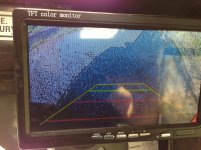
I fiddled with the settings tonight and pretty much got it to what was pictured in the earlier posts. Thinking my expectations are too high. I'm thinking that it might be both devices that I'm disappointed with. The camera has fairly poor color resolution, but does appear to be HD. The monitor, although listed Zane HD appears to be very grainy. Any suggestions for the next step up?
 
   / A backup camera for $50!!!!!!!!!!! #103  
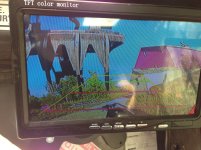
I fiddled with the colors last night and got this better, but the colors are still terrible. By biggest issue is with the resolution. I can barely make out the objects that are more than a few feet away.

2014-08-12 18.50.42.jpg2014-08-12 18.49.14.jpg
 
   / A backup camera for $50!!!!!!!!!!! #104  
I fiddled with the colors last night and got this better, but the colors are still terrible. By biggest issue is with the resolution. I can barely make out the objects that are more than a few feet away. <img src="http://www.tractorbynet.com/forums/files/customization/386414-backup-camera-50-a-2014-08-12-18-50-a"/><img src="http://www.tractorbynet.com/forums/files/customization/386415-backup-camera-50-a-2014-08-12-18-49-a"/>

That may indeed prove to be an issue since these units are designed as "backup" cameras where you only care about a few feet of view so, any great depth of field is not needed.

Sent from my iPad using TractorByNet
 
   / A backup camera for $50!!!!!!!!!!! #105  
My monitor arrived a few days before the cameras. I hooked up another camera (a spare from my home security system) to see how it worked and was disappointed. A few days later the cameras arrived and I thought the view on the display monitor was pretty good. I don't know why but yours seem to be pixelated (especially the first pic). I only want to see where the tips of my forks are in front and the 3 pt attachment on back. I don't expect hi resolution perfect views for $50. I think the view is comparable with the backup cams in my car and truck which cost a lot more.
Take the protective plastic off your display to see if that helps.
 
   / A backup camera for $50!!!!!!!!!!! #106  
I fiddled with the colors last night and got this better, but the colors are still terrible. By biggest issue is with the resolution. I can barely make out the objects that are more than a few feet away.

View attachment 386414View attachment 386415

Cord, I installed the same make monitor last week, and presumably the same camera if yours is the one Roger originally linked to in this thread. My image is much sharper than than the ones in your pics, and the colors are quite good after adjusting contrast and brightness. So I'd say something is defective in your case, most likely that monitor. Since it's only $28 (or whatever they are this week), I'd probably just order another one to compare. If it's o.k., keep it and send the first back. If not, send 'em both back at once.

FWIW, we have a 2014 motor home with a factory-installed Pioneer HD video display in the dash and a black and white back-up camera. The image on the tractor unit is as good as on the MH. :confused3:
 
   / A backup camera for $50!!!!!!!!!!!
  • Thread Starter
#107  
Cord,

Here is a picture of mine from tonight. The old truck was about 25' away. I need to play with the settings on my monitor more.


I think threepoint gave you some good advice on trying another monitor. Also have you tried it with the engine off? The alternator could be making noise.
 
   / A backup camera for $50!!!!!!!!!!! #108  
Yea, those pics were with the engine off. Does anybody know what the resolution is supposed to be? The image appears to be very pixilated which suggests that it's a very low resolution.
 
   / A backup camera for $50!!!!!!!!!!!
  • Thread Starter
#109  
Yea, those pics were with the engine off. Does anybody know what the resolution is supposed to be? The image appears to be very pixilated which suggests that it's a very low resolution.

480x230
 
   / A backup camera for $50!!!!!!!!!!! #111  
I wonder if any portable DVD players or tablets have compatible AV inputs. These devices tend to have pretty good resolution screens and (especially the DVD players) are pretty cheap. Could something like that be used, and give a sharper image than the screens being tried in the above posts? Or, is the innate camera resolution (or lack thereof) the source of the pixellation/fuzziness?
Bob
 
   / A backup camera for $50!!!!!!!!!!!
  • Thread Starter
#112  
I was thinking about trying this monitor: Amazon.com: 800x480 Resolution 7 Inch Widescreen In-Car LCD Monitor Compatible with Headrest or Stand: Computers & Accessories Pretty much the same one, but the resolution is now doubled to 800x480. Thoughts?

I guess it will be about the same as the one we have but with a higher resolution. IN another thread Eric suggested to upgrade the a/v cable. I think it is a good idea any you may get a little better picture quality. Amazon.com: 3-RCA Composite Video Audio A/V AV Cable GOLD -12 ft: Electronics
I wonder if any portable DVD players or tablets have compatible AV inputs. These devices tend to have pretty good resolution screens and (especially the DVD players) are pretty cheap. Could something like that be used, and give a sharper image than the screens being tried in the above posts? Or, is the innate camera resolution (or lack thereof) the source of the pixellation/fuzziness?
Bob

The biggest drawback to a portable DVD player would be the bulkyness to mount in a tractor. You can get docking stations for tablets with a/v hookups but IDK if they are inputs. It would take a special app to make the camera work. It also may be hard to keep the tablet in the docking station. I think the camera may be some of the problem. I need to take the time to hook up something else to the monitor and see what the picture looks like. I'm happy with the monitor and camera. All I wanted was to be able to see behind me and make sure I was not going run over somebody or something. I really don't have a need to see far behind me.
 
   / A backup camera for $50!!!!!!!!!!! #113  
First of all, GREAT WEBSITE. Many thanks to all who are willing to share their projects.
Just purchased and bench tested a camera and 7" monitor and all is well at this point.

I'm looking for suggestions on where to tap into the 12v on a Kubota L48. Ill be using the camera on the front end to view the FEL when picking up large rocks etc. I don't have a wiring diagram for the L48, anyone know where I can get one?
 
   / A backup camera for $50!!!!!!!!!!! #114  
First of all, GREAT WEBSITE. Many thanks to all who are willing to share their projects. Just purchased and bench tested a camera and 7" monitor and all is well at this point. I'm looking for suggestions on where to tap into the 12v on a Kubota L48. Ill be using the camera on the front end to view the FEL when picking up large rocks etc. I don't have a wiring diagram for the L48, anyone know where I can get one?

Good first step is to check your owners manual for location of your fuse block. Find a source of 12 volts that is switched by your ignition. Neither camera or monitor will draw very much current.

I bought a magnetic camera mount with 1/4-20 stud so I can move camera to different location, on front of tractor / FEL, for various operations. These magnets are very strong so no worries on camera falling off. Also bought a windshield suction cup mount for monitor so I can reposition it for different light situation.

Amazon.com : Grifiti Nootle Magnetic Foot 1/4 20 Threaded for Mini Ball Heads, Pan Heads, iPad Tripod Mounts, Cameras, iPhone Holders, Brackets, Music Stands, and Photography Light Stands : Camera & Photo

Good luck with your install.

Sent from my iPad using TractorByNet
 
   / A backup camera for $50!!!!!!!!!!!
  • Thread Starter
#115  
First of all, GREAT WEBSITE. Many thanks to all who are willing to share their projects.
Just purchased and bench tested a camera and 7" monitor and all is well at this point.

I'm looking for suggestions on where to tap into the 12v on a Kubota L48. Ill be using the camera on the front end to view the FEL when picking up large rocks etc. I don't have a wiring diagram for the L48, anyone know where I can get one?

Welcome to the forum. I used a fuse tap to power the monitor. The fuse I tapped was only on with the key on. For the camera I found a hot wire on top of the cab and used it.

.187 Tab Mini Fuse Power Tap 10 Pcs - WiringProducts (NAPA has them for less)

I may eventually add a second fuse box for my accessories.
 
   / A backup camera for $50!!!!!!!!!!! #116  
Welcome to the forum. I used a fuse tap to power the monitor. The fuse I tapped was only on with the key on. For the camera I found a hot wire on top of the cab and used it.

.187 Tab Mini Fuse Power Tap 10 Pcs - WiringProducts (NAPA has them for less)

I may eventually add a second fuse box for my accessories.

A safer product for tapping into fuse boxes is using add-a-circuit. These things come in all sizes, use the original fuse to protect the circuit you're tapping into as well as allow you to fuse your new circuit. Very handy. I'm a big fan of them.

Here is a mini low profile:

417hRxGR9uL._SY450_.jpg
 
   / A backup camera for $50!!!!!!!!!!! #117  
First of all, GREAT WEBSITE. Many thanks to all who are willing to share their projects.
Just purchased and bench tested a camera and 7" monitor and all is well at this point.

I'm looking for suggestions on where to tap into the 12v on a Kubota L48. Ill be using the camera on the front end to view the FEL when picking up large rocks etc. I don't have a wiring diagram for the L48, anyone know where I can get one?

Check under your "drivers side" rear fender. Many Kubotas have a 12v plug there, at least open station ones. Mine was fused to 10@ if I remember.
 
   / A backup camera for $50!!!!!!!!!!!
  • Thread Starter
#118  
A safer product for tapping into fuse boxes is using add-a-circuit. These things come in all sizes, use the original fuse to protect the circuit you're tapping into as well as allow you to fuse your new circuit. Very handy. I'm a big fan of them.

Here is a mini low profile:

Those are nice but I don't see how they are safer than a fuse tap. I don't think the add a circuit will fit under a lot of fuse box covers.
 
   / A backup camera for $50!!!!!!!!!!! #119  
Those are nice but I don't see how they are safer than a fuse tap. I don't think the add a circuit will fit under a lot of fuse box covers.

+1 for the low-profile mini add-a-circuit that Eric mentions. Agree with Roger that it probably isn't any safer than a simple copper fuse tap. But the simple tap slaves off the existing fuse, and I preferred having the second, dedicated mini fuse that the add-a-circuit allows. (I also left the OEM inline 2A fuse in the monitor's hot lead, after relocating it to the main fuse area, so it's no doubt overkill).

As to clearance for a fuse box cover, it does require more clearance for the cover over the fuses, a bit more than the thickness of the two mini fuses. To allow for the hot feed from the add-a-circuit, which exits to the side, I just cut a 3/16" slot in the side of the fuse cover and it fits fine.
 
   / A backup camera for $50!!!!!!!!!!! #120  
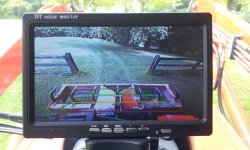
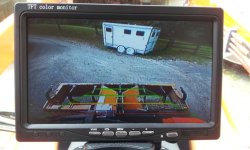
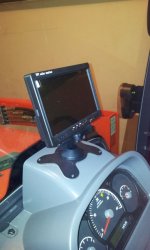
I've added three pics of my installed monitor to give folks an idea of the quality of the images I'm getting. Monitor and camera are the ones Roger linked to at the top of this thread.

The pics were taken with the tractor idling, with a cell-phone camera in bright sunlight (cabbed tractor). The implement under the guide lines is a box blade. The horse trailer in the second pic was about 25-30 feet away. The monitor is mounted to the dash/cowling with four small screws, using the mount that came with the monitor. I sandwiched the included neoprene pad between the dash and mount, but left the protective paper on the dash-side so as not to make it permanent. No idea how long a $28 monitor will last! BTW, vibration has surprisingly not been an issue at all for me, even at full throttle over rough terrain. YMMV.
 

Attachments

  • Monitor1resized.jpg
    Monitor1resized.jpg
    155 KB · Views: 543
  • Monitor2resized.jpg
    Monitor2resized.jpg
    142 KB · Views: 486
  • Monitor mount pic.jpg
    Monitor mount pic.jpg
    122.2 KB · Views: 549

Tractor & Equipment Auctions

Towable T/A Flammable Liquid Transport Tank (A59228)
Towable T/A...
Schulte SBW800 Rock Windrower (A56438)
Schulte SBW800...
KUBOTA M9000 UTILITY SPECIAL TRACTOR (A59823)
KUBOTA M9000...
2004 Ford E-350 Bus -6.0 Powerstroke Diesel - 55k Miles - Inoperable/Non-Running (A56438)
2004 Ford E-350...
HYDRAULIC THUMB FOR MINI EXCAVATOR (A58214)
HYDRAULIC THUMB...
2000 Bobcat 763 (A60462)
2000 Bobcat 763...
 
Top