buckeyefarmer
Epic Contributor
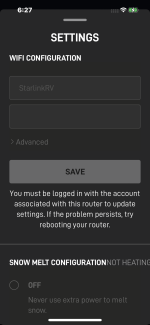
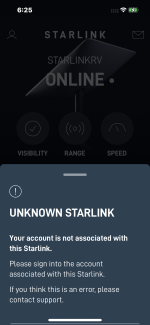
How do you bypass SL? I see nothing in settings

Sounds like you didn’t need much. If you have a larger home network the starlink router might not be the best option. With a newer smart home, you need more granular control.I'm confused about the discussion on set up. I was fortunate to get Starlink over a year ago and after placing the dish on the roof of my camper it took 5 minutes and I had internet. Am I missing something?
Sounds like you didn’t need much. If you have a larger home network the starlink router might not be the best option. With a newer smart home, you need more granular control.
You are correct in that initial setup is super simple.
Very interesting. Do you have an idea how fast the switch over is?I’ve had good success putting the SLs in bypass mode and using Meraki MX firewalls handling the DHCP. I let the Meraki MX do DHCP for the regular network and then also do a separate DHCP server on the site to site VPN side. I use their APs to get the smooth handoff between APs throughout the property. I’ve been pretty pleased with these setups thus far. And having the Meraki MX handle two providers in the event of a failover has also been very smooth.

How do you bypass SL? I see nothing in settings
It hasn’t been noticeable. Under a second.Very interesting. Do you have an idea how fast the switch over is?
I expect it will work fine for a couple of devices. The wireless won’t cover a larger house and I need to have seamless coverage, so I bypass the router and go with a much stronger home network. I’ve done mostly Merakis but a couple of erro networks on the smaller places.Thanks for the clarification. I guess I'll find out if the router is up to the task when we build our house.

Are you on the Starlink WiFi, or a WiFi downstream of Starlink? I am sure you tried, but perhaps try to scroll down or try another device?I also didn’t have Ethernet adapter installed, so installed it. And did reset on the WiFi settings. Still no option.
Are you on the Starlink WiFi, or a WiFi downstream of Starlink? I am sure you tried, but perhaps try to scroll down or try another device?
All the best,
Peter
I expect it will work fine for a couple of devices. The wireless won’t cover a larger house and I need to have seamless coverage, so I bypass the router and go with a much stronger home network. I’ve done mostly Merakis but a couple of erro networks on the smaller places.

You may have encountered a bug in the SL implementation. I suspect it thinks you are not "logged in" to your account with an appropriate name and password. It's also now happening to me, but I don't know why.How do you bypass SL? I see nothing in settings