Starlink

   / Starlink #2,601  
How do you bypass SL? I see nothing in settings
 
   / Starlink #2,603  
I'm confused about the discussion on set up. I was fortunate to get Starlink over a year ago and after placing the dish on the roof of my camper it took 5 minutes and I had internet. Am I missing something?
 
   / Starlink #2,604  
I'm confused about the discussion on set up. I was fortunate to get Starlink over a year ago and after placing the dish on the roof of my camper it took 5 minutes and I had internet. Am I missing something?
Sounds like you didn’t need much. If you have a larger home network the starlink router might not be the best option. With a newer smart home, you need more granular control.

You are correct in that initial setup is super simple.
 
Last edited:
   / Starlink #2,605  
Sounds like you didn’t need much. If you have a larger home network the starlink router might not be the best option. With a newer smart home, you need more granular control.

You are correct in that initial setup is super simple.

Thanks for the clarification. I guess I'll find out if the router is up to the task when we build our house.
 
   / Starlink #2,606  
I’ve had good success putting the SLs in bypass mode and using Meraki MX firewalls handling the DHCP. I let the Meraki MX do DHCP for the regular network and then also do a separate DHCP server on the site to site VPN side. I use their APs to get the smooth handoff between APs throughout the property. I’ve been pretty pleased with these setups thus far. And having the Meraki MX handle two providers in the event of a failover has also been very smooth.
Very interesting. Do you have an idea how fast the switch over is?
 
   / Starlink #2,607  
How do you bypass SL? I see nothing in settings

Dennis
Click Advanced under WiFi Configuration
IMG_0917.JPG
 
   / Starlink #2,609  
Thanks for the clarification. I guess I'll find out if the router is up to the task when we build our house.
I expect it will work fine for a couple of devices. The wireless won’t cover a larger house and I need to have seamless coverage, so I bypass the router and go with a much stronger home network. I’ve done mostly Merakis but a couple of erro networks on the smaller places.
 
   / Starlink #2,611  
I also didn’t have Ethernet adapter installed, so installed it. And did reset on the WiFi settings. Still no option.
 
   / Starlink #2,612  
I also didn’t have Ethernet adapter installed, so installed it. And did reset on the WiFi settings. Still no option.
Are you on the Starlink WiFi, or a WiFi downstream of Starlink? I am sure you tried, but perhaps try to scroll down or try another device?

All the best,

Peter
 
   / Starlink #2,613  
Are you on the Starlink WiFi, or a WiFi downstream of Starlink? I am sure you tried, but perhaps try to scroll down or try another device?

All the best,

Peter

On starlink WiFi.
 
   / Starlink #2,615  
A47288C0-467A-4AE1-8B7E-B74C38850EF9.jpeg
It’s under settings advanced under your routers name.
 
   / Starlink #2,616  
IMG_5062.JPG


I don’t have that screen on my app
 
   / Starlink #2,617  
I expect it will work fine for a couple of devices. The wireless won’t cover a larger house and I need to have seamless coverage, so I bypass the router and go with a much stronger home network. I’ve done mostly Merakis but a couple of erro networks on the smaller places.

OK. Thank you!
 
   / Starlink #2,620  
How do you bypass SL? I see nothing in settings
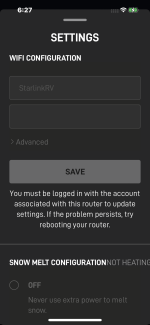
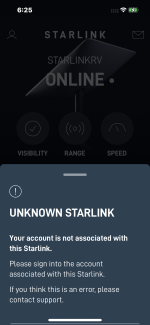
You may have encountered a bug in the SL implementation. I suspect it thinks you are not "logged in" to your account with an appropriate name and password. It's also now happening to me, but I don't know why.

Just now, I tried to put my SL into bypass. It has worked before and I've done it a few times. But it won't allow that now????? The choice on the app for bypass is dimmed. And it says I am not logged in. On the login page, the name is correct but dimmed. I do notice the password field is also dimmed, but occasionally flashes which is odd. On another page, I get a message saying "Unknown Starlink."

I went to 192.168.100.1 but that tells me to make changes using the app. No help there.

The app advises if problems persist, reboot the router. So I rebooted the router. No change.

I've been having recent problems with remote access. I set it all up, it works great and I can remote access cameras from an offsite location. For about a day. Then it inexplicably stops. I thought this might be a fixed IP collision problem; however, now I am also wondering if it is related to SL "losing" its login credentials? Really have no idea- just a guess. Or maybe a fixed IP collision is somehow related to the lost credentials. ????

I'm stuck. I guess next step is to plug/unplug 3 times? Kind of like Dorothy clicking her heels? :D
 

Attachments

  • SLnotloggedin.PNG
    SLnotloggedin.PNG
    248.1 KB · Views: 123
  • SLunknownaccount.PNG
    SLunknownaccount.PNG
    850.8 KB · Views: 179

Tractor & Equipment Auctions

2014 AMERITRAIL TUGGER TRAILER (A58214)
2014 AMERITRAIL...
2016 Nissan Altima 2.5 Sedan (A59231)
2016 Nissan Altima...
2011 NORAM POWER SYSTEMS 100KW GENERATOR (A58214)
2011 NORAM POWER...
2022 BOMAG BW145D-5 SMOOTH DRUM ROLLER (A60429)
2022 BOMAG...
2019 FREIGHTLINER CASCADIA TANDEM AXLE SLEEPER (A59904)
2019 FREIGHTLINER...
1989 AM General M998 HMMWV 4x4 Humvee Truck (A59230)
1989 AM General...
 
Top