Forum Update - Test it out

   / Forum Update - Test it out #61  
Will the different background colors for unread posts vs. read posts be coming back? For example, in the attached screenshots, the second post down from the top has been viewed. The old format changes the background color from yellow to white making it more obvious that the post has been opened already.

I think there was a similar tweaking of color shading that took place during the last forum upgrade. I hope it happens again. Thanks.
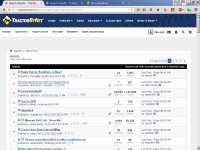
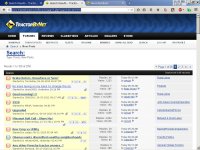
TodaysPostsNew.jpgTodaysPostsOld.jpg
 
   / Forum Update - Test it out #62  
I agree.

An odd situation I occasionally have is when replying I have to type verrrrryyyyyy slowly. If I go faster than one letter every couple seconds it will skip them and only enter every 4th or 5th letter. I usually hit the "back" arrow and start over with the reply and it is okay then. I figure that's something going on in my computer, not TBN.

I've sometimes had that problem with no idea what caused it. I've never mentioned it because I didn't know whether the problem is TBN, my computer, or my ISP.
 
   / Forum Update - Test it out #63  
Under the poster's avatar is his/her join date, location and number of posts. Missing with the new format is the poster's roster of owned tractors which can be helpful sometimes.
 
   / Forum Update - Test it out #64  
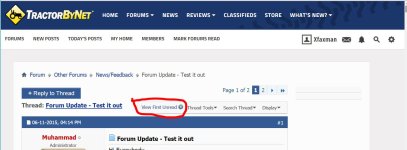
If you do end up on the first page of a thread, there is a place to click to go to the first unread post.

attachment.php
 

Attachments

  • vfu.JPG
    vfu.JPG
    91.4 KB · Views: 235
   / Forum Update - Test it out #65  
4. As for pop-ups on mobile devices... this feedback came in when you were still looking at the old design, I think. Are you seeing ads blocking parts of the page on the new design?

yes...........
 
   / Forum Update - Test it out #66  
Glad to see My Home is back.

Faster loading is evident and helpful.

Mobile photo uploads would be an improvement.

I miss the tractor info under the avatar, it provides useful context.
 
   / Forum Update - Test it out #67  
When looking at the list of "New Posts" or "Today's Posts", the far right column used to show which forum the post is contained in, as well as being a link to that forum. Is that something that can be retained in the new format? Having the forum name helps me decide whether I want to open the post or move on.

I agree it needs to be in the new format and the second column would be even better than far right because some post titles aren't to informative.

Knowing what forum it is in is the deciding factor for clicking or not.
 
   / Forum Update - Test it out #68  
Just tried it out on the desktop. Works fine and I am okay with it now that the my home button is back. But it is just too bland when viewing thread titles. Need the yellow back. I think this was an issue with the last update. Everyone hated all the blandness of everything being white.
 
   / Forum Update - Test it out #69  
The POPUP ads that have been plaguing me are not showing up on your new format. Thanks, and sorry for my rant.
 
   / Forum Update - Test it out #70  
As for the popups, they are gone as long as im in the new mode, however when i click on links in the new forum im kicked back to old forum and the popups continue.

I do miss not automatically opening on the last read post without clicking somewheres special
 
   / Forum Update - Test it out #71  
I hate it when web people get bored and feel they need to change everything just for change. Nothing is faster or better, it just sucks. And don't get me wrong, I'm not adverse to change but this update is a huge step backwards.

And what is extra aggravating is now I don't have the option of viewing this in the old format. Whenever I log on I get thrown into this new mess and clearing my cache and restarting does nothing. I used to get on TBN because it was fun and informative but now it's a mess and just ticks me off.

I was going to log off but I can't find that feature.


As mentioned, go back to Muhammad's earlier post and there is a link to click to go back to the old look. It works. I've done it a couple times. :thumbsup:
 
   / Forum Update - Test it out #72  
I agree.

An odd situation I occasionally have is when replying I have to type verrrrryyyyyy slowly. If I go faster than one letter every couple seconds it will skip them and only enter every 4th or 5th letter. I usually hit the "back" arrow and start over with the reply and it is okay then. I figure that's something going on in my computer, not TBN.

I think that may be a spell checker issue in your browser. It gets bogged down. I sometimes get the same thing.
 
   / Forum Update - Test it out #73  
Count me as another one that likes to automatically go to the last read post. Why would I want to go to the first post when I've already been there? ;)
 
   / Forum Update - Test it out #75  
Ditto. It's easier to click on the thread title than the tiny, little icon to the left of the thread title. :)
 
   / Forum Update - Test it out #76  
I agree.

An odd situation I occasionally have is when replying I have to type verrrrryyyyyy slowly. If I go faster than one letter every couple seconds it will skip them and only enter every 4th or 5th letter. I usually hit the "back" arrow and start over with the reply and it is okay then. I figure that's something going on in my computer, not TBN.
Using IE? Turn on the "compatibility mode" option to fix your problem.
 
   / Forum Update - Test it out #77  
I think I can train myself to click on the little button but 99% of the time want to go to first unread post. Why not switch the functions, make the title for going to first unread and make the little button for going to the start.
 
   / Forum Update - Test it out #78  
I think that may be a spell checker issue in your browser. It gets bogged down. I sometimes get the same thing.

Excuse me for my ignorance Moss. Is that something I have control of?? Probably not.....
 
   / Forum Update - Test it out #79  
Using IE? Turn on the "compatibility mode" option to fix your problem.

I went into the Tool icon, opened compatibility settings and added TBN. Hopefully that's what you were suggesting. I'll report the results. Thank you very much Kenny.
 
   / Forum Update - Test it out #80  
One thing that I use a lot is the "My Profile" link at the top off the page. It is not on the update.

429732-forum-update-test-out-xf-jpg


Here is what I use from the current version, after clicking "My Profile"

429733-forum-update-test-out-mp-jpg
 

Attachments

  • xf.JPG
    xf.JPG
    114.6 KB · Views: 366
  • mp.JPG
    mp.JPG
    163.5 KB · Views: 256

Tractor & Equipment Auctions

UNUSED FUTURE FTH50-(50) SHEETS OFGALVALUME (A60432)
UNUSED FUTURE...
Bush Hog 3pt 14' Mower (A53317)
Bush Hog 3pt 14'...
2014 Dodge Charger Sedan (A59231)
2014 Dodge Charger...
2008 KOMATSU D51PX-22 CRAWLER DOZER (A60429)
2008 KOMATSU...
iDrive TDS-2010H ProJack M2 Electric Trailer Dolly (A59228)
iDrive TDS-2010H...
Kubota B21 TLB (A60462)
Kubota B21 TLB...
 
Top