A backup camera for $50!!!!!!!!!!!

   / A backup camera for $50!!!!!!!!!!! #421  
What U posted looks exactly like my $50 ish system which has all the options that are listed.
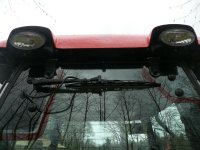
The camera units are designed for exterior mounting, so why not do so.
I also was doubting quality but for the price gave it a try and am super pleased.
I never did mount a front camera as planned but the rear is sure handy for snow blowing.
The specs they listed showed questionable cold limits but in practice I was pleased to discover our coldest weather had no negative effect and worked just fine.
I also discovered that just about any camera worked with the display.
The only concern was the extra fine wiring that they use considering the rugged environment a tractor poses as it does not take much to snag and destroy 26 gauge wire in a tractor environment.
 
   / A backup camera for $50!!!!!!!!!!! #422  
What U posted looks exactly like my $50 ish system which has all the options that are listed.
The camera units are designed for exterior mounting, so why not do so.
I also was doubting quality but for the price gave it a try and am super pleased.
I never did mount a front camera as planned but the rear is sure handy for snow blowing.
The specs they listed showed questionable cold limits but in practice I was pleased to discover our coldest weather had no negative effect and worked just fine.
I also discovered that just about any camera worked with the display.
The only concern was the extra fine wiring that they use considering the rugged environment a tractor poses as it does not take much to snag and destroy 26 gauge wire in a tractor environment.

What you have can enable/disable the grid lines? And do mirroring? If so, and sorry if I appear lazy (running through this entire thread my eyes are starting to glaze over :eek:), can you provide info on what you have (or what post # includes that info)?

I would prefer mounting the rear on the inside. On the front one has to pretty much put the camera outside the cab.

No interest in spending more than is necessary, given the same functions.
 
   / A backup camera for $50!!!!!!!!!!! #423  
What you have can enable/disable the grid lines? And do mirroring? If so, and sorry if I appear lazy (running through this entire thread my eyes are starting to glaze over :eek:), can you provide info on what you have (or what post # includes that info)?
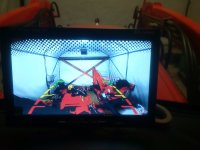
I would prefer mounting the rear on the inside. On the front one has to pretty much put the camera outside the cab.

No interest in spending more than is necessary, given the same functions.

I have the same camera and monitors as mentioned in the first post for $50.
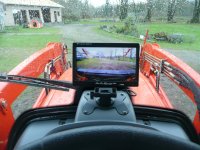
I have a cameras front and rear outside the cab. Monitor on dash.
Cameras DO NOT have audio.
Grid lines CANNOT be disabled. Not a big deal for me.
Monitor CAN ONLY do 2 cameras.
Monitor DOES have mirroring which can be used on either camera.
See my post #56 in that thread.

And just a side note, I suggest getting insurance on your new cabbed NX that has glass coverage. For the couple extra bucks its worth it if you break a window.
 
   / A backup camera for $50!!!!!!!!!!! #424  
I have the same camera and monitors as mentioned in the first post for $50.
I have a cameras front and rear outside the cab. Monitor on dash.
Cameras DO NOT have audio.
Grid lines CANNOT be disabled. Not a big deal for me.
Monitor CAN ONLY do 2 cameras.
Monitor DOES have mirroring which can be used on either camera.
See my post #56 in that thread.

And just a side note, I suggest getting insurance on your new cabbed NX that has glass coverage. For the couple extra bucks its worth it if you break a window.

You can likely add cameras with a simple switch. My guess is that the system is built with NTSC cameras. That was the old standard definition TV signal like all the TVs we once had before all the digital and high definition stuff came out. NTSC for North America or PAL for Europe. I've wired up several cameras with a simple rotary switch to select the camera. Switching each cameras TV or composite signal with the monitor wired to the switch common.
The cameras pull so little power that you can just leave them all powered up all the time.
The mirror function is typically done in the camera not usually the monitor so it's not a big problem. If you want a rear camera or a front camera just be sure you get the right one unless the camera itself has a switch for the mirror function. It's usually just a pin on the camera chip that the chip reads when it's powered up. That way you won't have to mess with it when switching between cameras. Put all the rear facing cameras in mirror mode and leave the forward facing cameras in the normal mode.
Like this one. Amazon.com: Auto Safety High-definition Night Vision Car Rear View Camera 17 Degree Back-up and Parking Camera Universal Waterproof Truck Car Camera (Silver): Car Electronics
I used to make the things for a living, camera chips that is but I've built my fair share of cameras too.
 
   / A backup camera for $50!!!!!!!!!!! #425  
Folks, I got a monitor just like the one "premiered" in this thread and it doesn't appear to be working. It seems to power up, gives me a white screen. I'd gotten two of the Esky backup cameras and they don't produce any images on the screen: hooked up two different digital picture cameras and those didn't produce anything either.

This monitor has a "Menu" button on it. Is this supposed to do anything? Reason I'm asking is that if it is then the monitor is definitely DOA. The Amazon seller couldn't (wouldn't?) tell me anything about this button (they don't provide "technical assistance" - huh?). It would suck to get a replacement and run across the same issue and then find out it's something that I'm doing.

This is what I got:

Amazon.com: WickedHD 7 Inch High Resolution Rotating Color TFT LCD Display Monitor with Remote Control and Mounting Bracket: Cell Phones & Accessories
 
   / A backup camera for $50!!!!!!!!!!! #426  
Folks, I got a monitor just like the one "premiered" in this thread and it doesn't appear to be working. It seems to power up, gives me a white screen. I'd gotten two of the Esky backup cameras and they don't produce any images on the screen: hooked up two different digital picture cameras and those didn't produce anything either.

This monitor has a "Menu" button on it. Is this supposed to do anything? Reason I'm asking is that if it is then the monitor is definitely DOA. The Amazon seller couldn't (wouldn't?) tell me anything about this button (they don't provide "technical assistance" - huh?). It would suck to get a replacement and run across the same issue and then find out it's something that I'm doing.

This is what I got:

Amazon.com: WickedHD 7 Inch High Resolution Rotating Color TFT LCD Display Monitor with Remote Control and Mounting Bracket: Cell Phones & Accessories

I'm guessing yours did work at some point and is not a new install that you can't get working.
I have the same TFT monitor. Pics of mine in post 56 of this thread. The menu button is for brightness, contrast, language, reverse, reset functions. I've never had a white screen but have had a blue screen (no signal) when it can't detect a camera. I've also had a monitor go bad. It seemed to power up but no picture (white, blue, or other) from either camera. It went bad just under the 1 year warranty but I couldn't find the box or paperwork. I did have a second monitor / camera I had installed in my truck. I pulled that monitor and plugged it in the tractor and all worked again so I just ordered another monitor (actually bought 2 so I have a spare on the shelf) and replaced the one I stole from my truck and all was back to normal.
 
   / A backup camera for $50!!!!!!!!!!! #427  
George, actually, it's a brand new unit. As I'd suspected, no display from/via the "Menu" pretty much seems to indicate that this unit is DOA.
 
   / A backup camera for $50!!!!!!!!!!! #428  
I hate getting something new that doesn't work. I assume you hooked the red wire to 12V and black to ground and plugged in the camera inputs. There is another wire (some monitors have a green, some a blue wire) that would hook to a back up light. Do you have that wire hooked up. If not, apply 12V to that wire to see if the screen come on.
These systems are designed to work in a car / truck and the monitor would only come on when put in reverse and power is applied to the back up lights which this extra wire is connected to.
 
   / A backup camera for $50!!!!!!!!!!! #429  
I didn't try reversing the polarity. Hoping that I had it right! I'd had wiring for the cameras connected up the same and when I checked on power for that plug the polarity showed correct (positive probe inside and negative on the outside).

Tried what they refer to as the "ACC" wire (with no documentation on what that means or what it is for) hooked to ground as well as to power and no change.

The screen does light up. Without a doubt it's getting power. Just isn't displaying any images (or anything from the "Menu" function).

I think that I've exhausted testing options. It's boxed back up and ready to be sent back.
 
   / A backup camera for $50!!!!!!!!!!! #430  
I wouldn't reverse the polarity but since its boxed up you don't have to worry about that. Yes, the instructions they come with are very poor and very small print. I had to go buy a magnifying glass to read the wiring. Sorry to hear you got a bad one and hope you get it replaced soon.
Cameras require 12V power and ground wires as well as video.
FYI, I also bought extra cameras too. I had one of them go bad also.
 
   / A backup camera for $50!!!!!!!!!!! #431  
Yeah, if I figure out it's an OK monitor (I get one that works!) I'll look to get a spare. Your thread here has been an inspiration. I will really appreciate having a front-mount camera for doing pallet fork work: on my B7800 I'd been standing up and looking over the hood to line things up- pretty clumsy with my 3pt forks chained up to the bucket and me wobbling about! And my neck will be happy to have a camera at the back:)
 
   / A backup camera for $50!!!!!!!!!!! #432  
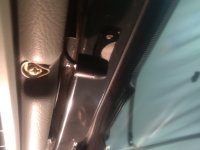
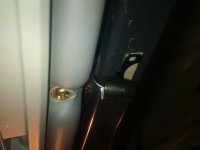
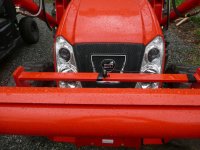
I'm in for $85 cdn including a wireless kit at $18. IMG_20161029_181517.jpgIMG_20161029_181601.jpgIMG_20161029_181611.jpgIMG_20161029_181704.jpgIMG_20161029_182032.jpg
I may drop the camera an inch for obvious reasons or not, see what it looks like outside.
 
   / A backup camera for $50!!!!!!!!!!! #433  
   / A backup camera for $50!!!!!!!!!!! #434  
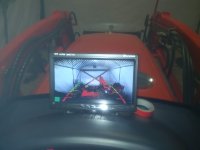
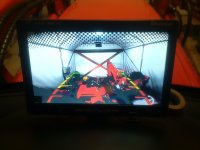
I got two cameras hooked up and the monitor installed on/in the Kioti. OK, I'm waiting for an RCA barrel connector in order to connect up two male jacks that are for the rear camera input. Although I need a front camera more right now (to do pallet fork work) it just turned out that that's what I managed to get connected (video jacks). Front camera is currently very adjustable- I've got it held down with electrical tape :D (and it's off center a bit). Once I figure that it's a good position for pallet fork work I'll make a more permanent mount.
P1120787.JPG
[don't have the rear one screwed down yet]
P1120788.JPG
With the movie rolling :D
P1120792.JPG
 
   / A backup camera for $50!!!!!!!!!!!
  • Thread Starter
#435  
I got two cameras hooked up and the monitor installed on/in the Kioti. OK, I'm waiting for an RCA barrel connector in order to connect up two male jacks that are for the rear camera input. Although I need a front camera more right now (to do pallet fork work) it just turned out that that's what I managed to get connected (video jacks). Front camera is currently very adjustable- I've got it held down with electrical tape :D (and it's off center a bit). Once I figure that it's a good position for pallet fork work I'll make a more permanent mount.
View attachment 488105
[don't have the rear one screwed down yet]
View attachment 488107
With the movie rolling :D
View attachment 488108

Looks good:thumbsup:
 
   / A backup camera for $50!!!!!!!!!!! #436  
I managed to test out the system doing some pallet work. My current mount (see picture a couple of posts up) tends to lose perspective when I have the forks down and am looking to drive them forward: of course, this is the position that matters most; having the FEL in any other position I can see things pretty well. I put the camera lower, on the bottom part of the brush guard, but that isn't quite working out either. Note: when I placed it lower I rolled it upside down- reason I'm mentioning this is that with the camera upside down I no longer have to mess with the ROTATE button when I toggle between front and rear cameras (someone in an earlier post had mentioned an issue such as this).

I'm still thinking that I'd like to have the camera attached to the tractor's body rather than the FEL. I'll see if I can mount the camera down lower, below the bottom of the hood.

Pretty impressed with these little Esky cameras.
 
   / A backup camera for $50!!!!!!!!!!! #437  
You can unscrew the front half of those camera see and spin them in the mount or even completely remove it from the mount.
 
   / A backup camera for $50!!!!!!!!!!! #438  
I managed to test out the system doing some pallet work. My current mount (see picture a couple of posts up) tends to lose perspective when I have the forks down and am looking to drive them forward: of course, this is the position that matters most; having the FEL in any other position I can see things pretty well. I put the camera lower, on the bottom part of the brush guard, but that isn't quite working out either. Note: when I placed it lower I rolled it upside down- reason I'm mentioning this is that with the camera upside down I no longer have to mess with the ROTATE button when I toggle between front and rear cameras (someone in an earlier post had mentioned an issue such as this).

I'm still thinking that I'd like to have the camera attached to the tractor's body rather than the FEL. I'll see if I can mount the camera down lower, below the bottom of the hood.

Pretty impressed with these little Esky cameras.

You might want to try a small ball and socket mount along with a good strong magnet to stick it where ever you need for which ever attachment you're using. That should get you all the mounting flexibility you'll ever need.
 
   / A backup camera for $50!!!!!!!!!!! #439  
country, thanks for the tip. Dummy me, I kept trying to figure out why they were out of "sync." Duh, the rear camera is mounted upside down (under the cab top)! When I mounted the front camera upside down then the two matched. I never cease to amaze myself on how stupid I can be! :laughing:

dick, yeah, I played around with the camera a bit today (busy with a bunch of other things, so I only had a few minutes) and am starting to think that I'd be best off extending the wiring and just doing a temporary mount based on need- mount on the pallet forks themselves for pallet work. Since I'm running the wiring in past the battery "bucket" (recessed area) I could stow excess wiring and or the camera in there when I don't need to use the camera).

Though I haven't gotten it all worked out/perfected I can say that this will end up being VERY helpful. To anyone contemplating doing this- DO IT! Many thanks to all for their contributions here.
 
   / A backup camera for $50!!!!!!!!!!! #440  
Yeah I did the same thing at first when I mounted mine, also the little thin metal mount won't last long if it gets bent back and forth a few times. Mine finally gave up after several run ins with small limbs. Cam is still working great and I still like the mounting location just have to come up with a mount that can be tilted or turned.
 

Tractor & Equipment Auctions

2024 YANMAR TL100VS SKID STEER (A60429)
2024 YANMAR...
Enmark Z Spray (A53316)
Enmark Z Spray...
2017 BX2680 Sub Compact Utility Tractor (A56438)
2017 BX2680 Sub...
2022 Takeuchi TL12R2 (A60462)
2022 Takeuchi...
2019 MACK PINNACLE (A55745)
2019 MACK PINNACLE...
500 BBL FRAC TANK (A58214)
500 BBL FRAC TANK...
 
Top