You are using an out of date browser. It may not display this or other websites correctly.
You should upgrade or use an alternative browser.
You should upgrade or use an alternative browser.
Free and easy CAD program?
- Thread starter mbohuntr
- Start date
- Views: 6700
More options
Who Replied?
/ Free and easy CAD program?
#1
RedNeckRacin
Elite Member
- Joined
- Jan 6, 2008
- Messages
- 2,506
- Location
- Western PA
- Tractor
- John Deere 5083E MFWD, Kubota L3400 HST
Draftsight is a decent free cad program
mikefromnh
Gold Member
- Joined
- Mar 7, 2009
- Messages
- 465
Did you try sketchup?

Redneck in training
Elite Member
Thanks, Couldn't find the free version of sketchup, so I downloaded draftsight.
SketchUp is confusing. The free version comes with 30 day SketchUp Pro trial. Ignore the request for licence nad you will have the free version.

bmaverick
Super Member
- Joined
- Sep 17, 2013
- Messages
- 7,309
- Location
- Beloit-WI
- Tractor
- Yanmar YM2610 ■YANMAR GURU■ EXTRAORDINAIRE
There are some good $99 CAD programs out there that even have file translators for machine shops to read the data into the CNC machines. So, if you can design it well in CAD, they can make the parts. ViaCAD is one of them.
I use SolidWorks 2008. It's a bit overkill for designing Ag tractor equipment.
The Draftsight is plain 2D like the early (old) AutoCAD. 3D really helps so you can visualize parts and assemblies easier with nearly no chances of parts not fitting together like 2D does. Thus, Draftsight is very limited.
For the ability to do 3D, then the OpenSource FreeCAD is the best value. FreeCAD: An Open Source parametric 3D CAD modeler FreeCAD even has the translators. A big plus doing the 3D to part for home or hobby use. Even making drawings with tolerance clearances are easy.
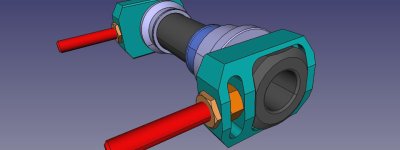
I use SolidWorks 2008. It's a bit overkill for designing Ag tractor equipment.
The Draftsight is plain 2D like the early (old) AutoCAD. 3D really helps so you can visualize parts and assemblies easier with nearly no chances of parts not fitting together like 2D does. Thus, Draftsight is very limited.
For the ability to do 3D, then the OpenSource FreeCAD is the best value. FreeCAD: An Open Source parametric 3D CAD modeler FreeCAD even has the translators. A big plus doing the 3D to part for home or hobby use. Even making drawings with tolerance clearances are easy.
Colonel Monk
Silver Member
Have any of you used any commercial CAD programs before? Wondering how the free CADs rate up, and whether or not they offer basic assembly functionality and parametric mates you can use to prototype basic motion.
I'm an engineer so CAD is my bread and butter, it's what I do about half of every day. I've meant to try SketchUp a few times and I've seen some really cool screen grabs of some pretty cool stuff that was modeled with it.
I tried it myself once, but I gotta admit, after using the ones I've used for so long, the novelty of learning CAD is so far gone, I just couldn't hang in there long enough to give it a fair shake.
I've always found most kinematic packages (and CADs that have them) to be a little contrived. It's probably time that I give them a fair shake once again, as I was disgusted about 10 years ago with the wonky nature of them and mostly gave up.
I have used SolidWorks most of all, and with simple mates you can click/drag a part which pivots and from that you can learn just about everything you need to know about it's motion. It allows you to figure out your cyl strokes just right, pivot points, etc. This is true of most CAD pkg these days. I use Inventor at my current job and it's ***** in comparison, the mates are goofy, don't solve right, and lock up half the time when you try to move something with your mouse.
CAD is a great tool for this kind of thing. I'm getting a welder (for christmas!) and plan to make some of my own attachments. My fabrication skill comes in designing in CAD, making parts to prints, and welding/assembling. I know most approach it from a "sketch" and fabricate from there. I think the more you work it out from your "drawing board" the less you spend reworking and redoing, and learning the hard way. I'm sure not everyone agrees, but it's true for me, and that's what the companies you're buying your attachments from are doing, for the most part.
Lemme know what you guys think about these free CADs, and would love to see your implement designs.
CM
I'm an engineer so CAD is my bread and butter, it's what I do about half of every day. I've meant to try SketchUp a few times and I've seen some really cool screen grabs of some pretty cool stuff that was modeled with it.
I tried it myself once, but I gotta admit, after using the ones I've used for so long, the novelty of learning CAD is so far gone, I just couldn't hang in there long enough to give it a fair shake.
I've always found most kinematic packages (and CADs that have them) to be a little contrived. It's probably time that I give them a fair shake once again, as I was disgusted about 10 years ago with the wonky nature of them and mostly gave up.
I have used SolidWorks most of all, and with simple mates you can click/drag a part which pivots and from that you can learn just about everything you need to know about it's motion. It allows you to figure out your cyl strokes just right, pivot points, etc. This is true of most CAD pkg these days. I use Inventor at my current job and it's ***** in comparison, the mates are goofy, don't solve right, and lock up half the time when you try to move something with your mouse.
CAD is a great tool for this kind of thing. I'm getting a welder (for christmas!) and plan to make some of my own attachments. My fabrication skill comes in designing in CAD, making parts to prints, and welding/assembling. I know most approach it from a "sketch" and fabricate from there. I think the more you work it out from your "drawing board" the less you spend reworking and redoing, and learning the hard way. I'm sure not everyone agrees, but it's true for me, and that's what the companies you're buying your attachments from are doing, for the most part.
Lemme know what you guys think about these free CADs, and would love to see your implement designs.
CM
Colonel Monk
Silver Member
There are some good $99 CAD programs out there that even have file translators for machine shops to read the data into the CNC machines. So, if you can design it well in CAD, they can make the parts. ViaCAD is one of them.
I use SolidWorks 2008. It's a bit overkill for designing Ag tractor equipment.
The Draftsight is plain 2D like the early (old) AutoCAD. 3D really helps so you can visualize parts and assemblies easier with nearly no chances of parts not fitting together like 2D does. Thus, Draftsight is very limited.
For the ability to do 3D, then the OpenSource FreeCAD is the best value. FreeCAD: An Open Source parametric 3D CAD modeler FreeCAD even has the translators. A big plus doing the 3D to part for home or hobby use. Even making drawings with tolerance clearances are easy.
View attachment 402552
I didn't see your whole comment. I can see where some folks would agree with your solidworks comment, but I wouldn't. I guess it kinda depends where your computer literacy skills lie, and whether you have the patience to figure out how a CAD tool works.
Well, SWX is really easy in comparison to the ones I used 20 years ago - you had to use those 8 hours a day to be proficient because there was so many commands to memorize. You don't have to do that anymore, I picked SWX back up after a year or more off and could still do anything I wanted.
Though SWX has more than you need to do AG equipment (since it can do complex surface modeling for fancy curvy stuff) it is definitely at home for that use. I have also used the older versions at home once they went to network licensing. You can build anything for your tractor on a several year old version of it. They add very little actual functionality version by version these days...
If you want to cut once, designing in 3D CAD is the way to go. Some guys are freakily good with their ability to design with a grinder and a welder, but I don't think that way, wasn't trained to I guess.

davesl708
Elite Member
Colonel Monk,
Having been a AUTOCAD user, Sketchup is lacking to say the least. With the freebees KISS is the rule. Work fine for that.
Having been a AUTOCAD user, Sketchup is lacking to say the least. With the freebees KISS is the rule. Work fine for that.
I wasn't really thrilled with sketchup, the arc tool is frustrating to say the least. Most likely because I have no experience in Cad, only in fabrication and traditional prints.
I have a good start for my grapple in Draftsight, But I haven't figured out how to dimension it yet. The kinematics work pretty well, I don't think you get 3D with the free version.
I have a good start for my grapple in Draftsight, But I haven't figured out how to dimension it yet. The kinematics work pretty well, I don't think you get 3D with the free version.
bmaverick
Super Member
- Joined
- Sep 17, 2013
- Messages
- 7,309
- Location
- Beloit-WI
- Tractor
- Yanmar YM2610 ■YANMAR GURU■ EXTRAORDINAIRE
Anyone try the FreeCAD yet? I've downloaded it. Just haven't had the time to mess with it. After being on Catia and UGNX for 10 hours per day, the last thing on my mind is to come home, eat and go at it for another 4 hours on SW2008. I did this back in July for a milk barn. It took about 16 full hours to have it all done. The great thing was, the BOM (Bill of Materials) was easy to calculate with the costs as I managed it with Lowes and Tractor Supply available items per each SW model. The assembly went together really well. Printing was easy too on 11x17 pages.
I did have AlibreCAD back when it was $99 for a full blown CAD package. I could save off STEP files and let a machine shop make the parts directly. This saved cost of setup and took the guess work out of the raw stock to acquire.
Before CAD, I had spent 4 years on the drafting board. Old school ways work well too if you are going to do the shop work yourself.
Another way is the 80/20 method. 80/20® Inc. - The Industrial Erector Set® There are plenty of DIY solution projects people have done. Some as tractor implements to a tractor canopy to a cab for the tractor. You will need to download and skim through each one for ideas. These are still helpful ideas even if you have your own structure steel and a welder.
You can take the 80/20 CAD files into the FreeCAD. Then assemble what you need for the overall project. Thus, a faster way than making each component part from scratch.
Another place to grab 3D CAD models is from 3dcontentcentral.com It takes a little effort to find just what you need, but it does help. I've had to grab a few models for a manufacturing plant layout last year.
I did have AlibreCAD back when it was $99 for a full blown CAD package. I could save off STEP files and let a machine shop make the parts directly. This saved cost of setup and took the guess work out of the raw stock to acquire.
Before CAD, I had spent 4 years on the drafting board. Old school ways work well too if you are going to do the shop work yourself.
Another way is the 80/20 method. 80/20® Inc. - The Industrial Erector Set® There are plenty of DIY solution projects people have done. Some as tractor implements to a tractor canopy to a cab for the tractor. You will need to download and skim through each one for ideas. These are still helpful ideas even if you have your own structure steel and a welder.
You can take the 80/20 CAD files into the FreeCAD. Then assemble what you need for the overall project. Thus, a faster way than making each component part from scratch.
Another place to grab 3D CAD models is from 3dcontentcentral.com It takes a little effort to find just what you need, but it does help. I've had to grab a few models for a manufacturing plant layout last year.
Last edited:

Colonel Monk
Silver Member
Anyone try the FreeCAD yet? I've downloaded it. Just haven't had the time to mess with it. After being on Catia and UGNX for 10 hours per day, the last thing on my mind is to come home, eat and go at it for another 4 hours on SW2008. I did this back in July for a milk barn. It took about 16 full hours to have it all done. The great thing was, the BOM (Bill of Materials) was easy to calculate with the costs as I managed it with Lowes and Tractor Supply available items per each SW model. The assembly went together really well. Printing was easy too on 11x17 pages.
I did have AlibreCAD back when it was $99 for a full blown CAD package. I could save off STEP files and let a machine shop make the parts directly. This saved cost of setup and took the guess work out of the raw stock to acquire.
Before CAD, I had spent 4 years on the drafting board. Old school ways work well too if you are going to do the shop work yourself.
Another way is the 80/20 method. 80/20® Inc. - The Industrial Erector Set® There are plenty of DIY solution projects people have done. Some as tractor implements to a tractor canopy to a cab for the tractor. You will need to download and skim through each one for ideas. These are still helpful ideas even if you have your own structure steel and a welder.
You can take the 80/20 CAD files into the FreeCAD. Then assemble what you need for the overall project. Thus, a faster way than making each component part from scratch.
Another place to grab 3D CAD models is from 3dcontentcentral.com It takes a little effort to find just what you need, but it does help. I've had to grab a few models for a manufacturing plant layout last year.
I hear that, was my whole point in not trying the free cads yet, I wanted to know if they worked before bothering. I had a career in CAD and other engineering softwares right a the beginning of my career, and now I just want to design stuff and not get in too deep.
I have used both Catia v4 (weird) and v5 when it came out, as well as the original version of UG. Back then all CAD computers were UNIX and cost about $50 grand each. Yikes. Can do more today with a laptop....
Anyway, I have also previewed Alibre, they were the cool up and comers but I think they just didn't have the big company backing to break in.... They don't seem to be around anymore, for all I know they are one of the free cads.
I've build alot of equipment frames using bosch and item extrusions. Very cool stuff, and really accurate. For machines that have multiple modules that need to align to each other it makes it easier than welded frames to achieve that tolerance, but can be pretty expensive. I'll have to check out 80/20, maybe they have DIY prices, that would be awesome.
Old school drawings are better than nothing, that's for sure. Although there are people out there that can fabricate some beautiful equipment with nothing but a tape measure, grinder, and welder, for every one of those there's 10 that don't turn out that great. Talking about building something complex, of course. I never used a board after college, I can barely draw a legible sketch on paper! I still try though.
I the one thing I think that 3D really does for you, is to be able to see how your parts will interact. I do alot of development of mechanisms in 2D sketch layouts first though - I guess that's my drafting board.
I can't wait to get my welder for christmas, the first project is going to be a quick and dirty mount for snowplow into my bucket. This will be replaced later with a skidsteer mount. Also, need a quick and dirty sawbuck the bucket, need to start burning our standing dead ash before it's rotten.
Colonel Monk
Silver Member
I wasn't really thrilled with sketchup, the arc tool is frustrating to say the least. Most likely because I have no experience in Cad, only in fabrication and traditional prints.
I have a good start for my grapple in Draftsight, But I haven't figured out how to dimension it yet. The kinematics work pretty well, I don't think you get 3D with the free version.
Arcs can be a pain, different companies do them different. That might have been the thing that turned me off as well.
If you can pick your style, that really helps. When drawing between two points, you want a "two point arc", not a "center point arc". There's also "3 pointers", where you pick 3 points along your arc...
One thing, for anyone wanting to try CAD out, is that most companies offer a 30 trial. You can get alot of work done in 30 days. Now, I'm not advocating you do this for a paying job, but for designing your own implements I don't see the harm.
If you have a computer you don't use much, you could simply create a backup before you install, so that after 30 days you can restore from backup, and get another 30. Now, I think you'll find that the latest and greatest now force you to register online, so the wipe and restart deal doesn't work for those. Unless you have multiple email addresses to sign up with....
I have some older versions of Solidworks that barely needed a serial number and they sure would let you design any kind of farm implement. If you can get your hands on anything like 2006 or earlier they didn't have online activation. But, only a 32 bit computer can run them. Newer ones won't, neither will windows 7 (I think).
Anyway, there's 3D cad out there, you just have to look for it. I think the seat of Inventor I'm using was $8000 or so, cheaper than 20 years ago, but still way too much for home projects.
Good luck
bmaverick
Super Member
- Joined
- Sep 17, 2013
- Messages
- 7,309
- Location
- Beloit-WI
- Tractor
- Yanmar YM2610 ■YANMAR GURU■ EXTRAORDINAIRE
I hear that, was my whole point in not trying the free cads yet, I wanted to know if they worked before bothering. I had a career in CAD and other engineering softwares right a the beginning of my career, and now I just want to design stuff and not get in too deep.
I have used both Catia v4 (weird) and v5 when it came out, as well as the original version of UG. Back then all CAD computers were UNIX and cost about $50 grand each. Yikes. Can do more today with a laptop....
Oh, I had to switch to another employer in my career. Sadly, they only use Catia. I've been on many of the high-ended and medium-ended CAD systems. Catia seems to have only jumped from the Mainframe/Unix and ported over with a no thrills clumbersome interface. Some of the functions to be really useful tend to be lacking compared to many of the other CAD softwares of today. I have not tried V6 yet. Stuck on V5R20 for now. UGNX was sweet and easy. SolidWorks is fun and easy. SolidEdge was alright. Pro/E+Creo is fun in an odd way.
As for Alibre, they we bought out by 3DSystems and renamed GeomagicDesign. They were ahead of the game for functionality and price. The user interface is key for them. 3D Systems | Geomagic Design Software
For the speed and accuracy 3D solids wins hands down today. Visualization of the 3D works the kinks out of any concept up front.
The Bosch/Rexroth products are a bit expensive. 80/20 has a fiar market price point and closer to reality. Still, if you have another source or means, it doesn't hurt seeing what can be made to generate your own ideas.
Well, FreeCAD is still FREE. Hope someone gets on to it before I do. Not enough time in the day to tackle this on my end.

DuckSlayer1017
Platinum Member
...The Bosch/Rexroth products are a bit expensive. 80/20 has a fiar market price point and closer to reality. Still, if you have another source or means, it doesn't hurt seeing what can be made to generate your own ideas.
Misumi offers a full line of aluminum strut just like 80/20 and Bosch. All their stuff is compatible with Bosch at a fraction of the cost. It may work with 80/20 too but I'm not 100% sure, we use Bosch at work. If you guys aren't familiar with Misumi check them out. We use them a lot at work for machine parts. I like to think of them as a configurable McMaster Carr. www.misumiusa.com
Millnturn
New member
- Joined
- Oct 7, 2014
- Messages
- 13
- Location
- Kalispell, MT
- Tractor
- John Deere 318, TORO Groundsmaster 325D
Check out Fusion 360 from Autodesk. It's a fairly new full blown 3D CAD/CAM program. It's cloud based, so the heavy computation is shared between your local machine and remote servers. Runs great on my older shop pc. It's free for students/start ups, $300 a year for business ($1200 for ultimate level). I run SWX 2015 by day, and F 360 for my side business. I have a CNC mill, and the CAM it includes is phenomenal. Modeling is lacking behind SWX, but light years ahead of sketch up or other free 3D modelers.
I am working on a scratch built FEL project now, and the ease of working out geometry is incredible. I enjoy on the fly fabrication work, adjusting the design as the scrap bin provides. For something as complex as a FEL or BH however, 3D CAD is the only way to roll.
I am working on a scratch built FEL project now, and the ease of working out geometry is incredible. I enjoy on the fly fabrication work, adjusting the design as the scrap bin provides. For something as complex as a FEL or BH however, 3D CAD is the only way to roll.
Renze
Super Member
At my previous employer i engineered wheeled loaders. For concept engineering i used ZwCAD (which is a chinese autocad clone for free) because the history free 3d program (One Space Designer) didnt have constraints so you couldnt simulate movements like a parametric program can. I put cylinders, parallel linkage and booms in Acad blocks to move them around. Thats the only serious drawback of history free 3DFor something as complex as a FEL or BH however, 3D CAD is the only way to roll.
ZwCAD only writes a text in your printed drawing after the trial period is expired, but hey, you can allways use a free DWGviewer to print without the watermark

p.s. does anyone know a free CAD program that includes a FEM module ??
Here are some similar links:


- Replies
- 5
- Views
- 3K
