Worth Replacing Laptop Hard Drive?

/ Worth Replacing Laptop Hard Drive? #41  
Shut down your Acer Aspire if it is running. Once the computer is off, press the power button to start it. Press “F2” immediately while your computer is booting up and displaying the “Acer” logo. Keep pressing “F2” until the BIOS Setup screen appears.
Above is what i could find on getting into the bios. once in the bios there should be a section on test and one for short and long test of the hard drive.
I have had both these test pass and still had hard drive issues.
 
/ Worth Replacing Laptop Hard Drive? #42  
I wouldn't put a new drive in it, too many other things can create this sort of issue and it being a laptop it takes a beating. Every time you pick it up it flexes. Think about what that can do to circuit boards after 6 or 7 years. You could do lots of things like create a Parted Magic diag disk. You boot off the disk which is basically a Linux distro, it will allow you to test things like memory and hard drive if you set it up properly. There are youtube videos on it. You can also connect to the internet using the included browser. Maybe one way to prove out the hardware but given the age I think I would just pick up a new one with an SSD drive. I bought my daughter an Asus laptop for college like the one below. She loves the size and 10 hour battery life, no moving parts. May be too small for us old folks with weak eyes but perfect for on the go.

Amazon.com: ASUS X25TA 11.6 Inch Laptop (Intel Atom, 2 GB, 32GB SSD, Windows 1, Dark Blue) (Certified Refurbished): Computers & Accessories
 
/ Worth Replacing Laptop Hard Drive? #44  
Easy to replace hard drives.
 
/ Worth Replacing Laptop Hard Drive? #46  
Last one i did just cloned the drive, New one exactly like the old, except more space.

Rereading the problem, think I would get a new laptop.
 
/ Worth Replacing Laptop Hard Drive? #47  
I was having similar problems with an HP. Sometimes it just would run the fan and never power up fully.
I ended up taking the whole thing apart for a better look--you would not believe what debris lands inside a computer. The cooling fan was failing (completely full of fuzz), so I replaced that. During the process I broke the wireless card and had to replace that. That seemed to solve the problem 90% of the time... at some point it updated on its own from windows 7 to windows 10... the issues resolved.
From time to time I still will get a shutdown when the cooling grates are blocked. Many of these have less than 1/4" gap beneath the unit, so putting on a blanket, lap, or paper can spike the heat--quickly if there's no airflow. I'd back it up while you have it running and get a closer look inside to see if everything looks kosher.
I'd guess you have a heat issue or a windows compatibility problem. I'd run the updates after you do your backup and go to 10. I didn't want it, don't like it, have a hard time finding my stuff in here now... but it works, and 7 will soon be like XP & 98.
 
/ Worth Replacing Laptop Hard Drive? #48  
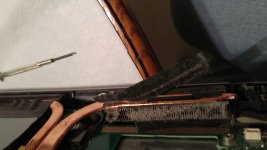
I ended up taking the whole thing apart for a better look--you would not believe what debris lands inside a computer. The cooling fan was failing (completely full of fuzz), so I replaced that.

I took the back off of my 3 yo laptop a couple nights ago. Cooling fins clogged with dust. Used scotch tape to remove it, worked well.

1487171758494.jpg
 
/ Worth Replacing Laptop Hard Drive? #49  
<snip>
I ended up taking the whole thing apart for a better look--you would not believe what debris lands inside a computer. The cooling fan was failing (completely full of fuzz), so I replaced that. During the process I broke the wireless card and had to replace that.

And that's one of the reasons I recommend to just get a new inexpensive laptop.

Many of the laptops built in the last few years are not designed for repair, especially considering loaded labor rates. It's to easy to break a piece of plastic or a thin wire and have another paperweight.
 
/ Worth Replacing Laptop Hard Drive? #50  
A good i7 laptop is still over $1k, not exactly cheap.
 
/ Worth Replacing Laptop Hard Drive?
  • Thread Starter
#52  
Still trying various fixes...

I did see that Windows Updates has been trying to install the same update for months and fails every time...

Right now I have the auto update off.

But, I did try to install the critical update and it gets to 99% and no more...

Windows 7 Service Pack 1 for x64-based Systems (KB976932)

It's been trying to install this for many years and failed!!!

Error details: Code 800B0100

Update type: Important

Windows 7 Service Pack 1 is a recommended collection of updates and improvements to Windows that are combined into a single installable update. The service pack can help make your computer safer and more reliable. A typical installation will take about 30 minutes to complete, and you will have to restart your computer about halfway through the process.

Last successful update is Windows Malicious Software Removal Tool January
 
/ Worth Replacing Laptop Hard Drive? #53  
Still trying various fixes...

I did see that Windows Updates has been trying to install the same update for months and fails every time...

Right now I have the auto update off.

But, I did try to install the critical update and it gets to 99% and no more...

Windows 7 Service Pack 1 for x64-based Systems (KB976932)

It's been trying to install this for many years and failed!!!

Error details: Code 800B0100

Update type: Important

Windows 7 Service Pack 1 is a recommended collection of updates and improvements to Windows that are combined into a single installable update. The service pack can help make your computer safer and more reliable. A typical installation will take about 30 minutes to complete, and you will have to restart your computer about halfway through the process.

Last successful update is Windows Malicious Software Removal Tool January

Try this...

EDIT: Woops had the wrong error code. Try this...

Error 8B:) during Windows 7 Service Pack 1 KB976932 update - Microsoft Community
 
/ Worth Replacing Laptop Hard Drive? #54  
Also, are you sure you're running Windows7 64bit? Make sure you are and not 32 bit. If its trying to install 64bit update to 32 bit, it will be a problem.
 
/ Worth Replacing Laptop Hard Drive? #55  
I would right click on the taskbar on bottom of the screen, click on task manager, go to processes, check the box for show all processes and see how much memory and processor power is being used. I have seen computers lock up like you're describing with Windows update running in the background and using 99% of the processor power. If so there will be a process whose name starts with wau that is using at least 80% of the CPU.

You can also go to the control panel, open Windows Update and see when it last checked for and installed updates.

Aaron Z

I have not read all of the other symptoms and responses on later posts to this thread. I have a 2012 HP 3D 17" Envy notebook with one of the fastest CPUs available at the time, 8 GB RAM, dual hard drives, two external monitors connected, Windows 7, etc., etc. Over time mine has gotten slower and started what appeared to be locking up. Investigation showed that whenever RAM usage went over 50% or so (kept Task Manager running for reference), I would get poor performance resembling lockups. I discovered through Task Manager that my Internet browser sessions (IE at the time) were using RAM in many hundreds of megabytes at a time for each session and sometimes up to a GB of usage. I would stop all browser sessions but Task Manager still showed IE having active sessions I had to kill or would not die. A reboot always fixed the problem. I had a similar issue using Chrome. Then tried Firefox and it used less memory but the version I am running with latest updates may go into stall/clocking condition. If I kill the offending session, all Firefox windows die. Restarting Firefox brings up a message that Firefox had a problem... and then reloads all of the previous active windows.

With my slow RAM swapping to hard disk issue, I recently replaced both internal hard drives with a single 1TB Crucial 300MX SSD. Wow, even with the RAM swapping to SSD, the speed is far greater than ever before. Very pleased. I then upgraded the RAM to 16GB to alleviate the memory shortage. As expected, the additional RAM did not make much difference as the hard drive had been the bottleneck. I previously went to Windows 10 with similar issues, did not particularly like it and went back to Windows 7 when I discovered the spring of 2017 W10 updates would lock in a lot of intrusive, privacy killing updates. Recently I see Microsoft has decided not to do some of them, most likely due to poor consumer feedback is my guess.

My wife's inexpensive, HP notebook (2014) with touch screen, 6GB RAM, Windows 8 and now Windows 10, has always been slow and would become unresponsive. But, she did not invest much money and she got what she got. I just upgraded her hard drive to a Crucial 300MX 750 GB and the PC is now lightening fast.

So rule of thumb with consumer computers is generally, the mechanical hard disk is the performance bottleneck. And Internet browser plugins can cause them to become really bloated memory hogs.
 
/ Worth Replacing Laptop Hard Drive? #56  
I did see that Windows Updates has been trying to install the same update for months and fails every time...


  1. Check your disk space.
  2. Clean out your cooling system. Yes, take the thing apart and get busy with some compressed air.
  3. Check your disk space.
  4. Clean off your desktop. Don't use that as a place to store files. Use shortcuts. (Learned about that while working as a contractor for Intel.)
  5. Check your disk space.
 
/ Worth Replacing Laptop Hard Drive?
  • Thread Starter
#57  
I have 140 free of 218 GB...

I've defragged, cleared histories, deleted and consolidated... also took the cover off to clean out... in 6 years the notebook has only traveled maybe 6 times... stopped all updates, remote access... etc.

It was getting so bad I switched to Fire Fox last night and so far so good... seems clean... the internet connects very fast... instead of minutes to connect it is about 30 seconds and ready for use.

I realize buying a new computer would come with benefits... but I still own the same car I bought in High School... so not one to cave easily.

The suggestions have been great... helped me learn more about computing... necessity is the mother of invention.
 
/ Worth Replacing Laptop Hard Drive? #58  
moss road is correct make sure you have a 64 bit operating system first.
right click my computer go to properties and that will tell you.
we have the same issue with PCs in the field that have not run windows updates, then try and run win updates.
Download Update for Windows 7 for x64-based Systems (KB3:confused:265) from Official Microsoft Download Center
the above link should be for KB3050265 down load and run that update then reboot the PC.
Download Update for Windows 7 for x64-based Systems (KB31) from Official Microsoft Download Center
the above link should be for KB3102810 dwon load run this up date and reboot.
then try running windows update.
your really want it to loan those updates.
if it is not 64 bit it won't load those updates. let me know and i can look up the ones for 32 bit i have them sum place.
I am pretty sure the above will get those updates to load.
 
/ Worth Replacing Laptop Hard Drive? #59  
I have 140 free of 218 GB...

I've defragged, cleared histories, deleted and consolidated... also took the cover off to clean out... in 6 years the notebook has only traveled maybe 6 times... stopped all updates, remote access... etc.

It was getting so bad I switched to Fire Fox last night and so far so good... seems clean... the internet connects very fast... instead of minutes to connect it is about 30 seconds and ready for use.

I realize buying a new computer would come with benefits... but I still own the same car I bought in High School... so not one to cave easily.

The suggestions have been great... helped me learn more about computing... necessity is the mother of invention.


You know, some version of Linux and the OpenOffice suites may suit your liking for the basics. Have you thought about that avenue? They are much more light-weight than Windows as far as footprint and in some instances resources.
 
/ Worth Replacing Laptop Hard Drive? #60  
i believe part of his issue is with his browser, which is why he is getting faster speeds when he uses firefox. When win sp1 comes in and he finishes loading all the updates, it should bring him to ie10 if my memory serves me correct. We see this issue in the shop when we have PCs that have been off the internet, then try and run windows updates, in fact i am correcting one now as i type this that is doing just what he described.
 

Marketplace Items

2007 Ingersoll Rand P185 S/A Towable Air Compressor (A59228)
2007 Ingersoll...
Sterling 9500 (A61306)
2017 FREIGHTLNINER CASCADIA SLEEPER (A59905)
2017 FREIGHTLNINER...
2023 SNORKEL A46JRT ROUGH TERRAIN BOOM LIFT (A59823)
2023 SNORKEL...
KUBOTA SVL75 ENCLOSED CAB (A52706)
KUBOTA SVL75...
2024 DEVELON DL250-7 WHEEL LOADER (A59823)
2024 DEVELON...
 
Top