Starlink

   / Starlink #4,081  
Yep, we got rid of Dish before getting Starlink. It works well. I think my wife has had pretty much every streaming service at some point with the free promos and I've not had any ISP issues with them.

Before Starlink, I had mobile internet that used T Mobile and some of the live services wouldn't allow it due to blackout rules. But I've not had that issue with Starlink.
That is what we want to do, ditch DISH. It's turned into a large monthly expense.
Which Roku device should I use?
 
   / Starlink #4,082  
A month or so ago I installed a TP-Link X5300 Deco mesh router system and was pleased how easy it was to get the satellites working. But I wasn't at all impressed with the speed, as going through even a single wall or ceiling cut speed in half. So I'm back to running Ethernet to the satellite locations. One of those satellites supports a network file server, so I do really need the speed.
Mine is the AX73. I've not tested the speed everywhere, but it works well throughout the house and in the metal shop about 100' away. This is just devices and Rokus though. I don't have any servers. Why not just connect the NFS right to the router?
 
   / Starlink #4,083  
That is what we want to do, ditch DISH. It's turned into a large monthly expense.
Which Roku device should I use?
I would say whichever form factor you prefer. I use the streaming stick. I do have mine setup so shutting off the TV cuts power to the Roku itself.
 
   / Starlink #4,085  
I use a Roku TV (TCL Brand) with Starlink- huge streaming performance improvement over using same TV with Hughesnet.
 
   / Starlink #4,086  
Is anybody using Roku TV with Starlink?
I am, use it all the time no problems. Once in a great while there might be slight buffering
 
   / Starlink #4,088  
I just ordered Starlink today. I used to have a LOS radio internet that transmitted from my attic, to a repeater on a neighbors barn, that just became super slow as they added subscribers and it wasn't reliable. So, I changed to an AT&T brick, which is also slow and requires frequent reboot's. With my wife looking for a "work remote" job, I need to at least be able to attend and host a microsoft teams meeting. I could barely even stream with the old set-ups.

So, help bring a network challenged newbie up to speed with what else I need.

I ordered the basic service with a pivot mount. I want to wirelessly cover my home and patio. I assume this Starlink thing then gets hooked up to a wireless router to cover the house. What's the best router to get? The one I have laying around from my radio internet was a 2.4/5.0, but it's at least 5 years old. I assume there's something better out there now. My house is a 2300 SF 1-story brick with a large outdoor covered patio. If I could also cover a 600sf in-law apartment that's 50' from the main house, that would be a bonus.

Edit:
If this Starlink now gives us reasonable speed to stream, I'd like to dump our Direct TV satellite and use a streaming service. Any recommendations for that?
 
   / Starlink #4,089  
I just ordered Starlink today. I used to have a LOS radio internet that transmitted from my attic, to a repeater on a neighbors barn, that just became super slow as they added subscribers and it wasn't reliable. So, I changed to an AT&T brick, which is also slow and requires frequent reboot's. With my wife looking for a "work remote" job, I need to at least be able to attend and host a microsoft teams meeting. I could barely even stream with the old set-ups.

So, help bring a network challenged newbie up to speed with what else I need.

I ordered the basic service with a pivot mount. I want to wirelessly cover my home and patio. I assume this Starlink thing then gets hooked up to a wireless router to cover the house. What's the best router to get? The one I have laying around from my radio internet was a 2.4/5.0, but it's at least 5 years old. I assume there's something better out there now. My house is a 2300 SF 1-story brick with a large outdoor covered patio. If I could also cover a 600sf in-law apartment that's 50' from the main house, that would be a bonus.

Edit:
If this Starlink now gives us reasonable speed to stream, I'd like to dump our Direct TV satellite and use a streaming service. Any recommendations for that?
The Starlink router, which is not in the dish, has a pretty decent WiFi signal. Check your possible dish locations with the phone app, and see where the best view of the sky is for the dish. I would then install the dish where it has an unobstructed view of the sky, and route the cable to the router in some location close to where your wife wants to work (e.g. her desk/office?), and then see how things are, and go from there.

We have our router outside on an outbuilding almost 200' away and my spouse has no issues hosting zoom / teams calls on that signal (2 bars of four), but the details of home construction matter a lot. (e.g. All wood construction vs. stucco, or stone/brick veneers, where it is the wire mesh support that causes the issues).

I can't help you in particular on Dish vs Starlink for streaming, but I have streamed 4K videos on Starlink, while other things were also downloading, so it should be a piece of cake.

All the best,

Peter
 
   / Starlink #4,090  
As Peter mentions, the Starlink system comes with a wifi router which will broadcast a wifi network in your home. Whether that is adequate for your connection needs from all devices in the home depends on a lot of things that are all specific to your home, size, layout, building materials and use cases. I'd say get the SL system, install it, try things out and then if there are places not getting great wifi signals look into a mesh wifi system to do a better job covering the house areas. You can choose to use a mesh system in concert with the SL router or disable the SL wifi and use only your other router/mesh system. The SL system is pretty decent but not high end. It doesn't allow access to some router features that more techie folks tend to like to adjust.
 
   / Starlink #4,091  
This is the new gen 3 router Starlink is offering:
I bet their website shows much more info in its specifications.

I have the original starlink router with cat cables running to
(Unifi) wireless access points to upstairs/ downstairs and 2 detached garages. I had this equipment on-hand. Overkill, I know
(Good coverage and I have not purchased this new router.)

This was the email I got :
"The new Gen 3 router introduces WiFi 6 and tri-band radios to Starlink.
With improved range, performance, and device support, the Starlink Gen 3 router will extend your WiFi network throughout your home to provide a more consistent and reliable connection.
How it works
The Gen 3 router is a drop in replacement for your current router and will arrive with everything you need to get connected to your current Starlink. If you purchase multiple Gen 3 routers they can be meshed together to extend the range of your WiFi network. "

regards,

R
 
   / Starlink #4,092  
FWIW:
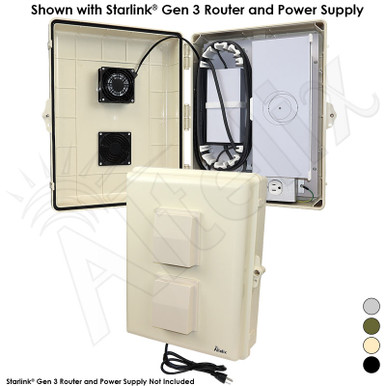
In case any of you are considering mounting your Starlink router outdoors, Altelix has introduced a line of outdoor, waterproof resistant, fan cooled enclosures specifically for Starlink.

I made something similar for mine, and it was really helpful to us for maximizing the Starlink WiFi signals.

All the best,

Peter
 
   / Starlink #4,093  
I just ordered Starlink today. I used to have a LOS radio internet that transmitted from my attic, to a repeater on a neighbors barn, that just became super slow as they added subscribers and it wasn't reliable. So, I changed to an AT&T brick, which is also slow and requires frequent reboot's. With my wife looking for a "work remote" job, I need to at least be able to attend and host a microsoft teams meeting. I could barely even stream with the old set-ups.

So, help bring a network challenged newbie up to speed with what else I need.

I ordered the basic service with a pivot mount. I want to wirelessly cover my home and patio. I assume this Starlink thing then gets hooked up to a wireless router to cover the house. What's the best router to get? The one I have laying around from my radio internet was a 2.4/5.0, but it's at least 5 years old. I assume there's something better out there now. My house is a 2300 SF 1-story brick with a large outdoor covered patio. If I could also cover a 600sf in-law apartment that's 50' from the main house, that would be a bonus.

Edit:
If this Starlink now gives us reasonable speed to stream, I'd like to dump our Direct TV satellite and use a streaming service. Any recommendations for that?
As ponytug & Bigblue posted, everything you need may be in the box. A decent wifi router and cabling is included. First find an unobstructed sky view using the phone app for the dish then it’s hopefully plug and play. I suggest trying out a temporary setup at first. I put the dish on a picnic table and ran the cable through a window to the router.

For TV streaming I first tried HULU (😣) and am currently using YouTubeTV. Pretty similar in channels offered and cost per month at around $75. If HULU still has issues with StarLink’s location verification I would avoid it.
 
Last edited:
   / Starlink #4,094  
The new router is not worth the upgrade in our case. I run the ethernet into the house from the Shop (taller building) and use a Wifi6 router off of that. The Starlink router gets us signal in and around the shop while passing the signal into the house.

Wifi6 is worth it if you need more speed.
 
   / Starlink #4,095  
As ponytug & Bigblue posted, everything you need may be in the box. A decent wifi router and cabling is included. First find an unobstructed sky view using the phone app for the dish then it’s hopefully plug and play. I suggest trying out a temporary setup at first. I put the dish on a picnic table and ran the cable through a window to the router.

For TV streaming I first tried HULU (😣) and am currently using YouTubeTV. Pretty similar in channels offered and cost per month at around $75. If HULU still has issues with StarLink’s location verification I would avoid it.
We use Hulu and I've not had location issues like I have seen in the past with YouTube. The YT location issue can be solved simply by logging into the YT TV account on your phone's browser and going to a particular place in your account to allow YT to let them access your actual location (versus what your ISP shows). I'd assume Hulu must have something like that.
 
   / Starlink #4,096  
We use Hulu and I've not had location issues like I have seen in the past with YouTube. The YT location issue can be solved simply by logging into the YT TV account on your phone's browser and going to a particular place in your account to allow YT to let them access your actual location (versus what your ISP shows). I'd assume Hulu must have something like that.
šŸ‘
 
   / Starlink #4,099  
I just ordered Starlink today. I used to have a LOS radio internet that transmitted from my attic, to a repeater on a neighbors barn, that just became super slow as they added subscribers and it wasn't reliable. So, I changed to an AT&T brick, which is also slow and requires frequent reboot's. With my wife looking for a "work remote" job, I need to at least be able to attend and host a microsoft teams meeting. I could barely even stream with the old set-ups.

So, help bring a network challenged newbie up to speed with what else I need.

I ordered the basic service with a pivot mount. I want to wirelessly cover my home and patio. I assume this Starlink thing then gets hooked up to a wireless router to cover the house. What's the best router to get? The one I have laying around from my radio internet was a 2.4/5.0, but it's at least 5 years old. I assume there's something better out there now. My house is a 2300 SF 1-story brick with a large outdoor covered patio. If I could also cover a 600sf in-law apartment that's 50' from the main house, that would be a bonus.

Edit:
If this Starlink now gives us reasonable speed to stream, I'd like to dump our Direct TV satellite and use a streaming service. Any recommendations for that?
We have been using Starlink for several years for Internet access including streaming videos, normal access, and web conferencing. Starlink has worked just fine even with my wife and I on separate web conferences at the same time.

We can have multiple video streams going as well.

We have the second generation dish and the router sits in the center of the house. The performance was not bad but we bought a couple of Starlink mesh extenders to improve the data rate at the "ends" of the house. They were easy to setup.

There have only been a few Starlink outages, the longest was 45 minutes or so. HEAVY rain can disrupt the signal but we had that problem with cable and cell internet too.

Starlink is simply a game changer for those in remote areas. I just watched a video of a woman travel to a remote Scotish island, and she was worried about Internet access, so she took her Starlink setup with her. The cell access was good, so she did not have to setup Starlink, but she could have if needed. Science Fiction that is.
 
   / Starlink #4,100  
I put starlink in bypass mode and installed Deco mesh system, best thing I ever did.

I do the same -- the decos are hard-wired and everything else in the house is wireless/connects to the Decos. Works great.
 

Tractor & Equipment Auctions

2008 Ford F-250 Lariat 4X4 - 303,424 miles - 6.4L Powerstroke -Automatic (A56438)
2008 Ford F-250...
WBrock Meyer 2000S 70'x12' 2000 BPH Grain Dryer W/Legs&Mill Discharge Sylo,Controller is included (A57148)
WBrock Meyer 2000S...
2020 KOMATSU HM400-5 OFF ROAD DUMP TRUCK (A60429)
2020 KOMATSU...
MANIFOLD TRAILER (A58214)
MANIFOLD TRAILER...
2017 John Deere 5090GN (A53317)
2017 John Deere...
500 BBL FRAC TANK (A58214)
500 BBL FRAC TANK...
 
Top