Forum Upgrade - Any Issues?

/ Forum Upgrade - Any Issues? #82  
Okay...Okay...Sorry to keep posting; I know there are some bugs to work out, but one other thing I miss is the box at the top of the forums that tells you the last time you logged in.

That aside, good job on the switch!!! :thumbsup:
 
/ Forum Upgrade - Any Issues?
  • Thread Starter
#83  
Aside from the "Reply to Thread" issue, it looks pretty good.

The one thing I miss is the old "smiles" list. I see some of them are still there, but there are a lot of new ones. Any chance we could get the old smiles back? Similar to the list on LMF?

Yes, smiles will be back for sure.
 
/ Forum Upgrade - Any Issues? #84  
2 things
The reply to thread button does not seem to work
Also when you click on a thread it does not seem to take you to the first new post, takes you back to # 1

Ditto here
Also harder to navigate at the bottom tab, have to still scroll through all the forum menus to get the one you want. Last version seemed simpler and better on the eyes
 
/ Forum Upgrade - Any Issues? #85  
800x600 screen resolution is not large enough to view the forum. The forum is only compatible with 1024x768 or larger resolutions.
But .... the side to side appearance on 800x600 looks fine. There isn't a side to side scroll bar, none needed. TBN has always looked great on this laptop. I don't see how the site update can have abandoned laptop users. :(

I'll just do more scrolling down to get to the first useful information, if that's what is needed.

The reason I'm asking about this is because I'm more eager to take time and read ads and stuff on the 800x600 laptop here at the ranch where I can think about what I need, compared to back home in town with the 24 inch monitor (1920 x 1200). Up to now TBN has looked equally good on either size monitor, I never felt limited by the 800x600.

Muhammad I'm sorry if I come across grumbly. :D My intent is simply help in fine-tuning.

Take it easy and don't stress over the minor bugs. Overall the site looks great and we all know the details will soon run smoothly.


CORRECTION this laptop display is 1280 x 800. My comments re screen appearance remain.
 
Last edited:
/ Forum Upgrade - Any Issues? #86  
I usually use iOS app to view the forum. That looks fine/the same as it was.
 
/ Forum Upgrade - Any Issues?
  • Thread Starter
#87  
But .... the side to side appearance on 800x600 looks fine. There isn't a side to side scroll bar, none needed. TBN has always looked great on this laptop. I don't see how the site update can have abandoned laptop users. :(

I'll just do more scrolling down to get to the first useful information, if that's what is needed.

The reason I'm asking about this is because I'm more eager to take time and read ads and stuff on the 800x600 laptop here at the ranch where I can think about what I need, compared to back home in town with the 24 inch monitor (1920 x 1200). Up to now TBN has looked equally good on either size monitor, I never felt limited by the 800x600.

Muhammad I'm sorry if I come across grumbly. :D My intent is simply help in fine-tuning.

Take it easy and don't stress over the minor bugs. Overall the site looks great and we all know the details will soon run smoothly.

Oh, no worries. Keep the feedback coming. :thumbsup:We will tweak it as much as possible. Keep in mind that the old forum was tweaked over a period of four years...

Oh and try this link when you're on your laptop: mobile style (use the link at the bottom to "full site" to go back to the regular look). That might be an option for those on very old computers who want a fast loading, no frills forum theme that works on small resolutions.
 
/ Forum Upgrade - Any Issues? #89  
1. It looks like Facebook.
2. It's too narrow and has 2" of whitespace to the right. I know it's meant for ads but keep in mind that some of us block the ads so we can use the full width of our monitors.
3. Embedded images are too large. No automatic image resize.
4. Fonts are too small.
5. Bottom "Reply to Thread" button doesn't work. The top "Reply to Thread" button works.
6. I don't hate it, but I don't exactly like it either.
 
Last edited:
/ Forum Upgrade - Any Issues? #90  
Oh and try this link when you're on your laptop: mobile style (use the link at the bottom to "full site" to go back to the regular look). That might be an option for those on very old computers who want a fast loading, no frills forum theme that works on small resolutions.
Wow that looks like the hypertext 1.0 that I used to write a little of. :laughing: Thanks for the suggestion, but really, this XP laptop displays the site just fine just like the big boys. (Except it takes more vertical scrolling).

Ok a real tuneup suggestion for after things calm down: I looked at 'Settings/Attachments posted by (me)'. Without the pic thumbnails, the Photo Title should be the in most prominent font with Thread Name and Post Name smaller since they are usually irrelevant when I later search for a photo. At least for me, I am always searching that list for a prior picture I made that I can re-use to illustrate some point in a later thread. Usually I am responding to some newbie and have used the same photo to answer the same question for earlier newbies many times before. You can see how photo title is more important than the name of the thread where I first used it.

And Attachments/show thumbnails doesn't show the name of the photo at all. Again, in that list I would like to see the photo name in a prominent font and the Thread/Post where it was used in a much smaller font. As I said, these are both minor tweaks that don't need immediate attention. They would simply make the site work more as expected.

Finally, a Wish List hope: It would be nice if that list of photos I posted (Settings/Attachments) listed far more attachments on each page, maybe 100? it would be nice to scroll way down without having to load 41 individual pages of thumbnails to find something.


Thanks!
 
/ Forum Upgrade - Any Issues? #91  
For me (windows 7, and safari 5.1.7) "reply to thread" does not work -- had to use the "reply with quotes" and delete the quoted part.

Does know that I already viewed the threads and puts me back to the beginning (I am logged in). Even if I look to the end of a thread, leave the forum, and come back, the forum shows me that thread has been viewed by me, but it still puts me back to the beginning.

The white space on the right does not go away until I have done several Ctrl-+ commands, and then the text is too big (17" LCD monitor). Color scheme is not eye friendly. :(
 
/ Forum Upgrade - Any Issues? #92  
The fact that last post is on page 1 is confusing.
I didn't try to upload any pics yet so I don't know if it is possible or not. The uploader should shrink the pics to correct size.
 
/ Forum Upgrade - Any Issues? #94  
The new forum design vaguely reminds me of a Web 2.0 website/forum design I created a few years ago, shown below during the design and testing phase.

msg2lt.jpg
 
/ Forum Upgrade - Any Issues? #96  
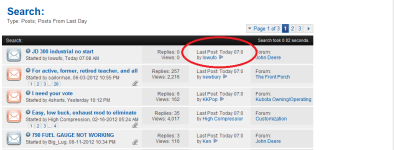
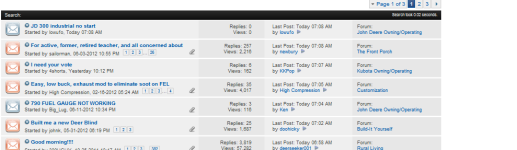
When viewing a list of posts, like clicking on "todays posts", the Time where it says "last post at..." still is getting snipped off.

time 1.PNG

Unless I zoom WAY out until the text is really small

time 2.PNG

Also, the reply button at the bottom is still not working forme either. Chrome browser BTW
 
/ Forum Upgrade - Any Issues? #98  
One more thing I noticed was under a post, it has "started by -member name" and then "date when created.."

Makes it look cluttered when browsing the list of posts. I believe the old forum only had the member name. No "started by" and no "date".

If we could do away with that extra clutter that would be great. Have just the members name there and thats it.:thumbsup:
 
/ Forum Upgrade - Any Issues? #99  
One more suggestion before I head out to a job today......

Earler I mentioned that the "my profile" and "log out" icons at the top get cut off when zooming in to a halfway readable level......well I got a suggestion to help that.

Do away with the "my topics"

Because it is the same as if you just go to "my home" and then click view ALL subscriptions. Dont really need the "my topics" Icon.

And I would still like to have a color difference between read and un-read posts/threads. Instead of just the Bold and un-bold. Similar to the last version where it was yellow for unread and grey for read:thumbsup:
 
/ Forum Upgrade - Any Issues? #100  
Ok,

What is the point of having gigantic icons, like the gear over "My Home" that the cursor reacts to and changes as if it is a clickable link, and yet if you click it NOTHING HAPPENS?

I can ONLY get to "Today's posts" or "My Home" by clicking on the text.

I am running IE 9.0 latest versions.

As an aside, I HATE How Apple & Macintosh have dumbed computers down, and Windows and Android, and everybdy else have follwed suit. I have been a omputer geek for 30 years and I hapen to understand that behind the scenes I should be able to configure almost EVERYTHING, and have many, many options. I hate big clunky icons that assume I'm not smart enough to figure things out. Like my new supposedly "smart phone" that has so few options it is really just a cool looking VT100 dumb terminal unless I down load a million specific "apps" to do each specific task... I call it a "Bimbo Phone" because it looks great but has limited functionality.

My reason for posting this rant is that I would sum up all of the NEW TBN upgrades as MOSTLY closer to Bimbo-izing, and less like enhancements.
Please do not dumb it down too far guys...

Thanks for all of your hard work, and thanks for being willing to LISTEN to grumpy old farts like me complain about all your hard work.

Be well,
David
 

Marketplace Items

15200 (A56857)
15200 (A56857)
2015 TEXAS PRIDE TRAILER  30 FLATBED GOOSENECK TRAILER (A58214)
2015 TEXAS PRIDE...
NEW HOLLAND T4.75 POWERSTAR TRACTOR (A62130)
NEW HOLLAND T4.75...
FLAT BED (A60736)
FLAT BED (A60736)
KUBOTA SVL97-2 SKID STEER (A62129)
KUBOTA SVL97-2...
GENIE AWP-36S MAN LIFT (A60736)
GENIE AWP-36S MAN...
 
Top