can't upload pix

   / can't upload pix #21  
testing...

still fails.
 
   / can't upload pix #22  
10 Meg is waaayyyyyyy too big. Humonginormous too big. 1 Meg would be tooooo bigggg. I try to keep my stuff around 100 K.

Godzilla on steroids compared to a chameleon.
 
   / can't upload pix #23  
I've been having trouble for the past week now to upload images and I uploaded 100's over the years.
 
   / can't upload pix #24  
Ok, that's a new one for me.
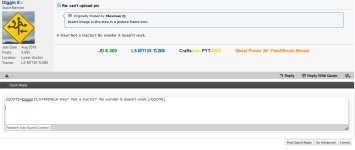
I guess Diggen is right, that's a new one on me too, TBN has done something differnt to their posting picture image, never had to go the (Go Advanced) before and or go down a few lines, what the Hades is going on.............

if-it-aint-broke-youre-not-trying.jpg
 
   / can't upload pix #25  
I reduce my pics to under 800K because of a limitation on another site that I visit,, (using Chrome)

sbYMD8c.jpg


r2353IF.jpg
 

Attachments

  • 5260tires7.jpg
    5260tires7.jpg
    673.9 KB · Views: 126
   / can't upload pix #26  
The point is uploading fails for some of us, and not for others. I have been uploading images for years. I have tried both methods, and different sizes of images, It still doesn't work. I have tried windows 7 and windows 10 PC's.
 
   / can't upload pix #27  
so I deleted 3 of my 1890 attachments. lets see what happens now.

nope.. still fails.
 
   / can't upload pix #28  
The point is uploading fails for some of us, and not for others. I have been uploading images for years. I have tried both methods, and different sizes of images, It still doesn't work. I have tried windows 7 and windows 10 PC's.

Have you tried turning it off and then on again...

Log out.
Clear your cookies and cache.
Reboot.
Log on again and try it?
 
   / can't upload pix
  • Thread Starter
#29  
I tried just now on another thread. Couldn't upload pix my usual way, but it worked via "manage attachments". Well, I guess that's the new normal then.
 
   / can't upload pix #30  
Check using the "Insert Image" icon:

P8171930.JPG


I rarely use "Manage Attachments", so will try it:
 

Attachments

  • P8171929.JPG
    P8171929.JPG
    296.2 KB · Views: 115
   / can't upload pix #31  
cleared cache, cookies, browsing history, logged out reboot, logged in.


no worky worky

lets try going advanced and adding a an image file that way:

View attachment IMG_20190117_230933842.jpg

Looks like that worked... I guess that is the "new normal"...
 
   / can't upload pix #32  
"Manage Attachments" posted the picture as an Attached Thumnail. Now I remember why I don't use it.
 
   / can't upload pix #34  
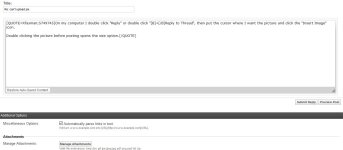
On my computer I double click "Reply" or double click "+Reply to Thread", then put the cursor where I want the picture and click the "Insert Image" icon.

Double clicking the picture before posting opens the size option.
 
   / can't upload pix #35  
On my computer I double click "Reply" or double click "+Reply to Thread", then put the cursor where I want the picture and click the "Insert Image" icon.

Double clicking the picture before posting opens the size option.

You must be using a different version of TBN than I am. When I double click reply to thread it brings me to a page (see attached) that only has a manage attachments option. I have no Insert Image option.
 

Attachments

  • page I get.JPG
    page I get.JPG
    68.1 KB · Views: 104
   / can't upload pix #36  
You must be using a different version of TBN than I am. When I double click reply to thread it brings me to a page (see attached) that only has a manage attachments option. I have no Insert Image option.
This is double clicked "Reply to Thread":

rtt.JPG


And double clicked "Reply With Quote"

rwq.JPG
 
   / can't upload pix #37  
Insert Image is the tree in a picture frame icon.

rtt.JPG
 
   / can't upload pix #39  
Insert Image is the tree in a picture frame icon.

View attachment 658207

I remember TBN changed its format a while ago and I stayed with the original old format. When I click reply to thread it does not look like what you posted. I do not have any of the functions shown in your screenshot. No emojis, can't change font size, underline, etc. When I click reply or reply to thread I get the quick reply box with go advanced in the lower right corner.
 

Attachments

  • reply to thread.JPG
    reply to thread.JPG
    81.4 KB · Views: 108
   / can't upload pix #40  
This is what I am using:

screenshot-www.tractorbynet.com-2018.05.16  07-53.jpeg

-------------------------------------------------------------------------------------------
It is in "General Settings":

my home.PNG
 
Last edited:

Tractor & Equipment Auctions

Kubota M5-111 (A53317)
2009 Kubota M108S (A60462)
2009 Kubota M108S...
2017 Wacker Neuson LTV6 Towable Light Tower (A56857)
2017 Wacker Neuson...
84" HYD ROCK GRAPPLE (A52706)
84" HYD ROCK...
THREE POINT MAINTAINER BLADE (A58214)
THREE POINT...
2018 Kubota RTV500 4x4 Diesel Utility Cart (A59228)
2018 Kubota RTV500...
 
Top