can't upload pix

   / can't upload pix #21  
testing...

still fails.
 
   / can't upload pix #22  
10 Meg is waaayyyyyyy too big. Humonginormous too big. 1 Meg would be tooooo bigggg. I try to keep my stuff around 100 K.

Godzilla on steroids compared to a chameleon.
 
   / can't upload pix #23  
I've been having trouble for the past week now to upload images and I uploaded 100's over the years.
 
   / can't upload pix #24  
Ok, that's a new one for me.
I guess Diggen is right, that's a new one on me too, TBN has done something differnt to their posting picture image, never had to go the (Go Advanced) before and or go down a few lines, what the Hades is going on.............

if-it-aint-broke-youre-not-trying.jpg
 
   / can't upload pix #25  
I reduce my pics to under 800K because of a limitation on another site that I visit,, (using Chrome)

sbYMD8c.jpg


r2353IF.jpg
 

Attachments

  • 5260tires7.jpg
    5260tires7.jpg
    673.9 KB · Views: 126
   / can't upload pix #26  
The point is uploading fails for some of us, and not for others. I have been uploading images for years. I have tried both methods, and different sizes of images, It still doesn't work. I have tried windows 7 and windows 10 PC's.
 
   / can't upload pix #27  
so I deleted 3 of my 1890 attachments. lets see what happens now.

nope.. still fails.
 
   / can't upload pix #28  
The point is uploading fails for some of us, and not for others. I have been uploading images for years. I have tried both methods, and different sizes of images, It still doesn't work. I have tried windows 7 and windows 10 PC's.

Have you tried turning it off and then on again...

Log out.
Clear your cookies and cache.
Reboot.
Log on again and try it?
 
   / can't upload pix
  • Thread Starter
#29  
I tried just now on another thread. Couldn't upload pix my usual way, but it worked via "manage attachments". Well, I guess that's the new normal then.
 
   / can't upload pix #30  
Check using the "Insert Image" icon:

P8171930.JPG


I rarely use "Manage Attachments", so will try it:
 

Attachments

  • P8171929.JPG
    P8171929.JPG
    296.2 KB · Views: 115
   / can't upload pix #31  
cleared cache, cookies, browsing history, logged out reboot, logged in.


no worky worky

lets try going advanced and adding a an image file that way:

View attachment IMG_20190117_230933842.jpg

Looks like that worked... I guess that is the "new normal"...
 
   / can't upload pix #32  
"Manage Attachments" posted the picture as an Attached Thumnail. Now I remember why I don't use it.
 
   / can't upload pix #34  
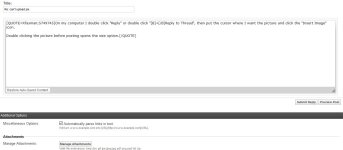
On my computer I double click "Reply" or double click "+Reply to Thread", then put the cursor where I want the picture and click the "Insert Image" icon.

Double clicking the picture before posting opens the size option.
 
   / can't upload pix #35  
On my computer I double click "Reply" or double click "+Reply to Thread", then put the cursor where I want the picture and click the "Insert Image" icon.

Double clicking the picture before posting opens the size option.

You must be using a different version of TBN than I am. When I double click reply to thread it brings me to a page (see attached) that only has a manage attachments option. I have no Insert Image option.
 

Attachments

  • page I get.JPG
    page I get.JPG
    68.1 KB · Views: 104
   / can't upload pix #36  
You must be using a different version of TBN than I am. When I double click reply to thread it brings me to a page (see attached) that only has a manage attachments option. I have no Insert Image option.
This is double clicked "Reply to Thread":

rtt.JPG


And double clicked "Reply With Quote"

rwq.JPG
 
   / can't upload pix #37  
Insert Image is the tree in a picture frame icon.

rtt.JPG
 
   / can't upload pix #39  
Insert Image is the tree in a picture frame icon.

View attachment 658207

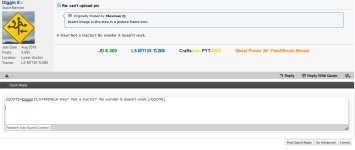
I remember TBN changed its format a while ago and I stayed with the original old format. When I click reply to thread it does not look like what you posted. I do not have any of the functions shown in your screenshot. No emojis, can't change font size, underline, etc. When I click reply or reply to thread I get the quick reply box with go advanced in the lower right corner.
 

Attachments

  • reply to thread.JPG
    reply to thread.JPG
    81.4 KB · Views: 108
   / can't upload pix #40  
This is what I am using:

screenshot-www.tractorbynet.com-2018.05.16  07-53.jpeg

-------------------------------------------------------------------------------------------
It is in "General Settings":

my home.PNG
 
Last edited:

Tractor & Equipment Auctions

25 DUAL AXLE GOOSENECK TRAILER (A58214)
25 DUAL AXLE...
2020 INTERNATIONAL REEFER TRUCK (A58214)
2020 INTERNATIONAL...
2007 Ford F-550 Crew Cab 11ft Flatbed Truck (A55852)
2007 Ford F-550...
2015 Haulotte 5533A (A53316)
2015 Haulotte...
2022 WEILER S350 SKIDDER (A60429)
2022 WEILER S350...
2003 UTILITY TRAILER MANUFACTURER UTILITY TRAILER MANUFACTURER (A55745)
2003 UTILITY...
 
Top