Camera Security Systems???

   / Camera Security Systems??? #142  
I got my Reolink Go the Wed before Thanksgiving. I have it setup in the backyard right now, I'm planning to move it out to my deer feeder to see how well it will work as a live video feed for the cellular activated wild hog traps I build. There are some things I like about it and some I don't. The resolution is plenty good and it seems to be pretty reliable thus far. I'm having a hard time getting the push notifications through the app to also play a sound (a necessity for what I want to use it for, pigs always come when you're asleep) and it would be really nice to have the option to connect to it from a computer instead of only a phone or tablet. I'm going to keep messing with it, if I can get the notification sounds working, I think it'll do for what I want it for. The camera and data are both cheaper than going with an Arlo, which was what I was considering originally.
 
   / Camera Security Systems??? #143  
HA HA! I spent decades monkeying around with various gate sensor technologies. Of course they go bonkey and false alarm when you are sleeping.
 
   / Camera Security Systems??? #144  
I got my Reolink Go the Wed before Thanksgiving. I have it setup in the backyard right now, I'm planning to move it out to my deer feeder to see how well it will work as a live video feed for the cellular activated wild hog traps I build. There are some things I like about it and some I don't. The resolution is plenty good and it seems to be pretty reliable thus far. I'm having a hard time getting the push notifications through the app to also play a sound (a necessity for what I want to use it for, pigs always come when you're asleep) and it would be really nice to have the option to connect to it from a computer instead of only a phone or tablet. I'm going to keep messing with it, if I can get the notification sounds working, I think it'll do for what I want it for. The camera and data are both cheaper than going with an Arlo, which was what I was considering originally.

I just sent you a private message. I have questions about the ReoLink Go
 
   / Camera Security Systems??? #145  
I just sent you a private message. I have questions about the ReoLink Go
Hey do post here unless it is personal... Richard already expressed he is not concerned about thread creep. I think my ReoLink bullet cameras are arriving tomorrow!
 
   / Camera Security Systems??? #146  
Hey do post here unless it is personal... Richard already expressed he is not concerned about thread creep. I think my ReoLink bullet cameras are arriving tomorrow!

Didn't want to hijack this thread, but I just asked him what he is using for his data plan with the ReoLink Go. I received my ReoLink Go on the day before Thanksgiving and rushed to the AT&T store to get a data sim card for it, so that I could put it at my deer feeder on Thanksgiving day.

You can read more about my experience with the ReoLink Go on pages 3 and 4 of this thread. https://www.tractorbynet.com/forums/rural-living/380424-cellular-game-camera-suggestions-3.html
 
   / Camera Security Systems??? #147  
What I told him -

I pulled a prepaid SIM out of another device I had on hand that already had some money on it because it was the only micro SIM I had here. All of my non-activated SIMs are regular size. On that one, I did a 3GB for 30 days at $25/plan but, the next time my rep is by here I'm going to get a blank micro SIM and get the recurring unlimited data for $30/mo plan from buyasession.att.com, if I can. They get kind of weird about what plans are available for what devices there sometimes, none of those plans are available when you go into the store.

I don't expect it to use more than 3GB in a month unless you're doing a lot of HD video, I've only used about 200MB since I set it up 5 days ago so, that only comes to 1.5GB/mo. What I'm using it for will proabbly have a little more data use than the regular security use.

I do really wish that they had an external antenna connection on the camera, that would be a HUGE benefit.
 
   / Camera Security Systems??? #148  
<snip>
You can read more about my experience with the ReoLink Go on pages 3 and 4 of this thread. https://www.tractorbynet.com/forums/rural-living/380424-cellular-game-camera-suggestions-3.html
Need to reference by post numbers, especially in long threads. I'm set at 40 posts per page, thus that thread is less than one page for me. This post is #148 an page 4 for me.

Now what I really came to this thread for was to write that I rec'd my Reolink Argus 2's. About 20:30 so I'll do the real "playing around" tomorrow.
First look -
Instructions were more than adequate, but then I've worked with computers since IBM put 3 transistors on a chip about 1972.
Very easy to set up, my biggest problem was typing in my password. I'm not a "phone typist". Process was plug battery into camera, plug a micro SD card in, scan QR code on instructions to get software, log in to Google Play and download the software. Scan QR code on camera, it linked to my house router easily, then have camera "scan" phone and it was all set up.
BUT -
Wireless reception is weak, dropped signal about 45 feet and 3 walls from the router where my signal app on the phone showed a signal strength of -70dBm.

/edit - I just realized this is my second experience with an Argus camera, I think I still have a 1960's Argus C3 35mm inherited from my Father. It too was wireless, even batteryless. :)
 
   / Camera Security Systems??? #149  
/edit - I just realized this is my second experience with an Argus camera, I think I still have a 1960's Argus C3 35mm inherited from my Father. It too was wireless, even batteryless. :)
Holy smokes... my dad had one as well and I am not sure if I still have it (box somewhere) or it found its way to goodwill during our move 10 years ago! Still have his Polaroid and a Brownie somewhere too I think.
 
   / Camera Security Systems???
  • Thread Starter
#151  
No worries about thread creep. I find value in all of this. :)
 
   / Camera Security Systems??? #152  
Well here's a creep.
I've got an Argus 2 I'm trying to get a handle on the battery life. It's just sitting on the table watching the room along with my Samsung Note 8 acting as a monitor. It's been sitting there for about an hour. All of a sudden the "voice" comes on and I hear an ad for some Youtube stuff. I couldn't tell for sure if it was the camera or the note. But I've had the note for 3 or 4 years and it's never done that before.
 
   / Camera Security Systems??? #153  
I concur that Blue Iris is the way to go. I've been using it for the last 7+ years. The developer, Ken, is available and responsive. I'd pay 10x the cost just support his genius.

I currently have 35 cameras - mostly Hikvision and Dahua PoE IP cameras. The program is on a dedicated i7-4XXX machine running windows 10. The CPU runs between 60 and 80% (depending on the activity level of the cameras), and I have about half the cameras set to 15 FPS, with the remaining set to 25 and 30 FPS. Most are set to 1080P.

All but about 5 of the cameras are hardwired. And some runs approach 500'. The max distance for cat5/6 cable is about 330', but if you use solid copper (23ga) you can push it to about 450' w/o issue. If you need to go longer, you can get mid-span switches that act as a signal booster.

View attachment 580709 2018-11-27_21-25-42.jpg
 
   / Camera Security Systems??? #154  
I am wondering if, like many other things, there are a handful of companies making these cameras and software under different names.

As for cameras, does anyone have a 270 degree camera? They seem to have multiple cameras inside but one housing and one image. I would like to have one of those under the eve on each corner of the house.
 
   / Camera Security Systems??? #155  
I concur that Blue Iris is the way to go. I've been using it for the last 7+ years. The developer, Ken, is available and responsive. I'd pay 10x the cost just support his genius.

I currently have 35 cameras - mostly Hikvision and Dahua PoE IP cameras. The program is on a dedicated i7-4XXX machine running windows 10. The CPU runs between 60 and 80% (depending on the activity level of the cameras), and I have about half the cameras set to 15 FPS, with the remaining set to 25 and 30 FPS. Most are set to 1080P.

All but about 5 of the cameras are hardwired. And some runs approach 500'. The max distance for cat5/6 cable is about 330', but if you use solid copper (23ga) you can push it to about 450' w/o issue. If you need to go longer, you can get mid-span switches that act as a signal booster.

View attachment 580709View attachment 580710
erk, I am pretty sure I am going with Blue Iris as well.

Curious to know what your RAM size is?

BTW... my Reolink cameras arrived today. Haven't unpackaged them yet... can't wait to change out my dead Lorex system to a POE system. I got some CAT6 wiring to fish using my old BNC cables.

Realizing now that my hard disk storage space isn't the issue as much as having enough CPU power and RAM to allow multiple camera recordings at 4K. And for those that love an analogy... it isn't so much a problem of the size of the pond as it is the pipe getting to it!
 
   / Camera Security Systems??? #156  
erk, I am pretty sure I am going with Blue Iris as well.

Curious to know what your RAM size is?

BTW... my Reolink cameras arrived today. Haven't unpackaged them yet... can't wait to change out my dead Lorex system to a POE system. I got some CAT6 wiring to fish using my old BNC cables.

Realizing now that my hard disk storage space isn't the issue as much as having enough CPU power and RAM to allow multiple camera recordings at 4K. And for those that love an analogy... it isn't so much a problem of the size of the pond as it is the pipe getting to it!

My RLC 411WS Reolink cameras have a max resolution of 2560X1440 Quad HD. This was the default setting. Videos downloaded at that resolution were not recognized by my WIN 7 media player. I set the resolution down to 1080P @ 30 FPS and downloaded videos play fine. If you download the videos off the interrnal memory cards at the FLUENT setting they come out at 640x480. You have to change the setting to CLEAR before choosing to download the files to get a 1920x1080 video off of the camera memory when set to 1080P.

Your model and results may differ.
 
   / Camera Security Systems??? #157  
My current system is running with 16GB of ram. The one it replaced had 32GB, but it seemed to be under-utilized, so when I upgraded, I went with less memory. Had no noticeable affect.

As with anything, unless you unlimited horsepower (CPU), you have to budget your processing power and data bandwidth (pipe between CPU and storage). If your data stream from 10 cameras is more than your bus can handle writing to the drive, you'll start having issues even if the CPU can handle the image processing.

While 4K resolution is pretty to look at on a big TV/monitor, the reality is, a single 4K camera will really tax the CPU. I don't recall the math, but when dealing with system limitations, it's a function of total megapixels and frame rate.

For example, a single 4K camera runs at 8MP per image. Getting the clean crisp images you see when directly logged into the camera is very difficult to achieve from an NVR - because the data stream tends to be reduced and highly compressed. Thus, digitally zooming in on a 4K image provides a lot of potential, once it's been compressed to meet reasonable storage and CPU requirements, most of the benefits of 4K evaporate.

If you have only one or two 4K cameras, you probably can try to maintain higher bitrates and your CPU would not be too stressed. But anything more than a handful, and even the higher-end systems will cry uncle.

Consider also that, generally, as resolution increases, sensitivity to light decreases. That means as sunlight fades, and certainly at night, the performance will drop off. High res cameras will compensate with higher gain, or slower shutter speeds (or a combination of both) and that results in noisy images, and blurred motion.

The temptation to have fewer high-res cameras than more low-res is understandable. But the reality is, your PC will really struggle to process the higher MPs and your night vision will be dramatically worse.

Most of my cameras are capable of 3 or 4MP. I keep them at 2MP for common/higher-traffic areas, and 1MP (720P) in areas that have low value/interest. With the lower MP, I can add cameras as needed without adding significant load to the Blue Iris machine.

The fact that your high-res cameras can be de-tuned to lower resolutions is a good thing, though the sensors will still under-perform in low-light conditions. But at least you'll have some wiggle room when your BI machine starts to scream for mercy :)

For what it's worth, there is a ton of very good information at ipcamtalk.com. Lots of people with years of experience - along with camera vendors and manufacturers - that can provide guidance.

I originally started with VHS tape systems. Then 8-ch analog boards on old Pentium PCs. Then IP cameras. And now HD IP PoE cameras. And while you can buy boxed proprietary systems from consumer-level suppliers (like Lorex, Swann, etc), you're going the best way. Dedicated machine, open cameras, and a well supported NVR program that will work with nearly any brand and type of camera out there.

Good luck!
 
   / Camera Security Systems??? #158  
Okay downloaded Blue Iris... free 15 day demo version. Plugged in a camera to the POE switch I added to the network. Stuff not mounted just trying it out.

Had a little trouble getting the camera to be recognized. Wouldn't 'auto find'. Logged into my router and found the static IP for the camera 'on the map'. Added that and I got the old familiar colored vertical rainbow bars (remember those... when the TV network went off air late at night?). A few seconds later the camera went live!

First thing I noticed is that all the youtube videos I watched on set up of Blue Iris need to be watched again!

Second thing I noticed is that the default settings just for one 5Mp camera was taxing my CPU and RAM. Looked at my MacBook details and learned that my 2.9Ghz Intel Core i7 processed w/16GB memory appears not nearly close enough if I am to run multiple cameras at high res. I'm thinking my MacBook isn't allocating enough RAM and CPU to my parallels desktop. I am running Windows 10 on it. More research I guess.

Third thing I noticed is that I could adjust the frame rate down from 30fps to 10fps and that helped but for some reason I could not lower the camera resolution from 2560x1920.

At least I know I can set up the cameras but I am going to need some computing power. Looks like I am going to need a dedicated PC/NAS to run this with 6+ cameras. Ugh!

This is not for the faint of heart... or should I say computer illiterates. A Lorex box system is soooo much simpler if you aren't a tinkerer.
 
   / Camera Security Systems??? #159  
dragoneggs, I don't know anything about Blue Iris but try logging into the camera from your internet browser. Just enter the ip in the address bar and use the default name and password if you haven't changed it.

My Reolink cameras have a built-in interface I can access via web browser. I use the gear symbol at upper right to open the camera settings panel. There you can change all the camera parameters.

The software that was designed for and supplied with the cameras works okay but for some reason the browser interface is a little more stable. Probably because it only sees one camera at a time in it's window. You can open each individual camera in different tabs. The software supplied will see all the cameras on the same page in multiple windows.

Here is a screenshot of the windows software. Not sure how the Mac version looks.
software-screenshot.jpg
 
Last edited:
   / Camera Security Systems??? #160  
Update and sample pics
<snip>
Now what I really came to this thread for was to write that I rec'd my Reolink Argus 2's. About 20:30 so I'll do the real "playing around" tomorrow.
First look -
Instructions were more than adequate, but then I've worked with computers since IBM put 3 transistors on a chip about 1972.
Very easy to set up, my biggest problem was typing in my password. I'm not a "phone typist". Process was plug battery into camera, plug a micro SD card in, scan QR code on instructions to get software, log in to Google Play and download the software. Scan QR code on camera, it linked to my house router easily, then have camera "scan" phone and it was all set up.
BUT -
Wireless reception is weak, dropped signal about 45 feet and 3 walls from the router where my signal app on the phone showed a signal strength of -70dBm.
<snip>
Played around with one a fair bit. I've been using IP cameras off and on since about 2008 so the software with no FM was a discovery process.
Hooking it up to the Mobley and back to my home router was not REAL easy but maybe I was just too impatient. But it worked fine with the Mobley in a test, both inside with the "home" router present and outside with no other router present.

The software is kludgy and reportedly it will NOT work with blue iris because BI requires some feature the camera lacks (edit -battery operated cam only).

It works as well or better than the netgear pre Arlo offering.

It's easy to pick up and move, runs fine off USB battery charging, has a sharp image. I charged up the battery to 100% on 26 Nov and it's now down to 62% after significant fiddling around, recording videos, taking a lot of snapshots, and I've got the alarm on so every time I walk by it talks to me (no more ads though).

I hung it outside (2 screws in the base to my soffit) so I can see when the Amazon deliverers are coming. That was a 3 minute process.

It seems the PIR range is about 25 feet as I've got it set.

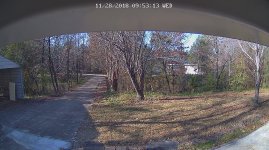
Sample pics:
Daylight
Preview_1_01_20181128_095321_579854343.jpg

Dark
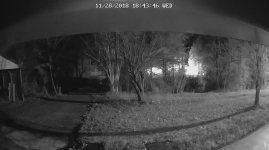
Preview_1_01_20181128_184347_611680671.jpg

/edit - where the pictures were taken is the same place it dropped signal when I took it out before. Don't know what changed.

/edit 2
Added the second camera - should have been simple but
1. would not "link" the scan of the upc code on the base of the 2nd unit, even after turning off the 1st unit. Has an annoying voice and the camera is shaped like something one would throw through a window when frustrated. Entered the code manually.

2. Then when the camera "scans" the generated upc code it would not acknowledge that until I doubled the size of the code (by tapping on my phone screen).
 
Last edited:

Tractor & Equipment Auctions

Le Roi 80-Gallon Air Compressor, 220 Volts (A59076)
Le Roi 80-Gallon...
159115 (A60430)
159115 (A60430)
2016 Bobcat E85 Midi Excavator (A59228)
2016 Bobcat E85...
2022 KOMATSU WA500-8 WHEEL LOADER (A60429)
2022 KOMATSU...
2005 Mitsubishi Fuso FE84D Auto Crane 3203 PRX 3,200 LB Crane Utility Truck (A59230)
2005 Mitsubishi...
QUINCY INDUSTRIAL AIR COMPRESSOR (A52706)
QUINCY INDUSTRIAL...
 
Top