Building design software

/ Building design software #1  

southerniltractor

Silver Member
Joined
Mar 7, 2011
Messages
186
Location
Caryle, IL
Tractor
Kioti DK40se HST with FEL, Simplicity Landlord, JD130
Howdy folks,

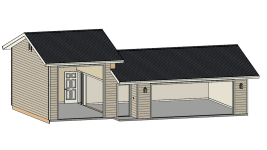
I've been struggling to design my "super-garage" which will support a wide variety of activities. While I can use a ruler and graph paper, I'm at a point where I 'd like to use some software to provide a 3d visualization of what I am creating. Can anyone recommend software for my purposes?

Thanks,
Mike
 
/ Building design software #2  
As far as I know, there is still a free version of Sketchup -- Sketchup Make (All Downloads | SketchUp). It's been several years since I used a freeware version of Sketchup, but it had capabilities far beyond my needs.

Steve
 
/ Building design software #3  
Unless you can commit days of time to learn the CAD software it will be money and time ahead to have someone crank out the 3D images you want. My wife (an Architect) gets emails all the time from folks who will make renderings for her.

Otherwise sketchup is probably the one you will find the most info online about. Other CAD software will have a demo of student version.
 
/ Building design software #4  
I like Sketchup Make as well. It's not building-specific, it's a general-purpose drawing program. I've used a few "easy" architect style programs and I pretty quickly reach their limitations.

What I like to do in Sketchup is simulate the construction. I'll make components for 2x4, 2x6, 2x8, sheet of drywall, sheet of plywood, etc. I'll grab a component, copy it, cut it to size, and put it in place, just as if I were building it. Problems with the design become very quickly readily apparent -- just like they do in real construction! When I'm done I have a plan that I can use to calculate materials and measure dimensions.
 
/ Building design software #6  
I use Chief Architect for my remodel jobs. I tried the free Sketchup years ago, but didn't care for it. I've been using Chief Architect for ten years and I guess I'm on my third of forth version of it. I find it to be simple to use, and worth the cost of buying it. My clients like how it prints out in my bids, so that's what really matters to me. I can give them multiple versions of a remodel with furniture, and other objects in there to show how much room there is to get around those things. I've found that to be the most important thing in designing a space. For a garage, I would start with a given size, then place what you want in there and see how much room you have left over. If you park a car in there, and you have a workbench, can you open the car doors? Can you walk around the car with all the doors closed? Once you add storage, and a work area, walking paths become very important.
 
/ Building design software #7  
I use Chief Architect for my remodel jobs.......... For a garage, I would start with a given size, then place what you want in there and see how much room you have left over. If you park a car in there, and you have a workbench, can you open the car doors? Can you walk around the car with all the doors closed? Once you add storage, and a work area, walking paths become very important.

I've used Chief Architect X4 Lite Version but it can be pricy + takes a bit of a learning curve. If you want to take a look go to their site and download a trail version. A garage is a pretty simple structure, I always create the outside perimeter walls then take it to my local Lumber Yard that has an Engineering Truss Fabrication Source, they can easily Design Trusses (like mine) that span 28' (front to back) also they would be able to show you a 3-D image of the roof design. If you're thinking about a floor above I'd suggest an Open Web Design + think about beefing-up a Snow Load if your area is prone to snow, don't forget a good garage door width and height.
 
/ Building design software #8  
I've used Chief Architect X4 Lite Version but it can be pricy + takes a bit of a learning curve. If you want to take a look go to their site and download a trail version. A garage is a pretty simple structure, I always create the outside perimeter walls then take it to my local Lumber Yard that has an Engineering Truss Fabrication Source, they can easily Design Trusses (like mine) that span 28' (front to back) also they would be able to show you a 3-D image of the roof design. If you're thinking about a floor above I'd suggest an Open Web Design + think about beefing-up a Snow Load if your area is prone to snow, don't forget a good garage door width and height.

Big fan of Chief also, as I used it for house and site design for my place, but it is spendy and has a pretty substantial learning curve. Full version is like $3k now, but they have lower power ones for under $1k. Seems overkill if you are talking a basic garage. There are other programs around that are more in the $100 or under range that might be sufficient for your needs, depending on how complex it is. Punch CAD was one of those i tried years ago that was Ok to a point. I just needed more power and $2k for Chief (at the time) was a lot better than $20k+ for an architect and allowed me immense flexibility and time to do what i wanted.
 
/ Building design software #9  
I am using AutoCad 2007. Started with AutoCad LT98, and another version in between. I am a mechanical engineer by education. Never drew for a living though. I haven't upgraded to newer version, because this suits me, and the cost to upgrade. I am laying out our future home, along with garage and workshop down the road. Architect/engineer friend is doing actual drawings for building permits. I have also drawn my furniture plans wih AutoCad. My kitchen cabinets will be drawn on it. I have laid out suspended ceiling grid.

I am not suggesting someone go by any program they can't afford. Try the free ones, get student versions(if not using them for business reason). Does local community college have any drafting courses? They might help with learning a software program and have the student versions included. How sophisticated do you need. Pencil and paper may be enough to put items on paper to scale. Use graph paper with 1/4" squares. one square equals a foot. Jon
 
/ Building design software
  • Thread Starter
#10  
Thanks for all the great suggestions folks. I'm eyeballing the free programs first.

My requirements include auto repair area with vehicle lift, general repair bay with welder, storage for agricultural equipment, storage for truck and trailer, and room for a heatable wood-working shop. I'm discovering trying to make one building do many things is not easy at you'd think! I've had very experienced folks eyeball my drawings and offer good sound advice, and in each instance, I've made changes. Then trying to tie the building into the property and make it look nice is also an issue. This project is secondary to a current building I'm constructing, but I need to nail down the design so I can get started on excavation.

Thanks again!
Mike
 
/ Building design software #11  
When designing a building, a rectangle is the most cost effective building to build. Avoid valleys in the roof wherever possible. They add to the cost, and create issues during storms, especially if they are full of leaves. Make your sidewalls tall enough to add lean to's to both sides in the future. Make the big door as big as you can. I did 12x12 on my first barn and that was great. I could back a trailer into it easily. On my current shop, I went with 10x10 and that's a bit tight. I wanted more wall space, which may have been a mistake. My walk through door is 3 feet wide and I put my sink right next to it. I really like having the sink right there. I also have a water spicket right outside the door, which also comes in handy. If 4 foot wide walk through doors where cheaper, I would go bigger for sure. I'm always banging into the door or the framing while carrying tools in and out when I'm too lazy to open up the big door.
 
/ Building design software #12  
I've been using Punch! for years..Pretty good although there are some stumble points.
 
/ Building design software #13  
I use (occasionally) Chief Architect - Home Designer Pro. Love it. $495 and well worth it (to me). There are cheaper versions depending on your needs. Maybe overkill unless you settle on one of the basic packages. Check it out here:

Home Designer Software Products

Very powerful for whole house design exterior/interior or remodels. If you have any CAD or photoshop type experience, the learning curve isn't too bad. It is addicting for some, like me. I have spent many an all-nighter learning and tweaking. First project was to get my old blueprints of our house modeled and ready to use for potential remodel projects. One of the features I love is the Bill of Materials. Easy to figure out the materials needed and cost. Once you get 3D models you can look from any vantage point to understand your lines of sight. Heck of a lot of fun but plan on some serious time if you want it done right. Otherwise, you can take your sketches and have someone bang it out for you.

Here is my detached garage with my proposed addition of a high bay. Can't remember how to put the garage doors down, but I like seeing into the interior.

View attachment Screenshot 2018-01-15 18.06.26.pdf
 

Attachments

  • Screenshot 2018-01-15 18.06.26.png
    Screenshot 2018-01-15 18.06.26.png
    443.9 KB · Views: 125
Last edited:
/ Building design software #14  
Another vote for Sketchup. It's free, does everything you'll probably ever need, is as powerful if not more so than many high cost CAD programs and is really easy to learn. If I could learn it pretty much anyone can. There are a ton of tutorials on YouTube but I recommend watching the Harwood Podcast videos as they break it down into bite size lessons and you can pick the ones that pertain to your immediate project and skip over the ones you don't need. For free, you can try it out and if it doesn't fit your needs move on to something else.
 
/ Building design software #15  
I played with Sketchup in the long past and yes quick learning curve and pretty slick for free. But I see it only as a sketch tool not a drafting tool for house plans. What I like about Chief Architect Home Designer is that it can quickly pump out framing diagrams, elevation views, truss designs, and many other features needed for a building permit. In fairness, I never explored Sketchup enough to see if it could do true house plans but Home Designer definitely can.

If you are only sketching and not making build to print plans then Sketchup should serve you well for minimum of headache. But if you are talking drawings that require a permit you probably need to graduate to a tool that is intended for that use (or hire out).
 
/ Building design software #16  
I played with Sketchup in the long past and yes quick learning curve and pretty slick for free. But I see it only as a sketch tool not a drafting tool for house plans. What I like about Chief Architect Home Designer is that it can quickly pump out framing diagrams, elevation views, truss designs, and many other features needed for a building permit. In fairness, I never explored Sketchup enough to see if it could do true house plans but Home Designer definitely can.

If you are only sketching and not making build to print plans then Sketchup should serve you well for minimum of headache. But if you are talking drawings that require a permit you probably need to graduate to a tool that is intended for that use (or hire out).

It must've been awhile since you used SketchUp. Every year they update it (again free) and it will do everything you described and then some. I actually watched some of the YouTube videos before I downloaded the program and was amazed at how thorough the program is. There are also tons of (here goes the F word again) "free" plug-ins for the program. It is probably one of the best supported design programs out there since it was developed by Google then sold to Trimble.

I designed my tractor barn with it down to the last board and shingle as well as using it for an ongoing home renovation project.
 
/ Building design software #17  
I have used everything mentioned. Still like the old microstation the best. I also have autocad, and chief arch. Havent used sketchup in a few yrs.

I taught CAD at community college in early 90s, class used microstation.
 
/ Building design software #18  
It must've been awhile since you used SketchUp. Every year they update it (again free) and it will do everything you described and then some. I actually watched some of the YouTube videos before I downloaded the program and was amazed at how thorough the program is. There are also tons of (here goes the F word again) "free" plug-ins for the program. It is probably one of the best supported design programs out there since it was developed by Google then sold to Trimble.

I designed my tractor barn with it down to the last board and shingle as well as using it for an ongoing home renovation project.
Good to know... yeah it has been awhile. Might have to reinstall it and give it a whirl some late night!
 
/ Building design software #19  
There are several ways to use sketchup, one is to just sort of freeform build stuff with the mouse, but you can also work to dimension as you go, or edit to a dimension once you have something sketched. You can also make components and copy them around, and save them seperately so you can simply call them up and insert them (studs, trusses, etc.). So it is possible to draw up pretty much anything you would with regular cad, but it isn't automated.

I suspect if you have a tool that does full studwall details etc. automatically on the fly, that's going to be more productive.
 
/ Building design software #20  
There are several ways to use sketchup, one is to just sort of freeform build stuff with the mouse, but you can also work to dimension as you go, or edit to a dimension once you have something sketched. You can also make components and copy them around, and save them seperately so you can simply call them up and insert them (studs, trusses, etc.). So it is possible to draw up pretty much anything you would with regular cad, but it isn't automated.

I suspect if you have a tool that does full studwall details etc. automatically on the fly, that's going to be more productive.
Yes, having the program automatically generate the framing and bill of materials is what I am talking about when using Home Designer by Chief Architect. I don't know if Sketchup has that capability. Entering in material prices for studs, siding, sheetrock, etc will give you a very good estimate of job cost.
 

Marketplace Items

2016 KENWORTH T680 6X4 T/A DAY CAB TRUCK TRACTOR (A67148)
2016 KENWORTH T680...
2010 GMC SIERRA 1500 (A67714)
2010 GMC SIERRA...
2011 CHEVROLET IMPALA CAR (A66091)
2011 CHEVROLET...
2017 Ford Escape SUV (A66738)
2017 Ford Escape...
PORTA POTTY (A68842)
Stout MP BigDog (A64912)
Stout MP BigDog...
 
Top