Using GPS to lay out a field

/ Using GPS to lay out a field #1  

quicksandfarmer

Elite Member
Joined
Dec 2, 2006
Messages
2,626
Location
Coastal Rhode Island
Tractor
Jinma 354, purchased 2007
Recently npalen started a thread (https://www.tractorbynet.com/forums/build-yourself/423698-any-electronics-gurus-out-there.html ) on using a laser level to automate a box blade. I talked a bit in that thread about using differential GPS (or DGPS) and I thought it would be worthwhile to do a dedicated thread showing some of the experimentation I've been doing with it.

DGPS is a technique for improving the accuracy of GPS. A regular GPS receiver can calculate its position on the surface of the earth with pretty good precision, typically under 50 feet. That's a technological marvel, but at the same time it's not good enough for any kind of fine control. The limiting factor on the precision is that atmospheric conditions affect the accuracy. What makes DGPS possible is that this error is consistent: two GPS receivers in the same place at the same time will have the same error. In a DGPS system two GPS receivers are used. One is placed at a fixed, known location, called the base. The other, called the rover, moves around. The position of the rover is calculated by reading the GPS on the base and rover, calculating the distance between them, and adding that to the known position of the base. When conditions are right this gives a position that is accurate to within a centimeter --less than half an inch -- in three dimensions (latitude, longitude and altitude.)

In the next few posts I'll describe how I've been using DGPS in a project that's somewhat useful but mostly just as a proof of concept.
 
Last edited:
/ Using GPS to lay out a field
  • Thread Starter
#2  
This project started out in a way that had almost nothing to do with tractors. I was volunteering with a youth soccer club. It's a large club, it had 7,000 members and over 200 games a week. For a typical season we'd use 35 to 40 fields, and they all had to be painted with lines for the games. Each age group had a different size field, ranging from 25 yards for 5-year-olds to 120 yards for high school kids. Mostly we relied on volunteers to do the lining, and it was a constant headache. We'd try to give people directions, but they would put the field in the wrong place or the wrong size or the wrong shape or crooked. You never know how many ways something can be done wrong until you ask volunteers to do it. So this project started out simply as a way to make maps that we could give to volunteers to show them where a field should go and what it should look like.

I create a web page that uses the aerial view in Google Maps and allows you to put in the latitude and longitude of a place, and then put in the length, width and orientation of a field, along with the dimensions of the interior lines, and it draws a picture of the field on the map. Here's a screen shot of the web page with a field for 12-year-olds drawn up on the grass of New York's Central Park:
centralpark.png


Just this map was a tremendous improvement. Since it's a web page someone can have it on their phone when they're on the ground. The Google aerial photography is pretty high-resolution, it can guide you around on the ground. You'll see on the input screen there are arrows next to the latitude and longitude. The single arrow moves the field one foot and the double arrow moves it ten feet. The resolution of the photos is generally good enough that a one foot move is noticeable.
 
Last edited:
/ Using GPS to lay out a field
  • Thread Starter
#3  
Even with the maps it was still a lot of work to lay out a field, you have to go out with a tape measure and string and mark and measure. If you’ve ever done any kind of layout you know it’s hard to get straight lines and square corners in the real world. So I started thinking about ways of improving the process. I stumbled upon a company called U-Blox that is producing (relatively) low-priced DGPS components. U-Blox is a chip-maker, they don’t make consumer products but they supply chips to people who do. They also make a kit for experimenting and prototyping with (C94-M8P | u-blox ). The kit has one of their DGPS chips mounted on a board with a radio link, a GPS antenna and a USB connection. You set up one kit as the base and one as the rover, and they communicate over the radio link and the rover spits out the calculated location. The kits are $400 each, or $800 for the pair, so I took a breath and bought a pair.

Once I got them configured I did some experimenting. You definitely need to have a clear view of the sky, I couldn’t get much under trees or near buildings. One of the things that messes up GPS is reflected signals, so they recommend having a metal sheet under the antenna. I found I got good accuracy setting the antenna on the roof of my car, so I ordered a pair of 18” aluminum pizza pans from Amazon and mounted the antennas to them, which seemed to help.

In a clear field, with the pans behind the antennas I seemed to be getting the claimed 1 cm accuracy. I tested this two ways. The first was just to leave the rover in the same spot for several hours while I recorded its position. Over several hours the reported position never moved by more than 1cm. The other way was to mark a position, read the location, then go away and come back. I put a penny down in the field, walked 100 yards or so away, then walked back and put the rover on the penny again, it reported the same location within 1cm.

I don’t always get 1cm precision, it depends upon the quality of the signal where I am. When the signal quality is lower the rover switches modes and gives 5cm precision. (I’m not sure of the exact mechanics of this). The rover does notify you when this happens. If the rover loses contact with the base the precision drops to 50 feet or so and the rover notifies you of that as well.
 
/ Using GPS to lay out a field
  • Thread Starter
#4  
So now I had to figure out how to turn it into something useful. I have some programming experience which I was able to put to use.

What I came up with is an app that runs on my smartphone. To start, the app downloads the field coordinates from the web. The rover unit plugs into the USB port and gives the precise current location of the antenna. The camera on the phone is on and displays on the screen. Overlaid over the camera image are the lines of the field, based upon the current location from the rover, and the tilt and orientation of the phone. It's augmented reality the camera shows you reality, the location of the lines is augmented. Here are a few screen shots I took today.

Here's a shot of the field with the camera tilted up.
DGPSFull.jpg


Here are a couple pointing straight down at the ground. The cross represents the location of the rover (which I'm holding next to the phone). I programmed the app so that when the reported accuracy is 1 cm the cross is blue and 1cm across, and when the accuracy is 5cm it's yellow and 5cm across. The white lines in the picture are the field layout lines. That black thing is my shoe.

dgpsyellow.jpg
dgpsBlue.jpg


To use the app you walk around the field looking at your phone, when the cross touches a line the rover antenna is exactly where you want to be. I made up a jig that attaches the rover, the smartphone and the antenna to a paint marking wand. Here's a picture of that rig; the base station is on the left.
dgps.jpg

So far this is all just a proof of concept. I did use it to mark a couple of fields last year, the referee at one game complimented me on how precise the field was. No soccer this year because of the virus. I see a lot of ways this technology could be used, a lot of directions this could go in. The actual DGPS chips are about $80 each, probably less in bulk, so I wouldn't be surprised if we start seeing them in consumer products soon.
Let me know what you think and I'd be happy to field questions.
 
Last edited:
/ Using GPS to lay out a field #5  
Pretty cool work. I am one of the early developers of AR for measurement/navigation, and love seeing stuff like this, especially the integration with DGPS. Are you using the phone's compass sensor to orient the AR rendering? That will aways be a weak point since the magnetometer sensors are notoriously unreliable. Gyro can be use to overcome some of this but not all.

I'd love to create a low-budget DGPS system. It would come in handy for so many things.
 
/ Using GPS to lay out a field
  • Thread Starter
#6  
Pretty cool work. I am one of the early developers of AR for measurement/navigation, and love seeing stuff like this, especially the integration with DGPS. Are you using the phone's compass sensor to orient the AR rendering? That will aways be a weak point since the magnetometer sensors are notoriously unreliable. Gyro can be use to overcome some of this but not all.

I'd love to create a low-budget DGPS system. It would come in handy for so many things.


Thanks. You're right that the compass is the weak link. The GPS gives a bearing. If you're moving at more than a slow walk it is very accurate (same accuracy as the underlying GPS), if you're not moving it's just a random number. So i look at the bearing and speed reported by the GPS. If the speed is over 1 knot I use the GPS bearing, otherwise I use the compass bearing.
 
/ Using GPS to lay out a field #7  
Seems like the concept would be useful in painting parking lot lines among many other applications limited only by imagination.
 
/ Using GPS to lay out a field #8  
When I layout a field, I like to use LIDAR and CAD...

LIDAR is pretty cutting edge, but for me CAD means, Cardboard Aided Design!

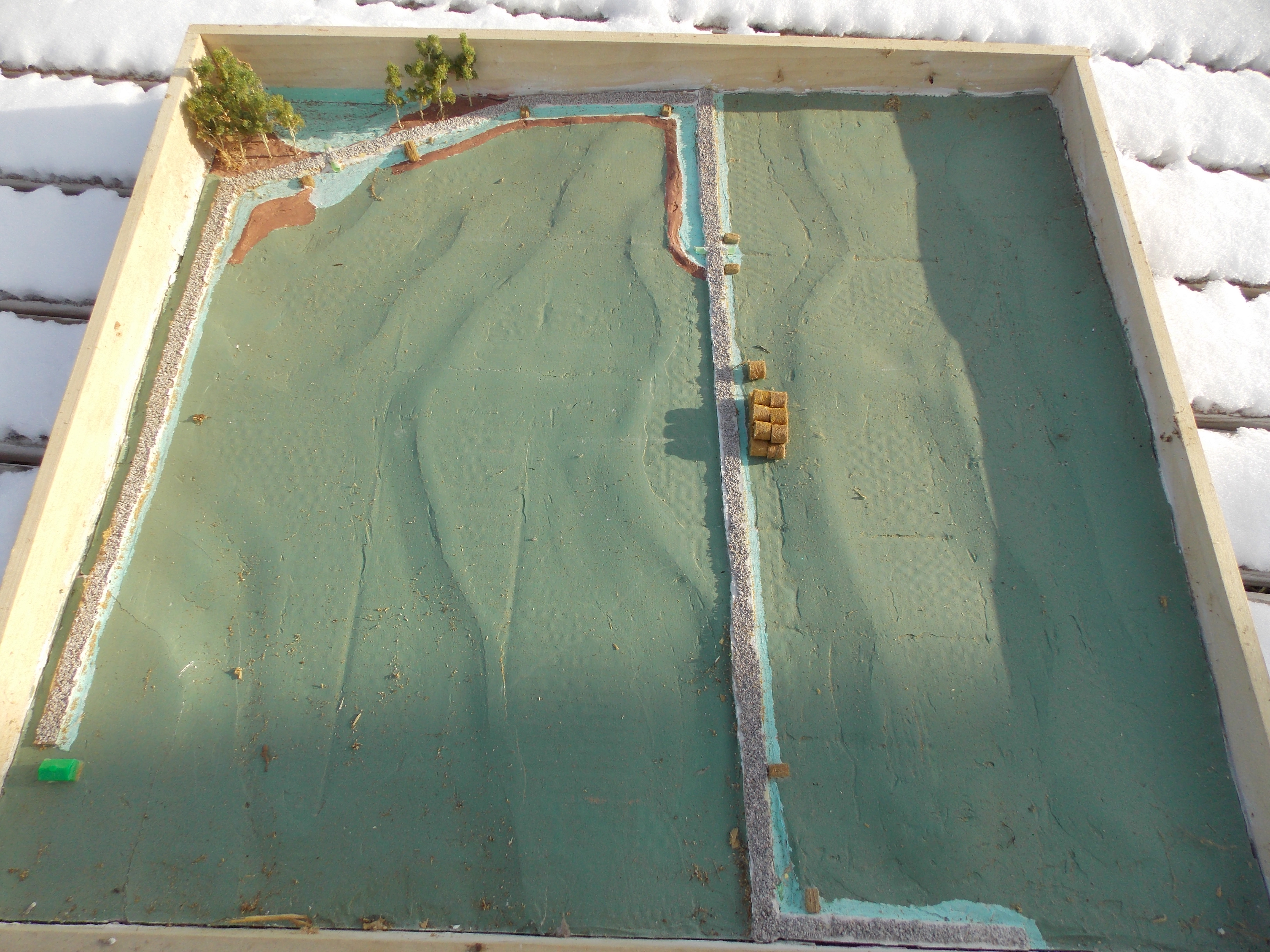
What I do is, take a LIDAR map of the field or area of my farm I want to work with, using 2 foot contours instead of 20 foot contours like most maps.

Then I make a shadow box of the area I am doing my farm planning on, so that I can work my map.

Because of the thickness of cardboard, this scales quite nicely into two foot contours, so as I cut and layer the cardboard, I get very accurate contours of the field because each layer represents 2 feet of elevation. This unfortunately gives me "steps". To fill those in, I then use drywall compound to make the final layer very smooth, so that I get all the details of the contours, hummocks, dips, ledge outcrops, ditches, swales, etc.

Then I paint the surface for whatever I am doing. Blue for ponds, swales, streams, etc. Dark green for forest, light green for fields. I will even add in railroad modeling stuff such as ballast to show where the roads are, haybales to show where erosion control goes, and even trees. When I am done, I have a very accurate 3D model of a field or portion of my farm.

This really helps when working with Federal or State Soil Engineers who are funding various farm projects. They can instantly see what your plan is for the field, or area of the farm. Then they can approve it or not. Taking a few hours to make a scale #D model, and then having it readily approved because they can see it, and you show your devotion from the start, goes a long way to getting funded for Federal and State Grants.
 
/ Using GPS to lay out a field #9  
Here is an example of a LIDAR derived 3D model within a shadowbox frame:

The area comprises of 47 acres, and shows where I want to place (2) roads. One is down the center, and the other starts in the background, drops down to the left, and then towards a cabin we want to build (the green Monopoly hotel in the model). The contours are very accurate, and within 2 feet of elevation thanks to LIDAR mapping. The model also shows where the swales and erosion control measures go for the roads, along with ditches, berms, and the pond that needs to be dug.

In an instant, you clearly see what I want a current field, and clear-cut to look like.

 
/ Using GPS to lay out a field #10  
At $800 the price is right. What are you using to interface with the GPS, phone, IPad? I can’t remember the exact cost of the last Trimble system we got at work but somewhere in the $50k range and we already had a $6k data collector.

What are you using for a coordinate system, I normally work in state plane. There are a lot of known points out there. They usually list lat. and long, UTM, and state plane coordinates. Google NGS, National Geodetic Survey and look for data sheets. I almost always tried to start a job using these known points to start from. There might be one near your job site. I’m not sure what kind of radio range you get.
 
/ Using GPS to lay out a field #11  
Thanks. You're right that the compass is the weak link. The GPS gives a bearing. If you're moving at more than a slow walk it is very accurate (same accuracy as the underlying GPS), if you're not moving it's just a random number. So i look at the bearing and speed reported by the GPS. If the speed is over 1 knot I use the GPS bearing, otherwise I use the compass bearing.

What you might want to try if you need an improvement in static bearings is to use the gyro. You would use a walking GPS "course" or a known bearing to calibrate the gyro to a known direction, then from there it will give pretty repeatable rotation measurement from your known bearing. Eventually the gyro will drift and need recalibration, but normally it's good for 5-10 minutes under gentle motions (will depend on the quality of the sensor and the software in the phone). You can build in automatic calibrations using known bearing back to your DGPS base station so that the software periodically corrects out drift. Gyro can be accurate to ~0.1 degree or better and gives very smooth data, which is great for rendering AR stuff.
 
/ Using GPS to lay out a field
  • Thread Starter
#12  
What you might want to try if you need an improvement in static bearings is to use the gyro. You would use a walking GPS "course" or a known bearing to calibrate the gyro to a known direction, then from there it will give pretty repeatable rotation measurement from your known bearing. Eventually the gyro will drift and need recalibration, but normally it's good for 5-10 minutes under gentle motions (will depend on the quality of the sensor and the software in the phone). You can build in automatic calibrations using known bearing back to your DGPS base station so that the software periodically corrects out drift. Gyro can be accurate to ~0.1 degree or better and gives very smooth data, which is great for rendering AR stuff.

Thank you for an excellent tip! I've been doing basically what you're saying with the compass -- when the unit is moving, take a GPS bearing and use that the calibrate the compass so that when the unit isn't moving I can compensate the compass. But the compass just jumps around a lot. I hadn't thought about gyro but it would work much better. I'll look into it.
 
/ Using GPS to lay out a field
  • Thread Starter
#13  
When I layout a field, I like to use LIDAR and CAD...

LIDAR is pretty cutting edge, but for me CAD means, Cardboard Aided Design!

What I do is, take a LIDAR map of the field or area of my farm I want to work with, using 2 foot contours instead of 20 foot contours like most maps.

Then I make a shadow box of the area I am doing my farm planning on, so that I can work my map.

Because of the thickness of cardboard, this scales quite nicely into two foot contours, so as I cut and layer the cardboard, I get very accurate contours of the field because each layer represents 2 feet of elevation. This unfortunately gives me "steps". To fill those in, I then use drywall compound to make the final layer very smooth, so that I get all the details of the contours, hummocks, dips, ledge outcrops, ditches, swales, etc.

Then I paint the surface for whatever I am doing. Blue for ponds, swales, streams, etc. Dark green for forest, light green for fields. I will even add in railroad modeling stuff such as ballast to show where the roads are, haybales to show where erosion control goes, and even trees. When I am done, I have a very accurate 3D model of a field or portion of my farm.

This really helps when working with Federal or State Soil Engineers who are funding various farm projects. They can instantly see what your plan is for the field, or area of the farm. Then they can approve it or not. Taking a few hours to make a scale #D model, and then having it readily approved because they can see it, and you show your devotion from the start, goes a long way to getting funded for Federal and State Grants.

Very interesting. Where do you get the underlying LIDAR data?
 
/ Using GPS to lay out a field
  • Thread Starter
#14  
At $800 the price is right. What are you using to interface with the GPS, phone, IPad? I can稚 remember the exact cost of the last Trimble system we got at work but somewhere in the $50k range and we already had a $6k data collector.

I'm using an Android smartphone. The rover has a USB port that plugs into the phone. The rover produces a stream of text ("NMEA sentences"). Here's what it might look like:

$GNGGA,123519,4807.038,N,01131.000,E,1,08,0.9,545.4,M,46.9,M,,*47

where:
123519 = Fix taken at 12:35:19 UTC
4807.038,N = Latitude 48 deg 07.038' N
01131.000,E =Longitude 11 deg 31.000' E
545.4,M = Altitude, Meters, above mean sea level

The other numbers are facts about the precision of the reading.

I have an app which I wrote running on the smartphone which reads the USB port, when it receives a sentence it reads it and updates the current position. There is another sentence that gives speed and bearing.

What are you using for a coordinate system, I normally work in state plane. There are a lot of known points out there. They usually list lat. and long, UTM, and state plane coordinates. Google NGS, National Geodetic Survey and look for data sheets. I almost always tried to start a job using these known points to start from. There might be one near your job site. I知 not sure what kind of radio range you get.

Everything is based off of the base station. There are two ways you can set the base. You can put it at a known location and input the lat/long. Or you can do what they call "survey in" where you just have it use regular GPS to calculate its position. If you let it sit long enough the theory is the errors will cancel each other out. For field layout I don't care so much about absolute position as the relative size and shape, so I set the base to do a five minute survey-in. Then I walk the perimeter and make sure there aren't any obstacles. If I need to move the field I'll adjust the way it's defined on the web page, I can move that in one foot increments.
 
/ Using GPS to lay out a field #15  
Unable to bring up the attachment in post #2.
 
/ Using GPS to lay out a field #16  
I wonder if there are any apps that would read that string and give useful data. Any pics of your system.
 
/ Using GPS to lay out a field
  • Thread Starter
#17  
Unable to bring up the attachment in post #2.

centralpark.png


I'm going to try attaching it again. I consider myself a pretty clever guy but I can't for the life of me figure out how the TBN picture attachment thing works. I'm reminded of what Ben Franklin said about electricity, "it makes a vain man humble."
 
/ Using GPS to lay out a field #18  
I clicked on the link to look at a pic of the equipment. It looks like it is just the guts of a GPS receiver. I saw where you mentioned putting a metal tray under them for reflections, which is called multi path. Surveying equipment has that stuff built into the housings and the software also helps in rejecting multi path.

Does your equipment just track American satellites? I am not sure how many are floating around up there now. Gps(USA), European (galelio), Japanese, Chinese (Bediou sp?) and Russian (Glonass). I first started using GPS about 1993 and at that time there were long periods of the day you could not work because there were not enough satellites. With RTK you need 5 to get a fixed solution and 4 to maintain it, that assumes no obstructions. These days it not uncommon to track 15 to 20 satellites.

Do you have this in some kind of housing? Are you using some kind of pole? Kudos to you to get it working, that is way beyond me.
 
/ Using GPS to lay out a field
  • Thread Starter
#19  
I wonder if there are any apps that would read that string and give useful data.
The format of the string is NMEA which stands for National Marine Electronics Association, it's a standard for GPS. Almost any GPS device is going to use NMEA.

Any pics of your system.

dgps.jpg


The base is on the left and the rover is on the right. The big metal disk is an aluminum pizza pan, the black metal square in the center of the pan is the GPS antenna. The plastic box with the antenna sticking out of the top is the DGPS kit. On the base unit the white box is a battery.

The rover is rigged up around a paint marking wand. I attached a couple of pieces of aluminum bar to the wand, and the dish and antenna are on one end of the bar. On the other end of the bar I have the DGPS receiver on the right and the smartphone on the left. The smartphone has velcro on the back to keep its position fixed relative to the antenna.
 
/ Using GPS to lay out a field #20  
I tell you that’s a heck of a setup. I assume the black box in the center is the GPS antenna? One thing that will help is to get that setup in the air. We usually use a 2 meter pole to get it up over our heads and the base sets on a tripod about 5.5 feet high.
 

Marketplace Items

2018 Freightliner M2 106 AWD Altec AA55 56ft. Insulated Material Handling Bucket Truck (A60460)
2018 Freightliner...
Case skid steer wheels and tires (A63118)
Case skid steer...
More info coming soon (A61569)
More info coming...
INOP/NON-RUNNING 2005 JCB Telehandler Lift (A61166)
INOP/NON-RUNNING...
2019 Kia Sorento AWD SUV (A61569)
2019 Kia Sorento...
2019 Merlo TF 42.7 (A60462)
2019 Merlo TF 42.7...
 
Top