You are using an out of date browser. It may not display this or other websites correctly.
You should upgrade or use an alternative browser.
You should upgrade or use an alternative browser.
Maps on the phone.
- Thread starter bcp
- Start date
- Views: 2464
More options
Who Replied?
/ Maps on the phone.
#1


MossRoad
Super Moderator
- Joined
- Aug 31, 2001
- Messages
- 67,211
- Location
- South Bend, Indiana (near)
- Tractor
- Power Trac PT425 2001 Model Year
Anyone else have to fight the urge to keep the phone flat, with the top pointed north?
Bruce
Only when I'm walking. :laughing:


TractorGuy
Elite Member
- Joined
- Sep 15, 2013
- Messages
- 4,616
- Location
- N. FL
- Tractor
- John Deere 4410, John Deere 4120, Kubota LX3310 cab, John Deere F725 Front Mount Mower, Swisher 60" pull behind mower. John Deere 4310 CUT (sold), Ford New Holland 575E Cab Backhoe (sold).
Mine are set to keep direction of travel up.

Dftodd
Super Star Member
- Joined
- Oct 19, 2014
- Messages
- 10,649
- Location
- vilonia, arkansas
- Tractor
- Massey Ferguson 1825E, Kubota Z121S
I set mine so it stays oriented with direction of travel. It's much easier to figure out left and right turns while driving.

- Joined
- Jan 15, 2013
- Messages
- 13,679
- Location
- St Helens, Tasmania, Australia
- Tractor
- JD 4105 / JD Z355E (48" deck)
Anyone else have to fight the urge to keep the phone flat, with the top pointed north?
Bruce
Nope... just you Mate.


oosik
Epic Contributor
I've got four mobile GPS mapping tools. My iPhone, Garmin Nav V, Garmin GPSmap 60CSx hand held & the mapping system on the Taco Wagon. All four use Garmin software. I can set them to have any of the four major ordinates or the direction of travel as either "up" or "down". It's just a matter of getting into the right place in your software and setting it the way you want it to operate. I've never REALLY used any of the four for critical direction situations. I guess if I were to travel in large cities they might help.
I've not tried the mapping system on the iPhone. It should allow you to hold the phone, more or less, vertical and show horizontal mapping. I know my other three devices do.
Of the four units, I VASTLY prefer the Garmin Nav V. Larger screen & more logical controls. If I had to use a mapping system - I would mount the Nav V in the Taco Wagon and use it. The Nav V is ONLY a GPS mapping unit. The unit that is OEM with the Taco Wagon has controls that service many of the other software programs. It requires a precise touch and can become somewhat of a PITA as you are driving.
I've not tried the mapping system on the iPhone. It should allow you to hold the phone, more or less, vertical and show horizontal mapping. I know my other three devices do.
Of the four units, I VASTLY prefer the Garmin Nav V. Larger screen & more logical controls. If I had to use a mapping system - I would mount the Nav V in the Taco Wagon and use it. The Nav V is ONLY a GPS mapping unit. The unit that is OEM with the Taco Wagon has controls that service many of the other software programs. It requires a precise touch and can become somewhat of a PITA as you are driving.
oosik
Epic Contributor
Bruce - you have to develop a somewhat different system of thinking as you use the mapping feature on your mobile phone. It will become more familiar as you use the phone.
Had a co-worker go on a bear hunt in AK. He had one of the very first mobile GPS mapping units. It might have even been a prototype. He had not become familiar enough with use of the unit to trust it or himself. Of course, he became lost. He did not trust the "back track" feature and had to spend a very cold, lonely night out in the Alaskan bush. He was lucky - he was found. And not by a bear.
Had a co-worker go on a bear hunt in AK. He had one of the very first mobile GPS mapping units. It might have even been a prototype. He had not become familiar enough with use of the unit to trust it or himself. Of course, he became lost. He did not trust the "back track" feature and had to spend a very cold, lonely night out in the Alaskan bush. He was lucky - he was found. And not by a bear.
MossRoad
Super Moderator
- Joined
- Aug 31, 2001
- Messages
- 67,211
- Location
- South Bend, Indiana (near)
- Tractor
- Power Trac PT425 2001 Model Year
When I'm following GPS directions, I have it so it's always looking in the direction of travel. When I'm just driving along, I also have it looking in the direction of travel. It tells me what road is coming up next. Works great if you're looking for a passing zone ahead, too. But if I want to zoom out to see where I am in an area, I want it oriented at North is up.
So what other things do you like the GPS to display for you?
In my older cars that don't have a compass, I have the compass displayed. I have time to destination up if I'm following directions to a specific location. I'll put up miles to destination, too. In hilly country I pop up the elevation. I rarely use the speedometer view, unless I have the phone sitting on the dash in front of the speedometer.
So what other things do you like the GPS to display for you?
In my older cars that don't have a compass, I have the compass displayed. I have time to destination up if I'm following directions to a specific location. I'll put up miles to destination, too. In hilly country I pop up the elevation. I rarely use the speedometer view, unless I have the phone sitting on the dash in front of the speedometer.
I must not have been very clear about my "problem."
My problem isn't with using the phone and the map program, or the car's map program.
When I am on foot, I notice that I always tend to hold the phone in a flat and level position, with the map and phone oriented towards north.
It is from old habits using a paper map and compass. You hold the compass flat and level, and turn the map so north on the map matches north on the compass. I'm subconsciously treating the phone like a paper map and compass.
Bruce
My problem isn't with using the phone and the map program, or the car's map program.
When I am on foot, I notice that I always tend to hold the phone in a flat and level position, with the map and phone oriented towards north.
It is from old habits using a paper map and compass. You hold the compass flat and level, and turn the map so north on the map matches north on the compass. I'm subconsciously treating the phone like a paper map and compass.
Bruce
Mine are set to keep direction of travel up.
I set mine so it stays oriented with direction of travel. It's much easier to figure out left and right turns while driving.
I prefer it that way, as well as when I'm using my GPS. Despite what the map tells me, I still want to know which way north is and more importantly, the actual direction back to my truck if the phone/GPS dies or the sats get scrambled. (Which happened on Sept 11.)I must not have been very clear about my "problem."
My problem isn't with using the phone and the map program, or the car's map program.
When I am on foot, I notice that I always tend to hold the phone in a flat and level position, with the map and phone oriented towards north.
It is from old habits using a paper map and compass. You hold the compass flat and level, and turn the map so north on the map matches north on the compass. I'm subconsciously treating the phone like a paper map and compass.
Bruce

buckeyefarmer
Epic Contributor
I always say you have to be smarter than the GPS. Unfortunately most aren’t.

ovrszd
Epic Contributor
- Joined
- May 27, 2006
- Messages
- 33,727
- Location
- Missouri
- Tractor
- Kubota M9540, Ford 3910FWD, Ford 555A, JD2210
I always say you have to be smarter than the GPS. Unfortunately most aren’t.
What this requires is a high level of intelligence.
No offense intended. Just popped into my pea sized brain.
buckeyefarmer
Epic Contributor
A relative on wife’s side once drove an hour west to get to a road to go east. They could have taken a road south about 25 miles to get to the same road, and save 2 hrs. Don’t think this case was GPS caused.
Same person over 3 hrs away heading to parents house(interstate all the way) got off interstate and took backroads for hrs because the GPS said go that way. At least that was their excuse for bring late one thanksgiving. I find this one a little hard to believe.
Same person over 3 hrs away heading to parents house(interstate all the way) got off interstate and took backroads for hrs because the GPS said go that way. At least that was their excuse for bring late one thanksgiving. I find this one a little hard to believe.
MossRoad
Super Moderator
- Joined
- Aug 31, 2001
- Messages
- 67,211
- Location
- South Bend, Indiana (near)
- Tractor
- Power Trac PT425 2001 Model Year
A relative on wife痴 side once drove an hour west to get to a road to go east. They could have taken a road south about 25 miles to get to the same road, and save 2 hrs. Don稚 think this case was GPS caused.
Same person over 3 hrs away heading to parents house(interstate all the way) got off interstate and took backroads for hrs because the GPS said go that way. At least that was their excuse for bring late one thanksgiving. I find this one a little hard to believe.
We were down in eastern Kentucky a couple weeks ago hitting state parks. The way to the park seemed convoluted. When the GPS wanted us to turn up what looked like a farmer's lane/logging road, I pulled over and switched to the overhead map view. I could see the park on the other side of the ridge. It was going to take me the shortest way. I opted to follow the paved roads around the ridge. Took another 1/2 hour VS 5 minute estimate.
A couple days later, similar thing. We were trying to find some hiking trails by a boat launch. But the GPS kept taking us up and up hills, way above the lake. When the road switched to what looked like railroad track ballast, the road signs changed to Natural Resources Road 1, and a large logging truck came out of the woods, stopped in front of us, and immediately reversed towards us because (I think) he didn't expect a car to be in his switch-back spot, we kinda assumed the GPS was mistaken and turned around. :laughing:
oosik
Epic Contributor
I've noticed one irritating situation. If I program the GPS to show "shortest route" - you can, at times, get into trouble. It will lead me to "roads" that don't or never seem to have existed. More than once I ended up at a barbed wire gate opening up into a never-ending wheat field.
And like Moss Road indicates - the route up a driveway and thru a farmers yard is seldom the best route.
"Shortest route" seldom cuts it out in the country.
OK - I WILL use the Nav V GPS on my motorcycle. When I'm going into a new location and need to turn off onto a specific road. You can zoom out and it will show the upcoming road. Quite a ways before you get to the exact turn off.
I've NEVER used any GPS because I fear I might get lost. As long as there is gas in the tank - I'm never lost.
Bruce - with your phone held flat and everything pointing north - slowly lift the phone to a "half-vertical" or more normal viewing position. Nothing should change. Rotate the phone in that "half-vertical" position. Notice how the map and "north is up" changes. It's just a situation of use and familiarity.
And like Moss Road indicates - the route up a driveway and thru a farmers yard is seldom the best route.
"Shortest route" seldom cuts it out in the country.
OK - I WILL use the Nav V GPS on my motorcycle. When I'm going into a new location and need to turn off onto a specific road. You can zoom out and it will show the upcoming road. Quite a ways before you get to the exact turn off.
I've NEVER used any GPS because I fear I might get lost. As long as there is gas in the tank - I'm never lost.
Bruce - with your phone held flat and everything pointing north - slowly lift the phone to a "half-vertical" or more normal viewing position. Nothing should change. Rotate the phone in that "half-vertical" position. Notice how the map and "north is up" changes. It's just a situation of use and familiarity.
oosik
Epic Contributor
As we all should know - the GPS unit will lead you to just about anything. Either by name or address or general category. However - there is one category that will not show. At least around these parts. How to get to a local brothel. It may just be that there aren't any in these parts. I wouldn't know. But I DID try and got a rather "tight-****d" comment back from my Nav V. So, I guess, the unit knows what I asked - it's just not programed to provide that info.
MossRoad
Super Moderator
- Joined
- Aug 31, 2001
- Messages
- 67,211
- Location
- South Bend, Indiana (near)
- Tractor
- Power Trac PT425 2001 Model Year
I've noticed one irritating situation. If I program the GPS to show "shortest route" - you can, at times, get into trouble. It will lead me to "roads" that don't or never seem to have existed. More than once I ended up at a barbed wire gate opening up into a never-ending wheat field.
And like Moss Road indicates - the route up a driveway and thru a farmers yard is seldom the best route.
"Shortest route" seldom cuts it out in the country.
OK - I WILL use the Nav V GPS on my motorcycle. When I'm going into a new location and need to turn off onto a specific road. You can zoom out and it will show the upcoming road. Quite a ways before you get to the exact turn off.
I've NEVER used any GPS because I fear I might get lost. As long as there is gas in the tank - I'm never lost.
Bruce - with your phone held flat and everything pointing north - slowly lift the phone to a "half-vertical" or more normal viewing position. Nothing should change. Rotate the phone in that "half-vertical" position. Notice how the map and "north is up" changes. It's just a situation of use and familiarity.
I've tried to instill in my kids my philosophy about being lost....
You're never lost.
You know you're currently in the U.S.
You probably know which state you're in, or close to.
You probably know what city you're currently in, or close to.
You're not lost, you're just detoured. :laughing:
ovrszd
Epic Contributor
- Joined
- May 27, 2006
- Messages
- 33,727
- Location
- Missouri
- Tractor
- Kubota M9540, Ford 3910FWD, Ford 555A, JD2210
I've tried to instill in my kids my philosophy about being lost....
You're never lost.
You know you're currently in the U.S.
You probably know which state you're in, or close to.
You probably know what city you're currently in, or close to.
You're not lost, you're just detoured. :laughing:
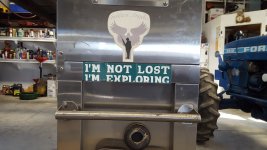
My wife got this bumper sticker for me to put on my Jeep. I chose instead to put it on my toolbox. Much less teasing from my rowdy gang....