Ubifi Rural Internet

/ Ubifi Rural Internet #121  
I don't think a signal booster is going to help you. They work great for phones because they are able to take an external antenna, which you already have, and attach to a radio that is broadcasting at the max allowed power, which you also already have, and then repeat that signal to the phones and other local devices so they appear to have 5 bars. A booster will make your Mofi appear to have 5 bars but, it will still have the same -110db connection to the tower so the through put is going to remain the same. The only way you're actually going to improve your performance is to elevate your antenna to improve your line of sight to the tower. Buying a booster will really be a waste of money here, it can't improve over the connection you've got now when it will be dealing with the same limitations.
 
/ Ubifi Rural Internet #122  
but it has not been as big of an improvement as I thought it would be.

When I added an antenna, I have not gained any bars. In fact I almost returned it as bars continues to fluctuate between 0 and 1.
However, I quickly observed that stability improved significantly (my connection is more stable than DSL) and I monitor both, and my bandwidth tests were better and more consistent.
You want it better, go higher. As I noted earlier, if I go on top of my hill I don't even seen to need an external antenna signal/speed is so good.
I did not bother with a booster, but it does wonders for my cell phone service (my boosters are 2G)
Also, if your reliability changes in the summer (leaves) you may need to revisit your antenna direction.
Our distance to antenna is under 3 miles, but we have line of sight (if I jump on top of my roof)
My setup was "good enough" and I don't intend to change any time soon.
 
Last edited:
/ Ubifi Rural Internet #123  
Their faq is about why you should switch accountants...

Their FAQ is gibberish when dropped in Google translate.
Jasmine lion than football. Football salad and violet skirt and poisonous gas. Vestibulum id ligula porta felis euismod semper. Cras justo odio, dapibus ac facilisis in, egestas eget quam.
Otherwise your chat airline.

There is no free developer of a quiver propaganda. However, it is set at the main policies.
 
/ Ubifi Rural Internet
  • Thread Starter
#124  
So let's say you watch a couple/three episodes of The Walking Dead and 3-4 movies each week. How's that affect your data usage?

Netflix says their HD video is about 3gb of data per hour. So you can do the math from there and compare to your plan.

We watch 1/2 hour of news each night. Lots of pre-bed time tv so probably another 2 hours per night there. Lets just say 3 hours average per day. So 9gb if we stream. That would be 270 gb a month or so. Just of TV. That would not include any other web browsing, but compared to video the data useage on emails or tractorbynet is pretty minimal.
 
/ Ubifi Rural Internet
  • Thread Starter
#125  
An hour of HD video will use roughly 1GB of data. We stream all of our TV, live and on demand, and we use over 100GB a month. It's better to just have an unthrottled unlimited plan and not have to worry about it. For us, TV and Internet combined is about $100/mo for every US, British and Canadian channel, including premium, sports and PPV (we don't pay extra for those), so it's cheaper than having satellite or something and trying to stay under some monthly data limit.

Who do you use for TV where you get all those channels?
 
/ Ubifi Rural Internet #126  
Who do you use for TV where you get all those channels?
I don't want to clutter the thread up by repeating it all, if you'll go back to post 47, I cover it all with links.
 
/ Ubifi Rural Internet #127  
All of these streaming services can be cumbersome and a real pain in the ***** to get set up and also use. I like simple so Dish Network and AT&T Mobley and I'm still under $110 a month and have 2 receivers with DVR, local channels and unlimited data with the Mobley.
 
/ Ubifi Rural Internet #128  
All of these streaming services can be cumbersome and a real pain in the ***** to get set up and also use. I like simple so Dish Network and AT&T Mobley and I'm still under $110 a month and have 2 receivers with DVR, local channels and unlimited data with the Mobley.
It took me 30 minutes to set it all up. If the Mobley was still available with the unlimited plan, I'd be about $55/mo but, it's not. There is an "unlimited" AT&T plan at buyasession.att.com for $30/mo but, you're subject to throttling based on network congestion after 22GB. I haven't tried it yet, I'm going to give it a go one more thing though and see how badly I get throttled, if at all. AT&T has a pretty robust network in Texas and my area is pretty sparsley populated so I might not see any throttling.
 
/ Ubifi Rural Internet #129  
It took me 30 minutes to set it all up. If the Mobley was still available with the unlimited plan, I'd be about $55/mo but, it's not. There is an "unlimited" AT&T plan at buyasession.att.com for $30/mo but, you're subject to throttling based on network congestion after 22GB. I haven't tried it yet, I'm going to give it a go one more thing though and see how badly I get throttled, if at all. AT&T has a pretty robust network in Texas and my area is pretty sparsley populated so I might not see any throttling.

I have never seen any throttling with the Mobley but then again, I'm not using a ton of data either. We will stream some On Demand stuff every now and then but nothing regular. Usually NetFlix or Amazon Video. I'm afraid if I start Streaming a bunch then I will see the throttling. Don't want to screw up a good thing.
 
/ Ubifi Rural Internet #130  
AT&T seems to be more lenient about it. Verizon throttles when you hit the cap, period. But, Verizon has better national coverage and a faster network. AT&T is great if you know you've got coverage, Verizon is better if you move around a lot, usually.

When we're in Houston, I can get 50MBps with the AT&T device and 100MBps on my Verizon phone.
 
/ Ubifi Rural Internet #131  
I just checked my Mofi, it says I used 220 GB last month and we're at 189GB so far this month, not sure why we're using so much more so far this month.
 
Last edited:
/ Ubifi Rural Internet #133  
Could be.
 
/ Ubifi Rural Internet #134  
I ordered UbiFi, and it arrives tomorrow. We just finished building a new house and will be moving in next week. I will test it out this weekend. We are in a rural location where Verizon and Centurylink tell us "We have no service in your area" yet neighbors less than a 1/4 mile away have their service.

We usually have 2-3 bars of ATT LTE at our house, so I am sure it will work fine.
 
/ Ubifi Rural Internet #135  
I have never seen any throttling with the Mobley but then again, I'm not using a ton of data either. We will stream some On Demand stuff every now and then but nothing regular. Usually NetFlix or Amazon Video. I'm afraid if I start Streaming a bunch then I will see the throttling. Don't want to screw up a good thing.

Isn't NetFlix and Amazon Video, streaming, or did misunderstand and when you stream, you use those services?
 
/ Ubifi Rural Internet #136  
We ordered UbiFi over the weekend. Took about 15 minutes or so for them to setup the account and print the shipping label. Since it was the weekend, it did not ship until Monday. UbiFi is in IL and with the cheap shipping the package arrived here in NC yesterday. The wife did the initial setup but I went home, changed the admin password and setup WiFi security. The admin interface is decent though there was some language about setting up the admin and WiFi passwords that was not as clear as it should be.

The wife did a speed test early in the day at got 18 mbps down though later in the day she say 2-3 mbps down. I did on test in the evening and got 13 mbps down. The wife set up the device in a different spot in the room that we did not test. That spot is only getting two bars according the device's admin page. We are going to move the MoFi to a different place in the room and see if that makes a difference. The speed we were seeing on the device are what we were seeing with our phones at a given time of day. Never saw a pause when watching the videos. I am still amazed that we lived without YouTube. :laughing::laughing::laughing:

The wife used about 500MB of data by the time I got home. I downloaded some updates to one computer and a TV, did some browsing, and watched some YouTube videos. By the end of the night we had used 1.67 GB.

If we still get two bars which is surprisingly low based on our cell phone testing, I guess we will look at the directional antennae. Flip side is that even with two bars we are getting better speeds than DSL.

Later,
Dan
 
/ Ubifi Rural Internet #137  
So I brought up the whole Ubifi thing originally a while back in this thread - https://www.tractorbynet.com/forums/rural-living/400565-rural-internet.html. I mention that because if you look at the end of that thread, I've been messing around with some service plan options to bring the cost down by purchasing directly from the carrier instead of Ubifi. Anyway, for those that don't want to mess with a lot of stuff but would like to save some money (about $480/yr), here is the short and simple way to do that.

Buy the Mofi from Ubifi with the trial month. During that month, get a SIM direct from AT&T, most AT&T stores can give you one but, if you don't want to go into a store, you can get them on Amazon - https://www.amazon.com/AT-T-Standard-SIM-Card/dp/B00P9Y3C66/ref=sr_1_13. Activate the SIM card at buyasession.att.com, this is VERY IMPORTANT, there are plans available here that the sales reps at the stores DO NOT have access to. I buy a lot of prepaid plans from AT&T for the cellular controlled wild pig traps I build so I'm very familiar with what they offer, I have an AT&T rep that delivers SIM cards to my shop monthly and activates part of the systems for me, he does not have access to the buyasession plans.

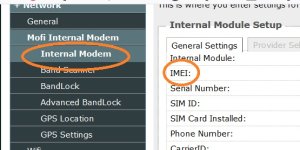
You'll need the IMEI number from the Mofi, you can get that by logging onto the Admin function of the Mofi and clicking on the Internal Modem Tab (as pictured)
Mofi.jpg

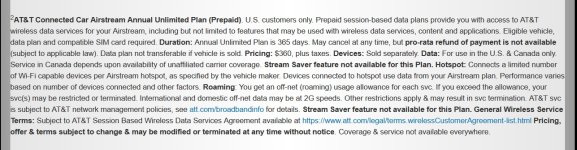
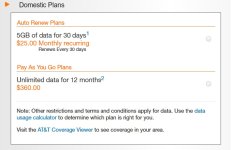
Once you setup your device on buyasession.att.com, you'll have 2 possible data plan options for it, one is 5GB for $25/mo, that's not good obviously, the other is $360 for UNLIMITED data for ONE YEAR, that's the one you want. The terms and conditions look to only apply throttling or prioritization if you're roaming onto a partner network, you already know you're getting good quality AT&T service so that's not an issue. Sign up for that, change out your SIM and everything should be good to go for the year for $480 less than Ubifi is charging and the same service. You do, of course, lose their support which is, admittedly pretty good. I'm not sure it's $480 good, though... Rate plan screen shots below.

I'm working on getting mine running on Verizon because they're 3x the speed of AT&T at my house.
ATT1.jpg

ATT2.jpg
 
/ Ubifi Rural Internet #138  
I think I'm going to go with OTRMobile. $60./month sounds like a better deal than Ubifi.. I had looked at Netbuddy but their website is kind of a mess, they apparently only bill through PayPal, and I sent them an email with some questions about a week ago and so far haven't heard back. That makes me wonder about support if there was a problem.

And now STx has given me something else to think about.:) I also read that the AT&T Mobley deal is back on - $20./mo. for unlimited.
 
/ Ubifi Rural Internet #139  
Hey everyone, I'm an ISP tech in rural Montana. I have the great privilege of working for a communications Co-Op, or Cooperative. I have been in this line of work for about 20 years now. I have worked in many different areas and for different companies for 10 years prior to working for the company where I am currently employed.
This Co-Op I work for has been very diligent in bringing excellent internet service to our most rural and isolated customers. Over the last 10 years we have deployed fiber optic cables to roughly 80% of our customers homes. Currently, we deploy not only fiber to the home, but fiber to the desktop via a fiber fed residential gateway that also doubles as a wireless router.
However, we still have plenty of customers that are on copper DSL service where we have yet to deploy fiber. DSL presents many challenges for me as a tech to keep running reliably, especially on old copper cables that we are really not putting much money into maintaining since they will be abandoned in the not too distant future when they are overbuilt with fiber. But, that is not to say that it cannot be done!
Current DSL (ADSL 2+) standards dictate that service will not work properly beyond 18,000 feet (18Kft) from the DSLAM (the equipment that generates the DSL signal across your cable pair and to your house). I have been able to successfully maintain a reliable DSL connection out as far as 24Kft under ideal circumstances, although if I were installing service at that distance I would make sure it was known ahead of time that the customer was not to expect reliable service! There have been devices created over the last several years that have extended the distance that DSL can reliably function as well as extend the range that higher throughput rates can be achieved. We have used a couple of DSL loop extenders over the years with mixed results, but the newest one that seems to be working pretty well is the Positron ADSL Line Extender. This is something that your ISP would splice into your cable pair at an engineered point along the way, usually somewhere about halfway. If you have Century Link, sorry to have gotten your hopes up, but it's just not going to happen! If you know your local DSL Tech and you have poor service, tell him about this product and ask that he look into testing it out. I've been pretty impressed and I had all but given up on DSL extenders!
Besides that, to be completely honest, I find that about 70-80% of DSL problems come from inside the house itself. DSL is very sensitive to what we call "Bridge Tap", or when a single cable pair is spliced and then sent down 2 cable pairs in 2 directions. Nearly every house has wiring inside the house that has potential to be bridge tapped. There are 2, maybe 3 basic ways to wire a house for phone; a single cable from the phone jack inside the house back to where the buried/aerial phone line terminates on the outside of the house in the NID (Network Interface Device). This scenereo is often referred to as a home run. The next situation involves one cable that leaves the NID, enters the house, and appears at the first phone jack inside the house, then leaves that jack and goes on to the next much like how power is wired in a circuit. This is often referred to as being daisy chained. This is the least desirable method for phone wiring, especially when it comes to DSL. The last method is really a variation on the first. This is when a single wire comes in from the NID to a central location inside the house, perhaps to a smart panel often found in the closet of the master bedroom for some reason, and then all other individual "home runs" leave this smart panel and go out to each individual jack. This is the most desirable method.
So, the reason that I bring all of this up is that there is something that many of you on DSL can do to help yourselves and this is often overlooked by many DSL techs. Ideally what you want to happen is to have the DSL signal get split off inside the NID and sent to one specific phone jack where the DSL modem will be located. I accomplish this by using a lightening protector that doubles as a DSL splitter. Your DSL tech should have access to these. If you have home runs, disconnect any cables that do not have a phone hooked up at the far end and get rid of any that you can do without...each of these cables represents extra footage that is the #1 enemy of DSL. Lastly, if you are unable to do absolutely nothing else, plug a DSL filter into each jack that does not have the modem plugged into it. Even if there is not a phone plugged into this jack, plug a filter into it. The filter will absorb the DSL signal and prevent it from bouncing back down the line like an echo and causing performance issues.
As I mentioned previously, if you have Century Link, all bets are off. I am friendly with my counterpart in Century Link that works at the next small town 30 miles to the north of me (my hometown as it happens). They are still operating on DSL equipment that we scrapped out 10 years ago that is much less capable than newer DSLAM equipment that is available currently...truly archaic equipment by today's standards! He covers an area that is comparable to the same square mileage of some smaller eastern states all by himself and he has a computer tracking his every movement. He gets written up if he spends more than "X" amount of time per trouble/install. We have a smaller area to cover and we do it with 4 "Combo Techs" (we do everything from digging ditches to jumping on a laptop and programming a DSLAM) and one Central Office tech. We are given much more free reign to do everything we can to make sure each customer has the best service that we can provide. This means that we have much more time available to be more thorough and also allows us to be able to experiment a bit in the deployment of our DSL service and find what works best.
There is not and will not be (in anyone's lifetime who is currently reading this) a better medium for transporting data than fiber optics. The reason that so many of you are experiencing such fluctuations on speedtests with your cellular based internet is that you do not have an individual channel dedicated to you and you alone. Your service will also depend on who else is using their 4G (or 5G when that comes) data service and how much of it and what they are doing on the same tower that you are bouncing off of. The simple fact is that there are only so many frequencies available to transmit and receive on. These are not unlimited.
 
/ Ubifi Rural Internet #140  
Well when you get a DSL Self Install you certainly aren't going to look at the customers inside wiring. You take it to the NID and that's as far as you test. I'm sure small rural Telco's do things a lot different.
 

Marketplace Items

2017 Ford F-550 (A55973)
2017 Ford F-550...
New/Unused Electric Golf Cart (A61166)
New/Unused...
2016 GMC Sierra Denali 1500 4x4 Crew Cab Pickup Truck (A60352)
2016 GMC Sierra...
24in excavator tooth bucket (A61307)
24in excavator...
LMC Nitrogen Applicator (A62177)
LMC Nitrogen...
WACKER NEUSON LIGHT TOWER (A60736)
WACKER NEUSON...
 
Top