Starlink

   / Starlink #2,321  
that's not necessarily true. I use router made by mikrotik, that have the ability to generate traffic for a Btest, and it does terrible in that regard. but is totally acceptable for normal router use. creating traffic is a significant higher load, then wifi demands ( you can actually see the process loads on tik)
The iperf3 utility on a high end gaming PC with a 10 gigabit NIC talking to a 10 gigabit switch & firewall tops out at about 1 gigabit. You have to run it multi-threaded to come close to 10 gigabit throughput. It's surprisingly hard to generate even fake traffic.
 
   / Starlink #2,322  
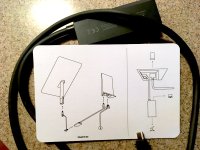
What is the process for installing the ethernet adapter? Should I stow, unplug the unit, connect the adapter, then unstop, and replug the unit? Can I skip the stow process and just unplug and attach the adapter?
 

Attachments

  • IMG_0097.JPG
    IMG_0097.JPG
    389.8 KB · Views: 145
   / Starlink #2,323  
When I installed mine and during some of the trouble shooting I just unpluged the unit,
connected the adapter and then plugged it back in.
 
   / Starlink #2,324  
What is the process for installing the ethernet adapter? Should I stow, unplug the unit, connect the adapter, then unstop, and replug the unit? Can I skip the stow process and just unplug and attach the adapter?
I've moved the dish a few times and just unplugged it without stowing. It boots faster if the dish doesn't have to realign itself.
 
   / Starlink #2,325  
What is the process for installing the ethernet adapter? Should I stow, unplug the unit, connect the adapter, then unstop, and replug the unit? Can I skip the stow process and just unplug and attach the adapter?
My adapter just came in yesterday. I just installed it this morning. I just unplugged everything, moved router and hooked everything up to router and then plugged back in wall outlet. Everything booted up and worked with no problems. Now my home network is running as normal with Starlink just providing internet service. I bypassed the Starlink WiFi in the Starlink app so there would be no conflicts between it's WiFi and my home mesh setup. Couldn't be more pleased so far with the performance of the system.(y)
 
   / Starlink #2,326  
   / Starlink #2,327  
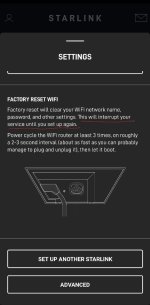
I do believe i answered my own question, which was happens when you shut the wifi off, how do you get into the router? Ethernet adapter cable came. Networking the starlink router then leaving the starlink's wifi on bothers me. Yes you can shut it off but when you turn it back on you will have to set it up again does not appear to be a big deal(they make you do a factory reset). To get to there speed test and settings and what not you go to the app on your phone go to setting it has you log on through the internet then you can get to what appears to be everything that is available when connected to the router wirelessly. It is kinda spiffy. Is there a way to get into the starlink router off it's ip address?
I'm wrong or what I am saying is not inertly accurate. Test wasn't real world. You shut the wifi router off it turns into a modem, good for me. Settings turns into being able to stowing it and advanced options. Where you get debug data and you can allow starlink remote access. So spiffy is not the word I would use.
 
   / Starlink #2,328  
My adapter just came in yesterday. I just installed it this morning. I just unplugged everything, moved router and hooked everything up to router and then plugged back in wall outlet. Everything booted up and worked with no problems. Now my home network is running as normal with Starlink just providing internet service. I bypassed the Starlink WiFi in the Starlink app so there would be no conflicts between it's WiFi and my home mesh setup. Couldn't be more pleased so far with the performance of the system.(y)
I tried to connect mine today. Unplugged everything then connected the ethernet adapter powered up and the system did not connect to the satellites. After 45 minutes I did a factory reset and that did not result in a connection. I have tried another factory reset with no success so I am removing the ethernet adapter and hope that the system connects this time..... I did check, recheck, and recheck the connections.

I took the ethernet adapter out and restarted Starlink and I could connect. Could it possibly be a bad ethernet adapter? After my first (gen2) dish failed, now I am wondering. I will try again in the morning to connect with the ethernet adapter. Time for a big glass of nice wine....
 
Last edited:
   / Starlink #2,329  
I tried to connect mine today. Unplugged everything then connected the ethernet adapter powered up and the system did not connect to the satellites. After 45 minutes I did a factory reset and that did not result in a connection. I have tried another factory reset with no success so I am removing the ethernet adapter and hope that the system connects this time..... I did check, recheck, and recheck the connections.

I took the ethernet adapter out and restarted Starlink and I could connect. Could it possibly be a bad ethernet adapter? After my first (gen2) dish failed, now I am wondering. I will try again in the morning to connect with the ethernet adapter. Time for a big glass of nice wine....
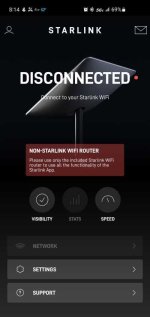
It doesn't sound good. If you connected everything like the little card shows that came with the adapter and made sure the connections were fully seated, it kinda sounds like there could be something wrong with the adapter. Especially if you are able to connect with it out of the loop. How were you trying to connect to Starlink router when adapter was connected, wifi or wired ethernet? Did your screen look like the attached picture? The attached picture is what the app looks like when you are not connected to the starlink router.
 

Attachments

  • Starlink.jpg
    Starlink.jpg
    81.9 KB · Views: 166
   / Starlink #2,330  
I lookfirst tried connecting directly to the Starlink router and then to my mesh router via the ethernet cable. I could connect to the router(s), but not to the internet. Yep, my app screen looked like the image you posted. I will try one more time in the morning. I did make sure the cables were seated...
 
   / Starlink #2,331  
I lookfirst tried connecting directly to the Starlink router and then to my mesh router via the ethernet cable. I could connect to the router(s), but not to the internet. Yep, my app screen looked like the image you posted. I will try one more time in the morning. I did make sure the cables were seated...
so the dish powers up? are you sure it had a internet address? I don't know how long the acquire signal process takes. Did you wait long enough?
 
   / Starlink #2,332  
I lookfirst tried connecting directly to the Starlink router and then to my mesh router via the ethernet cable. I could connect to the router(s), but not to the internet. Yep, my app screen looked like the image you posted. I will try one more time in the morning. I did make sure the cables were seated...
I would verify that you were connected to the starlink wifi and not your mesh to start with. When I had everything up and running I could still connect to the starlink wifi until I shut it off. Maybe when you factory reset it, you need to setup the starlink wifi again to be able to log on to it. I'm thinking of 3 things it could be.

1. You were not actually connected to the starlink router, maybe you auto connected to mesh instead, but you should have still been able to see starlink router. Check the available wifi's and make sure you are connected to starlink.
2. You may need to re-configure/redo the initial startup configuration of the wifi setup on starlink router since it was factory reset before you can log on to it, and maybe to be able to see it on your old router through ethernet cable.
3. You have a bad adapter module.

I would lean to 1 & 2 first. The adapter is a pretty simple device.
 
   / Starlink #2,333  
I lookfirst tried connecting directly to the Starlink router and then to my mesh router via the ethernet cable. I could connect to the router(s), but not to the internet. Yep, my app screen looked like the image you posted. I will try one more time in the morning. I did make sure the cables were seated...
 

Attachments

  • Screenshot_20220413-231826_Starlink.jpg
    Screenshot_20220413-231826_Starlink.jpg
    106.7 KB · Views: 145
   / Starlink #2,334  
I lookfirst tried connecting directly to the Starlink router and then to my mesh router via the ethernet cable. I could connect to the router(s), but not to the internet. Yep, my app screen looked like the image you posted. I will try one more time in the morning. I did make sure the cables were seated...
I did think of another way to check it. Connect the adapter like it is supposed to be, but don't plug anything in to the ethernet port and see if you can still connect to your starlink router.
 
   / Starlink #2,335  
"I did think of another way to check it. Connect the adapter like it is supposed to be, but don't plug anything in to the ethernet port and see if you can still connect to your starlink router."

This is what I did initially when I applied power after hooking up the adapter, just to make sure I could see the Starlink router. I could se the router, but after 30-40 minutes the dish still said "Offline." Then I did the factory reset after connecting the adapter to my mesh. I could then see both the Starlink router and the mesh, but still had the "offline" indication in the app. After the second factory reset I took the adapter out of the connection and I could connect and get online.

I'm going to try the process again this morning.

UPDATE: Things are working. I unplugged the Starlink router. Powered off the mesh router. Connected the ethernet adapter and connected the ethernet cable to the adapter but not to the mesh. Within two minutes Starlink was "online" when I connected to the SL router. I then plugged the ethernet cord into the mesh and powered it on. I connected several devices to the mesh and ran speed tests and all is fine. It works.

In my situation, the ethernet. adapter or the 150 cable is necessary for Starlink to be useful. The Sl router is in the basement in about the best location the house configuration allows, but wifi signal from the SL router is limited on the main floor of the house. We have had this same issue with our DSL and mesh routers in the past and we had to relocate the routers to a central location on the main floor. When I ordered Starlink a year or so ago, I thought the longer cable would reach the main floor location, but then I received the square dish with the 75' cable that will not reach to the main floor location. Then I ran an ethernet cable from the main floor to Starlink location in the basement after we realized the wifi connection to the Starlink router was limited or nonexistent on the main floor. I know others have no issues with Starlink wifi coverage, but in our house it has problems and without the ethernet adapter or longer cable, Starlink is problematic. Now that we have it connected to our mesh and have signal throughout the house, life is good.......
 
Last edited:
   / Starlink #2,337  
Has anyone tried the new Starlink Mesh Router?

It's not available yet on the Starlink website and is only being offered to select subscribers via email:

 
   / Starlink #2,338  
Has anyone tried the new Starlink Mesh Router?

It's not available yet on the Starlink website and is only being offered to select subscribers via email:
This would be nice, but I still don't see anywhere that it has an ethernet port. Not everything is wifi, yet, these days. I also prefer for my mesh nodes to be wired together and not use up wifi bandwidth communicating with each other.

I have the new Gen 2 square system and I have to say I was very pleased with the 2.4g wifi coverage, but very disappointed in the 5g coverage.

I do think starlink needs more functionality and access to their routers like setting up a guest network, priority traffic handling, wifi channels etc. But I get it, their's is a very simple straight forward plug it in and it pretty much works setup. More for the mass general public.

Oh, and I haven't received an email about the option to get one. As mentioned, it wouldn't work for my home setup.
 
   / Starlink #2,339  
This would be nice, but I still don't see anywhere that it has an ethernet port. Not everything is wifi, yet, these days. I also prefer for my mesh nodes to be wired together and not use up wifi bandwidth communicating with each other.

I have the new Gen 2 square system and I have to say I was very pleased with the 2.4g wifi coverage, but very disappointed in the 5g coverage.

I do think starlink needs more functionality and access to their routers like setting up a guest network, priority traffic handling, wifi channels etc. But I get it, their's is a very simple straight forward plug it in and it pretty much works setup. More for the mass general public.

Oh, and I haven't received an email about the option to get one. As mentioned, it wouldn't work for my home setup.
The "don't see an ethernet port" simply solved by buying a sub-$20 ethernet switch and the Starlink ethernet adapter. Plug the Starlink ethernet connector into the switch and then connect whatever hardwired devices you have to the switch.

As you noted, the Starlink router is intended to be simple. It meets the needs of a huge portion of typical users. And anyone who needs more complexity can easily bypass it and add your own router of choice.
 
   / Starlink #2,340  
The "don't see an ethernet port" simply solved by buying a sub-$20 ethernet switch and the Starlink ethernet adapter. Plug the Starlink ethernet connector into the switch and then connect whatever hardwired devices you have to the switch.
I have the adapter and I am very pleased at how it is working with my existing system. No need for a switch since it goes to an ASUS RT-AC68 setup with a mesh configuration. I have the Starlink router in bypass mode so I don't have to re-address or assign the static IP's or login the wifi devices. It was a seamless conversion from my AT&T WHPI service since the ASUS is still managing my network. All I did was disconnect ethernet plug from AT&T and connect to Starlink adapter. All of 5 minutes and up and running everything as usual, just a lot faster.👍
 

Tractor & Equipment Auctions

2019 INTERNATIONAL 4300 26FT NON CDL BOX TRUCK (A59905)
2019 INTERNATIONAL...
5ft Pull-Behind Rotary Tiller Tractor Attachment (A59228)
5ft Pull-Behind...
VOLVO ECR25 EXCAVATOR (A60429)
VOLVO ECR25...
2019 CATERPILLAR TL1055D TELESCOPIC FORKLIFT (A60429)
2019 CATERPILLAR...
2015 Peterbilt 348 Dump Truck (A55973)
2015 Peterbilt 348...
2020 DRAGON ESP 150BBL ALUMINUM (A58214)
2020 DRAGON ESP...
 
Top