signature question

/ signature question #1  

frank_f15

Super Member, Rest in Peace
Joined
Mar 30, 2001
Messages
6,020
Location
BUFFALO ,NEW YORK AREA
Tractor
kubota b2400- R4 tires
after a lot of post i decided ot add a sig. to my post, got the name down ok(will be redone) then tried to add a graphic. HARV a while back told me how to do it, i printed it and am just now getting to try it. i took a small jep. image from the internet(public site) and saved it to deasktop, then i attaced it to a mesage and copied the url and pasted it in the sig. area of profile, wrapeed it in tags ie {image] www. whatever
[/image] and this is what i get, see below!!!! thanks for any help.
 
/ signature question #2  
Frank - I just figured this out myself

1- Attach the graphic file to one of these posts - it will show up on your message to the left as "Attachment"
2 - Go back and open the attachment from this thread and right click on it to see Properties
3 - Copy the url (ctrl c) to your clipboard
4 - go back to your profile and paste (ctrl v) the full url to the Signature field
5 - Make sure you don't delete the posting or your Signature will disappear.

This worked for me.

ps - Make sure you use the correct brackets [] and also the full url, including http://
 
/ signature question #3  
Frank -

Sounds like you did all the right things, but the image file you referenced flat out ain't there. My only guess is what Bill already suggested -- you deleted the post that had the attachment?

The pict file has to reside permanently on a server somewhere. The most convenient for most folks is the TBN server, so attaching it to a message as you did is the right approach, but ya gotta leave it there.

Oh, and Bill - your profile picture is lookin' good (pleased to see you
wink.gif
), but if you wanna be perfect (and like, totally efficient), you might format the image to exactly 65 x 75 pixels. It would save a microsecond of download time and prevent any distortion, although your aspect ratio is within a few pixels of perfect anyway.

6-122263-Bill.JPG


This free advice was brought to you by Mr. "Who Asked You Anyway". /w3tcompact/icons/grin.gif
 

Attachments

  • 6-122263-Bill.JPG
    6-122263-Bill.JPG
    5.5 KB · Views: 83
/ signature question
  • Thread Starter
#4  
HARV & BILL: THANKS FOR THE HELP I DID EVERYTHING RIGHT except as HARV mentioned i deleted the post. think it will work now. all i have to do is refine what i want, now that i know how to do it. THANKS AGAIN, AND ANY OTHER TIPS WELCOMED!!!
 
/ signature question #5  
Harv,

Thanks - and I've got a bright shiny face /w3tcompact/icons/wink.gif to boot!
 
/ signature question
  • Thread Starter
#6  
guess i have to try this again, the sig. was there then it dissapeared. working a tractor is easier /w3tcompact/icons/grin.gif
 

Attachments

  • 6-122294-sigr.jpg
    6-122294-sigr.jpg
    2.6 KB · Views: 82
/ signature question
  • Thread Starter
#7  
mabey i should just forget the graphics?/w3tcompact/icons/tongue.gif
 
/ signature question #8  
Hey Frank - you did it!

And that's one heck of a tractor!! /w3tcompact/icons/shocked.gif/w3tcompact/icons/shocked.gif
 
/ signature question
  • Thread Starter
#9  
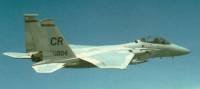
BILL ; thanks for your help and as u can see i scaled it down a little, the graphic goes with my name frank_f15 thus frank and pic. of f15 fighter. btw i don't plow snow with that baby i just fire it up and melt the damm stuff./w3tcompact/icons/grin.gif
 
/ signature question #11  
Harv,
How do I add this to my signature?

Crown
 

Attachments

  • 6-122887-243.jpg
    6-122887-243.jpg
    4 KB · Views: 80
/ signature question #12  
Jeff -

- Copy the url (address) of your uploaded attachment

- Go to the Control Panel and edit your Personal Information

- Find the Signature box and paste in the url

- Type [image] tags around the url

- Go to the very bottom of that page and click Submit.

You can test your results by going through the motions of posting a message and taking a look at the Preview page. If you were successful, your new signature will show up there. You don't even have finish posting if you choose not to.

And don't worry that the entire membership of TBN will be looking over your shoulder. /w3tcompact/icons/laugh.gif
 
/ signature question #14  
You got it! Might want to make it a tad smaller /w3tcompact/icons/smile.gif.
 
/ signature question #15  
I'm gonna try this --
mike
 

Attachments

  • 6-123252-hat.JPG
    6-123252-hat.JPG
    6.4 KB · Views: 84
/ signature question #17  
<font color=blue>did it work?</font color=blue>

If your goal was to create a profile picture, you definitely succeeded.
smile.gif


If you were trying for a signature, you're not quite there yet.
wink.gif
 
/ signature question #18  
picture this time -- sig later -- worked as planned
mike
 

Marketplace Items

2008 FORD F-150 (A60736)
2008 FORD F-150...
BUYERS PREMIUM & PAYMENT TERMS (A59908)
BUYERS PREMIUM &...
NEW HOLLAND T4.75 TRACTOR (A52707)
NEW HOLLAND T4.75...
2022 Harley-Davidson FLHTP Police Electra Glide Motorcycle (A60352)
2022...
2025 Pabreak Auger Bits and Plate Skid Steer Attachment (A61567)
2025 Pabreak Auger...
2020 INTERNATIONAL MV607 26 FT BOX TRUCK (A59905)
2020 INTERNATIONAL...
 
Top