New Forum software!!!! Like it or not??

/ New Forum software!!!! Like it or not?? #81  
The only thing I miss is not being able to use a pull down to hit a specific forum section.
 
/ New Forum software!!!! Like it or not?? #82  
jlesliel said:
This is what i get

<img src="http://www.tractorbynet.com/forums/attachment.php?attachmentid=269372"/>

Just wrap your search query in single(') or double(") quotes... 'pole barn' or "pole barn"
 
/ New Forum software!!!! Like it or not?? #83  
How can I fix this jumble mess.

If I magnify, I can't see all the screen.

The page looked good before the upgrade.

Example:
 

Attachments

  • TBN capture.jpg
    TBN capture.jpg
    219.3 KB · Views: 125
  • 25 june.jpg
    25 june.jpg
    55.4 KB · Views: 115
/ New Forum software!!!! Like it or not?? #84  
How can I fix this jumble mess.
If I magnify, I can't see all the screen.
The page looked good before the upgrade.
Example:
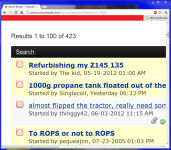
You are using Chrome on XP? Try disabling some plugins, here is what I get on Chrome in Windows 7:
ChromeZoomed.PNG

Aaron Z
 
/ New Forum software!!!! Like it or not?? #85  
Yes, am using Chrome on an XP computer.

I am not sure if your are saying that is good, or bad.

If the text size looks good on the top part, the post area is messed up, and if the post area looks good, the top is jumbled, as in my above post.. One will shrink and the other will expand.

I don't seem to balance things so everything looks good.

Is there a way to revert to the old TBN page display, which looked good to me in every respects.?
 
/ New Forum software!!!! Like it or not?? #86  
Yes, am using Chrome on an XP computer.
I am not sure if your are saying that is good, or bad.
If the text size looks good on the top part, the post area is messed up, and if the post area looks good, the top is jumbled, as in my above post.. One will shrink and the other will expand.
I don't seem to balance things so everything looks good.
Is there a way to revert to the old TBN page display, which looked good to me in every respects.?[/QUOTE]
I was trying to show that on my computer (as seen in the picture) everything is expanding in sync rather than in a jumbled fashion like you are seeing. My first guess would be that one of your plugins is messing with things.
As a troubleshooting step, could you try loading TBN in Chrome using "Private browsing mode" (hit Ctrl+Shift+N)? That will disable your plugins for the private browsing window and will let you see if one of the plugins is causing this.

Is there a way to revert to the old TBN page display, which looked good to me in every respects.?
I don't think that is possible as everything was upgraded.

Thanks

Aaron Z
 
/ New Forum software!!!! Like it or not?? #87  
The add on the right obscures the information on the right. If I make the browser window wider, the ad finally does not obscure info on the page.
I am using IE 8 on Windows 7.

Forums.jpg
 
/ New Forum software!!!! Like it or not?? #88  
I like the ability to choose multiple files to upload in one step. That saves a lot of time when picking pictures to post on a thread.
 
/ New Forum software!!!! Like it or not?? #89  
How can I fix this jumble mess.

If I magnify, I can't see all the screen.

The page looked good before the upgrade.

Example:

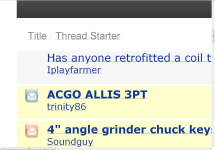
Your text size has been increased so much that it's making the formatting really bad. You should decrease your text size (control minus) once or twice for starters.
 
/ New Forum software!!!! Like it or not?? #90  
Your text size has been increased so much that it's making the formatting really bad. You should decrease your text size (control minus) once or twice for starters.

Odd, I am running at 1280x1024 here at work and I can zoom in as far as Chrome 19.0.1084.56 m will let me (as seen below) and everything scales correctly. I also tried it at 800x600 with the same zoom level and it looked the same.
BigZoomForum.PNGBigZoomHeader.PNG


Aaron Z
 
/ New Forum software!!!! Like it or not?? #91  
I like the ability to choose multiple files to upload in one step. That saves a lot of time when picking pictures to post on a thread.

X2 That is a nice feature.
 
/ New Forum software!!!! Like it or not?? #92  
Is there a quick way to go back to the beginning of the thread (Today's active Threads.)..say after reading a thread w/5-6 pages, without having to use the go back button 5-6 times to be able to pick up the next thread down ?
 
/ New Forum software!!!! Like it or not?? #93  
ctrl key on keyboard then PLUS or MINUS sign. to enlarge or decrease text font. agree font seems a little small.

CTRL +
CTRL -

I didn't know about the CTRL +, that could be handy all the time.
 
/ New Forum software!!!! Like it or not?? #94  
Is there a quick way to go back to the beginning of the thread (Today's active Threads.)..say after reading a thread w/5-6 pages, without having to use the go back button 5-6 times to be able to pick up the next thread down ?

Hit the "Home" or "Page Up" key to get back to the top of the page and click on the button again.
You can also use middle click or ctrl click to open the threads in a new tab.

Aaron Z
 
/ New Forum software!!!! Like it or not?? #95  
I didn't explain that right, I knew it as I read it. Lets try again....
You've found an interesting title to a post and it has 4 pages. Now you read all the post reply's (pages) and want to backtrack to the start of the post (where the yellow highlight is) and continue down the individual new posts without losing where you were on the main page of "new posts" I have to use the go back key till I get to the main page and continue down the list. Is there an easy way to do this? Do I make any sense yet?
 
/ New Forum software!!!! Like it or not?? #96  
Not sure what you mean by yellow highlight but you can use the buttons under the bottom "reply with quote" button to navigate through pages on the post. While looking at that I noticed you can go to other forum sections via the quick navigation pull down. That's a big deal to me. :thumbsup:
 

Attachments

  • tbn.JPG
    tbn.JPG
    15.9 KB · Views: 108
/ New Forum software!!!! Like it or not?? #97  
I am not crazy about it but I'll probably get used to it. The reply with quote screen seems a little more awkward. The cursor seems to sometime get lost when you've typed a several lines and want to go back and click to insert something at the end of a previous line. One other minor annoyance is the quick navigation scroll list. It used to default to the forum that you were on which was convenient to click on after reading a long thread with multiple pages and wanting to go back to the same forum. Now it always goes back to the top requiring scroll down to the forum you were at.
 
/ New Forum software!!!! Like it or not?? #98  
I didn't explain that right, I knew it as I read it. Lets try again....
You've found an interesting title to a post and it has 4 pages. Now you read all the post reply's (pages) and want to backtrack to the start of the post (where the yellow highlight is) and continue down the individual new posts without losing where you were on the main page of "new posts" I have to use the go back key till I get to the main page and continue down the list. Is there an easy way to do this? Do I make any sense yet?
I am not quite understanding you, do you want to go back to the beginning of the thread, or the list of new posts?

Aaron Z
 
/ New Forum software!!!! Like it or not?? #99  
Never mind, I just can't find the right words/way to get my question out. When I do I'll try again. Sorry & thanks for trying to help.
 
/ New Forum software!!!! Like it or not?? #100  
Still a huge delay when reporting posts. The Android app never completes a report

Sent from my SCH-I500 using TractorByNet
 

Marketplace Items

Case SV280B (A60462)
HYD QUICK ATTACH STUMP GRINDER (A52706)
HYD QUICK ATTACH...
2018 CATERPILLAR 305E2CR EXCAVATOR (A60429)
2018 CATERPILLAR...
2014 TAKEUCHI TL12 SKID STEER (A60429)
2014 TAKEUCHI TL12...
2004 Ford F-550 Miller 301 Wrecker Truck (A55852)
2004 Ford F-550...
2005 INTERNATIONAL 4200 24FT BOX TRUCK (A59905)
2005 INTERNATIONAL...
 
Top