Google Earth

/ Google Earth #1  

RalphVa

Super Member
Joined
Dec 19, 2003
Messages
7,902
Location
Charlottesville, VA, USA
Tractor
JD 2025R, previously Gravely 5650 & JD 4010 & JD 1025R
I'd been accessing Google Earth from one of my old HDs using a HD/USB adaptor. Well, my wife's old HD apparently ruined it or maybe my old HD with its bad sectors made some more, etc. and ruined it. Can no longer read HDs on it.

Found Google Earth online. Just Google it and you'll find (below the ads) a URL for it. So, I went exploring. One thing was to explore places where we've lived.

They're attached. I've never figured out how to put them right here in the message.

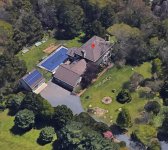
We lived at the place in NJ for 20 years (I was only there less than 1/2 the time, what with our travelling on business, etc.). The house and swimming pool have not changed except for that butt out on the right of the house in the rear, but there've been extensive changes to the property, including the driveway. Driveway used to be very steep right straight down in front of the garage on the right end of the house. We used to sled down that driveway, making a severe right to avoid the neighbor's mailbox across the street.

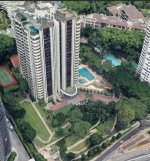
The place in Singapore is called Beverly Hill. It is a condo tower. Our condo there was 5500 sq ft, bigger than this house in Va and the same size as the house in Baton Rouge parish.

The other pic is of our place on 8.5 acres here in Va just west of Charlottesville. Our property goes down to Ivy Creek. We're right near the Barracks POW camp where the hessian soldiers were kept in the Revolutionary War.

I could not get a good pic of the house in BR parish because of all the trees on that part of South Fulwar Skipwith (name of a southern general).

Ralph
 

Attachments

  • Beverly Hill.JPG
    Beverly Hill.JPG
    182.1 KB · Views: 174
  • Old house in NJ.JPG
    Old house in NJ.JPG
    149.5 KB · Views: 200
  • Our place.JPG
    Our place.JPG
    147.5 KB · Views: 200
/ Google Earth #2  
That's interesting. I haven't used Google Earth in ages. I have used regular Google Maps for a similar purpose. It provides pretty good overhead terrain pictures, but these look like much higher resolution.
 
/ Google Earth #3  
Google earth has a feature that lets you look back at historical photos of an area. On my Google Earth application, the icon to do this is in the top bar, and looks a bit like a clock. If you click on that and scroll back through time, you might find a time when the images were taken when the leaves were off the trees. That might allow you to see some of your BR parish house.

I know the historical feature does cover satellite photos. It may not cover the "street level" photos which show more detail (but haven't been a Google Earth feature for all that long).
 
/ Google Earth #4  
I have used this before to get to the winter pictures so I can actually see my house.
There is also a fzcteature to see property lines, which looked pretty close to my survey, but not ex
 
/ Google Earth #5  
That's interesting. I haven't used Google Earth in ages. I have used regular Google Maps for a similar purpose. It provides pretty good overhead terrain pictures, but these look like much higher resolution.

Google Earth lets you do so much more, once you learn how to use it. I made the map shown below of our trail system and wetlands on Google Earth. Just walked the trails with a handheld GPS or a smartphone running an appropriate app, and you can import the GPS/phone data into Google Earth to tweak it, clean it up, and print out if you want a hard copy.

This one shows our property and that of our neighbors and good friends with whom we share a driveway. I have another, more extensive view that shows most of the trail system on a few more properties. The neighborhood works together to maintain the trails for all of us to enjoy. On this one, I added a bit of color to make the streams and wetlands show up more.(I have a higher resolution version, but it's too large a file to upload here, with our slow internet connection.) You can turn various layers on and off. For example, I can turn off display of the trails, or my "wetland enhancements", or turn on the display showing the locations of various obstacles on our obstacle course in the woods.

McNerney-Clark-Isham Trails 4-26-20.jpg


And here's one where I exported the data on some of our neighborhood network from Google Earth into an online application (CalTopo) to get a better topo map than what was available on Google Earth:

Nichols-Bennett Rd Topo.jpg
 
/ Google Earth #6  
I've used Google Earth and Google Earth Pro for several years now as enhancement for GPS, especially for Search and Rescue uses. Although the images on Google Earth aren't absolutely up to date, they are more up to date than any topo map and I can check to find ways to access a remote area, then create a track in Google Earth and then export it to Garmin Basecamp and any GPS units we may be using. Works great for trails that are not on any topo map.
 
/ Google Earth #7  
At one point there was a promotion for free Google Earth Pro, i have it on my home PC, it is handy!
 
/ Google Earth #8  
The historical imagery in google earth is handy. Many of the images are with the leaves off the trees giving you a much better vantage point. The property lines in google maps in my area are off by 200 feet.
 
/ Google Earth #9  
Hate google but have to admit their mapping stuff is best. I used the historical photos to mark the approximate location of my bootcamp barracks in Florida. It is now a city park with most buildings razed.
 
/ Google Earth #12  
I have spent many an hour on Google Earth looking at places I have lived/visited and places I want to visit. It is one of those things you wonder how we lived without it. :laughing:

I have read, and still read, quite a bit of history. One of the maddening things about some/many history books is the lack of maps. I sure wish I had Google Earth when I was a kid and started reading history. Having those images would have been so helpful.

We are thinking about moving the coast for a variety of reasons. :rolleyes: I have used FEMA and NOAA flood maps to look at areas along with Google Earth's historical images to check out areas. Surprisingly to me, one area we are interested in does not look like there has been beach erosion in the 20 or so years that Google has images.

Once upon a time, I had spent quite a bit of time looking at a certain town in another country using Google Earth images and street views. A co worker happened to travel to that country, and when they returned to work, they were talking about the trip. They mentioned visiting this town I had looked at on Google Earth. I started asking questions. If they had noticed the church at one end of the town, did they visit the chocolate shop, how about the RNLI station at the other end of town, did they see the Indian restaurant that was up the little side street that headed out of town up a steep slope down by the RNLI station,.... :D:D:D

They were shocked I knew all of these details. And the funny part is that I had never visited that remote little town in person but I knew more about the place than they did. :D But I had just visited by Google Earth images and street view. :laughing::laughing::laughing:

We use Google Earth to plan trips to other places. We use it to look at the area we are thinking about staying so that we know our way around before we ever get there. Where is a grocery store and cell phone store for sim cards? What does the area look like? Does it look safe? Where are restaurants and what do they serve? If using public transport, where are the stops? Are there places near where we are staying that we want to visit or should we stay somewhere else? Can we walk to a pub? :D If we have a car, we will draw a circle of 60 miles, i.e., a roughly one hour trip from where we are staying and put placemarks in Google Earth for the places we want to see. If the place is outside of the circle we might not visit due to time it takes to get there.

People traveling around the world use Google Earth images to help them navigate remote areas. Many places in the world are not charted, and if they have been charted, it could have been last done by Captain Cook. :rolleyes::eek::) Looking at satellite images can tell you if the charted channel still exists and if it really exists as charted. Some remote places can be more than a mile off the plotted location. :rolleyes: That could ruin your day. Tools exist to turn Google Earth images into charts that can be used by modern chart plotters. It is amazing stuff.

Later,
Dan
 
/ Google Earth #13  
Pay attention to the imagery dates. The aerial views are usually more recent than the street views. I've often seen things in the aerial views that I wanted to check out in Street View, only to find it didn't exist five years earlier when the street view was logged.
 
/ Google Earth #14  
I have spent many an hour on Google Earth looking at places I have lived/visited and places I want to visit. It is one of those things you wonder how we lived without it. :laughing:

I have read, and still read, quite a bit of history. One of the maddening things about some/many history books is the lack of maps. I sure wish I had Google Earth when I was a kid and started reading history. Having those images would have been so helpful.

We are thinking about moving the coast for a variety of reasons. :rolleyes: I have used FEMA and NOAA flood maps to look at areas along with Google Earth's historical images to check out areas. Surprisingly to me, one area we are interested in does not look like there has been beach erosion in the 20 or so years that Google has images.

Once upon a time, I had spent quite a bit of time looking at a certain town in another country using Google Earth images and street views. A co worker happened to travel to that country, and when they returned to work, they were talking about the trip. They mentioned visiting this town I had looked at on Google Earth. I started asking questions. If they had noticed the church at one end of the town, did they visit the chocolate shop, how about the RNLI station at the other end of town, did they see the Indian restaurant that was up the little side street that headed out of town up a steep slope down by the RNLI station,.... :D:D:D

They were shocked I knew all of these details. And the funny part is that I had never visited that remote little town in person but I knew more about the place than they did. :D But I had just visited by Google Earth images and street view. :laughing::laughing::laughing:

We use Google Earth to plan trips to other places. We use it to look at the area we are thinking about staying so that we know our way around before we ever get there. Where is a grocery store and cell phone store for sim cards? What does the area look like? Does it look safe? Where are restaurants and what do they serve? If using public transport, where are the stops? Are there places near where we are staying that we want to visit or should we stay somewhere else? Can we walk to a pub? :D If we have a car, we will draw a circle of 60 miles, i.e., a roughly one hour trip from where we are staying and put placemarks in Google Earth for the places we want to see. If the place is outside of the circle we might not visit due to time it takes to get there.

People traveling around the world use Google Earth images to help them navigate remote areas. Many places in the world are not charted, and if they have been charted, it could have been last done by Captain Cook. :rolleyes::eek::) Looking at satellite images can tell you if the charted channel still exists and if it really exists as charted. Some remote places can be more than a mile off the plotted location. :rolleyes: That could ruin your day. Tools exist to turn Google Earth images into charts that can be used by modern chart plotters. It is amazing stuff.

Later,
Dan

Were you in Google MAPS, or Google EARTH?
 
/ Google Earth #15  
The GE pic of my farm is five years old.
 
/ Google Earth
  • Thread Starter
#16  
Pay attention to the imagery dates. The aerial views are usually more recent than the street views. I've often seen things in the aerial views that I wanted to check out in Street View, only to find it didn't exist five years earlier when the street view was logged.

I could hardly find our old house at 16654 S. Fulwar Skipwith in Baton Rouge parish for all the trees, but my brother apparently found it in street view. Haven't figure out how to get to street view online yet. Will try it again. Probably won't be able to see the back yard.
 
/ Google Earth #18  
GMaps is what you visit on the web with a browser.

GEarth is a program you download and run on your PC desktop.

Their street views are similar, but don't appear to be exactly the same.
 
/ Google Earth #19  
Google Earth lets you do so much more, once you learn how to use it. I made the map shown below of our trail system and wetlands on Google Earth. Just walked the trails with a handheld GPS or a smartphone running an appropriate app, and you can import the GPS/phone data into Google Earth to tweak it, clean it up, and print out if you want a hard copy.

What's a good Android app to map trails?
 
/ Google Earth #20  
What's a good Android app to map trails?

I use Gaia GPS. The basic level is free. Mine is on an iPhone, but they make an Android version as well. The paid membership levels offer access to more maps. If I recall, the premium level ($40/year) includes parcel boundaries and ownership data. I've just been using their free version, and added my own parcel boundary information.

Another app I've used is On X Hunt. It's $30/year for one state or $90/year for 50 states. I have the one state version. I've debated dropping it, but there are things I like about it. (They make it very easy to move info back and forth from computer to phone to Google Earth, for example. It can also be done in Gaia GPS, I just like the OnX interface a bit better.)
 

Marketplace Items

iDrive TDS-2010H ProJack M2 Electric Trailer Dolly (A59228)
iDrive TDS-2010H...
More info coming soon! (A56858)
More info coming...
1999 Van Hool Transit Bus T2100 Bus, VIN # YE2TC63B3X2043319 (A61165)
1999 Van Hool...
2014 International WorkStar 7400 Service Truck with Crane, VIN # 1HTWGAAR8EH765283 (A61165)
2014 International...
SKIDDED FRAC TANK (A60736)
SKIDDED FRAC TANK...
Bobcat T590 (A60462)
 
Top