A computer wifi problem

/ A computer wifi problem #11  
Is the new machine WiFi frequency the same as your network (probably 2.4ghz or5 ghz)?
 
/ A computer wifi problem
  • Thread Starter
#12  
most pc's don't have wifi cards installed. can you link the model you bought?
How do you tell if a wifi card is installed?
If your other computer and phone are seeing the Wi-Fi connections, then the router setup should be OK. I think a good starting point would be to confirm that there is a wireless networking device in the new computer.

Go to Start - Windows System - Control Panel - Network and Sharing Center. Click on Change adapter settings. Look for an entry that says Wi-Fi.
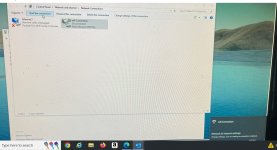
I did that as the attached photo shows after I clicked on "start this connection" the box popped up at the right bottom of the screen that says "change settings such as having the connection metered".
 

Attachments

  • pc.jpg
    pc.jpg
    526.4 KB · Views: 137
/ A computer wifi problem #13  
How do you tell if a wifi card is installed?

I did that as the attached photo shows after I clicked on "start this connection" the box popped up at the right bottom of the screen that says "change settings such as having the connection metered".
yea that photo shows you don't have a wifi card installed. that "wifi" is not it, thats a ppoe connection thats been renamed.

you need something like this.

 
/ A computer wifi problem #16  
Just for future reference, another option is to buy a network switch. You could plug this into your router to provide more ethernet connections.


Marketplace Items

2014 Freightliner Cascadia 125 S/A Day Cab Truck Tractor (A59230)
2014 Freightliner...
2015 KOMATSU PC170LC-10 EXCAVATOR (A62129)
2015 KOMATSU...
2016 PETERBILT 365 (A58214)
2016 PETERBILT 365...
2020 DRAGON ESP 150BBL ALUMINUM (A58214)
2020 DRAGON ESP...
2017 Scag Cheetah 61in Zero Turn Commercial Mower (A59228)
2017 Scag Cheetah...
12' Truck Box (A60352)
 
Top