database selection

   / database selection #1  

WinterDeere

Super Star Member
Joined
Sep 6, 2011
Messages
12,712
Location
Philadelphia
Tractor
John Deere 3033R, 855 MFWD, 757 ZTrak; IH Cub Cadet 123
Hi folks,

Nothing to do with tractors, but with a wide and varied group here, I'm guessing there are a few who could offer me some advice here.

I implemented an ERP system for a small manufacturing business in Excel, a collection of about a dozen spreadsheets with error checking and a huge array of interdependencies. Some are simple match / lookup, but more are complicated operations based on finding data in other sheets. It all works great, but the latest versions of Excel are consistently breaking it with poorly-implemented autocorrect features, and of course it can only ever be accessed by one person at a time. It's also very prone to a user hosing the whole thing up by accident.

It's time to convert it to a database, but the only databases I've ever personally coded / created from scratch were all in MS Access. I'm not sure that dozens of hours put into recreating this ERP system in Access would be the best investment, but I don't know.

Of course there are canned ERP systems I could buy, but the cheap ones are very limited, and this operation is too small to invest in a big enterprise level solution and the investment that maintaining those usually entails. A fully-customized system in a very user-friendly database such as Access does seem to fit the bill.

Maximum users will likely remain under 10 for at least several years to come, and number of records (items < 5000, BOM's < 500, transactions < 20,000) isn't exacty huge, but it is sufficient to slow down Excel with the constant cross-referencing.

Go Access, or find and learn a better option?
 
   / database selection #2  
Hi folks,

Nothing to do with tractors, but with a wide and varied group here, I'm guessing there are a few who could offer me some advice here.

I implemented an ERP system for a small manufacturing business in Excel, a collection of about a dozen spreadsheets with error checking and a huge array of interdependencies. Some are simple match / lookup, but more are complicated operations based on finding data in other sheets. It all works great, but the latest versions of Excel are consistently breaking it with poorly-implemented autocorrect features, and of course it can only ever be accessed by one person at a time. It's also very prone to a user hosing the whole thing up by accident.

It's time to convert it to a database, but the only databases I've ever personally coded / created from scratch were all in MS Access. I'm not sure that dozens of hours put into recreating this ERP system in Access would be the best investment, but I don't know.

Of course there are canned ERP systems I could buy, but the cheap ones are very limited, and this operation is too small to invest in a big enterprise level solution and the investment that maintaining those usually entails. A fully-customized system in a very user-friendly database such as Access does seem to fit the bill.

Maximum users will likely remain under 10 for at least several years to come, and number of records (items < 5000, BOM's < 500, transactions < 20,000) isn't exacty huge, but it is sufficient to slow down Excel with the constant cross-referencing.

Go Access, or find and learn a better option?
Seems like a quick fit for MS Access. You could solve your issue with numbers of spreadsheets, just using a shared Access database. Automate the input, automate the updates if someone does it in Excel. How big are the spreadsheets? You have a IIRC 2GB limit for Access. You may need to compress the db after input.

You get forms and functionality with Access. Plus there is a nice upgrade path to SQL server you can do should it "take off". Queries are easily built and prototyped. All in one place too, LOL.

Personally linking more than 2 or 3 spreadsheets is my cut off point for databases. That and number of records in spreadsheets.

Good Luck.
 
   / database selection
  • Thread Starter
#3  
Thanks! This is exactly the sort of advice I need.

The largest half dozen spreadsheets are only 450 kB, which is actually a surprise to me, given how large the arrays are, and how slowly some of them update off SSD-cached NAS thru 1 Gbps link. The total ERP system, 15 spreadsheets, is under 3 MB total storage. Hard to believe, but I guess text just doesn't take up that much storage, when we're all so used to looking at the size of video files and large images.

I guess another benefit of Access, over non-MS products, is that there may be more tools to automate the migration from Excel to Access.

Any issues with Access, that might frustrate efforts to share this with off-site contractors thru NAS share or cloud hosting?
 
   / database selection #4  
Flashbacks to my former life before teaching.

It's always a conundrum between going with what you have and what would likely be better.

It is 100% possible to set up Excel in a way that allows multiple people to enter information, but it is a little clunky. Access is better, but some staff can't wrap their heads around it. You'd probably be best off with a dedicated program designed for your purposes.

That said, at 10 users I would personally make Excel work for now (I tend to prefer something where I'm an expert rather than learning something new.)

You said 20k transactions...a day, a year?

I feel you on the newer versions...its been a problem since I used Lotus 123 under DOS.

Without diving into your setup, I would guess you could streamline what you have. My last role where I needed that level involved tracking work through various stages of completion. Each 'piece' might have up to 10 users who may need access at a given time. Typically, only 1 or 2 would be making changes as the work moved through the process.

Excel has become considerably more capable over the years, especially once you could run VB routines.

If my oldest wasn't gainfully employed, I'd refer you to him. He's a ChemE and has a head for that stuff.

You may be able to find a young enterprising person who can revamp your system. Even when/if you move on from Excel, someone is going to need to build it and transition your data.

Have fun! I used to love diving into that stuff. If I could fix my equipment in a spreadsheet, I'd be a great mechanic! Unfortunately, those skills don't translate.
 
   / database selection #5  
Thanks! This is exactly the sort of advice I need.

The largest half dozen spreadsheets are only 450 kB, which is actually a surprise to me, given how large the arrays are, and how slowly some of them update off SSD-cached NAS thru 1 Gbps link. The total ERP system, 15 spreadsheets, is under 3 MB total storage. Hard to believe, but I guess text just doesn't take up that much storage, when we're all so used to looking at the size of video files and large images.

I guess another benefit of Access, over non-MS products, is that there may be more tools to automate the migration from Excel to Access.

Any issues with Access, that might frustrate efforts to share this with off-site contractors thru NAS share or cloud hosting?
Ok, sounds like the Excels are very small. More Excel code and formatting I guess. They should not be an issue. Access uses Visual Basic, as do all MS Office products. The good majority of functions "macros" in Excel if your under the hood can map directly to Access functions.

Getting your Excel spreadsheets into Access can be accomplished through either VBA code with the transferspreadsheet functions and code, or through the Access User Interface, get external data.

Backend infrastructure for Access can get a little tricky. If you have a network share, say LAN oriented, then obviously granting permissions to the database location requires the user to be on the LAN Domain. That's good for 5 to 25 people.

Moving to the cloud means cloud authentication and ensuring the location that the database is stored at/on is accessible via the cloud domain and network infrastructure. In addition the database should be stored on a "file" like infrastructure and not abstracted to or run under binary object stores.

A quick virtualized Windows File Server under Azure/Amazon/or your Cloud Provider will suffice.

Good Luck.

You can PM me for more details or consults at your leisure.
 
   / database selection #6  
Are all the spreadsheets separate files? Combining the spreadsheets into one with multiple tabs and cleaning up your queries would be a simple way to start making incremental improvements. Can the organization host on Sharepoint/One Drive to facilitate sharing between multiple users?

I'm not thinking of any obvious benefits to go to Access over Excel if that is working for them now. I'd focus on the low hanging fruit before starting over, unless there is a clear reason to adopt a whole different solution.
 
   / database selection #7  
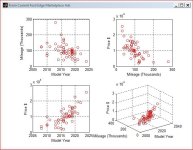
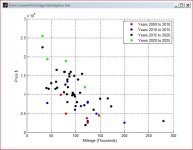
I use an engineering & scientific program tool (Matlab) to process, retrieve & store records into an Access database. Matlab has a Databas toolbox that lets me interact with Excel and Access via a GUI interface that is remarkably simple to construct using the Matlab GUI builder. This has served me well for analyzing data for statistical, prediction, model fitting, and graphical analysis. Whatever you choose, a 'relational' database is what you want so you can add new fields at any time without redesigning the whole project.
All this in about 15 lines of code using FB marketplace data.
 

Attachments

  • edge1.JPG
    edge1.JPG
    172 KB · Views: 48
  • edge2.JPG
    edge2.JPG
    129.8 KB · Views: 47
   / database selection
  • Thread Starter
#8  
Are all the spreadsheets separate files? Combining the spreadsheets into one with multiple tabs and cleaning up your queries would be a simple way to start making incremental improvements. Can the organization host on Sharepoint/One Drive to facilitate sharing between multiple users?

I'm not thinking of any obvious benefits to go to Access over Excel if that is working for them now. I'd focus on the low hanging fruit before starting over, unless there is a clear reason to adopt a whole different solution.
15 spreadsheets, each with maybe 4 to 6 tabs. A fairly sizeable chunk of data. And there are good reasons for keeping it in separate files, regarding potential data corruption and restoration. Plus, we keep financial transactions in separate files from item master and BOM's, as well as stock room, to keep access restricted appropriately.
 
   / database selection #9  
Hi folks,

Nothing to do with tractors, but with a wide and varied group here, I'm guessing there are a few who could offer me some advice here.

I implemented an ERP system for a small manufacturing business in Excel, a collection of about a dozen spreadsheets with error checking and a huge array of interdependencies. Some are simple match / lookup, but more are complicated operations based on finding data in other sheets. It all works great, but the latest versions of Excel are consistently breaking it with poorly-implemented autocorrect features, and of course it can only ever be accessed by one person at a time. It's also very prone to a user hosing the whole thing up by accident.

It's time to convert it to a database, but the only databases I've ever personally coded / created from scratch were all in MS Access. I'm not sure that dozens of hours put into recreating this ERP system in Access would be the best investment, but I don't know.

Of course there are canned ERP systems I could buy, but the cheap ones are very limited, and this operation is too small to invest in a big enterprise level solution and the investment that maintaining those usually entails. A fully-customized system in a very user-friendly database such as Access does seem to fit the bill.

Maximum users will likely remain under 10 for at least several years to come, and number of records (items < 5000, BOM's < 500, transactions < 20,000) isn't exacty huge, but it is sufficient to slow down Excel with the constant cross-referencing.

Go Access, or find and learn a better option?
I think you might run into some of the same issues with Access that you see with Excel. MS likes to bloat their products with tools and tweeks that usually cause more troubles than they solve. If I was doing this, I would look for a more long term fix. The world has changed since I was doing DBA and I am sure the market for DBs has changed a lot. I would look around for something that wouldn't be som prone to the bloating updates that MS seems to do with Office. Not to mention that I think the current version of Access is cloud based and not local.
 
   / database selection #10  
15 spreadsheets, each with maybe 4 to 6 tabs. A fairly sizeable chunk of data. And there are good reasons for keeping it in separate files, regarding potential data corruption and restoration. Plus, we keep financial transactions in separate files from item master and BOM's, as well as stock room, to keep access restricted appropriately.

That sounds a little more complicated than I was thinking.

Is the spreadsheet constantly breaking the biggest problem?
 
   / database selection
  • Thread Starter
#11  
Is the spreadsheet constantly breaking the biggest problem?
It's definitely an annoyance. I can usually fix it with just a few minutes, but it can really frustrate other users, and hose things up when they try fixing on their own.

The reality is there are no problems, until Excel's built-in intelligence "fixes" them. Things like named ranges inside of tables, which work fine when the document is not opened, get automatically reformated to relative ranges inside of a named table... which don't work when the referenced file is not opened. Totally stupid stuff, that never caused any problem on older versions of Excel, but now routinely breaking themselves on more recent versions.

Getting the whole system away from Excel is a foregone conclusion. I'm just tired of finding ways to make it work beyond its intended purpose.
 
   / database selection #12  
I've used Google sheets for projects like that. They allow multiple people to view/edit the sheet at the same time and you can set permissions on sheets. It would be an evolutionary step from Excel.

They also have a scripting language that is very useful.
 
   / database selection #13  
It's definitely an annoyance. I can usually fix it with just a few minutes, but it can really frustrate other users, and hose things up when they try fixing on their own.

The reality is there are no problems, until Excel's built-in intelligence "fixes" them. Things like named ranges inside of tables, which work fine when the document is not opened, get automatically reformated to relative ranges inside of a named table... which don't work when the referenced file is not opened. Totally stupid stuff, that never caused any problem on older versions of Excel, but now routinely breaking themselves on more recent versions.

Getting the whole system away from Excel is a foregone conclusion. I'm just tired of finding ways to make it work beyond its intended purpose.
I think you really should take a harder look at databases for this.

You need separation of duties and data access. On top of this you need canned reporting.

You should spend your time building, not fixing. Better for all involved.

Good luck.
 
   / database selection
  • Thread Starter
#14  
I think you really should take a harder look at databases for this.
MS Access is a database.

Or are you referring to commercial ERP software?
 
   / database selection #15  
MS Access is a database.

Or are you referring to commercial ERP software?
No. Just making a hard sell on upsizing to Access for you.

Who does the data input and/or query/macro builds in all the spreadsheets? Exactly what are they putting in? Are they updating existing rows and columns or adding data?
 
   / database selection
  • Thread Starter
#16  
Until now, it has been entirely me, which is why Excel was a great starting point for this system. But now work has grown to where I'm having to bring in contractors and outsource, and I'm getting tired of manually transferring all records for them, and printing everything they need on paper.

When data is added, it's mostly new rows, such as a new item number with descriptor, vendor, etc., or a new sales order with pricing, or a new purchase order, etc.

I've built a few Access databases in the past, but always uncontrolled environment, one large file, etc. So I understand the basics like tables, queries, and forms, but I will have to learn about what access control features it may have for a multi-user environment.

Also, in the category of "time flies", I now realize that most of my work in Access was probably 1995 - 2000, a full 20 - 25 years ago! It has probably been at least 20 years since I built an all-new database, but I work in Excel literally all day everyday, and I do recall enough functional similarities that I don't expect an enormously steep re-learning curve.
 
   / database selection #17  
Until now, it has been entirely me, which is why Excel was a great starting point for this system. But now work has grown to where I'm having to bring in contractors and outsource, and I'm getting tired of manually transferring all records for them, and printing everything they need on paper.

When data is added, it's mostly new rows, such as a new item number with descriptor, vendor, etc., or a new sales order with pricing, or a new purchase order, etc.

I've built a few Access databases in the past, but always uncontrolled environment, one large file, etc. So I understand the basics like tables, queries, and forms, but I will have to learn about what access control features it may have for a multi-user environment.

Also, in the category of "time flies", I now realize that most of my work in Access was probably 1995 - 2000, a full 20 - 25 years ago! It has probably been at least 20 years since I built an all-new database, but I work in Excel literally all day everyday, and I do recall enough functional similarities that I don't expect an enormously steep re-learning curve.
So you can store the data in one database, and have the users in another database just doing adds and updates from another. You could even see who the user is, and present them only with a form for reports. They in turn are separated from the data and delegated to just providing whomever a report.

Are each spreadsheet unique data wise, or do they share common data fields? Worst case is you have x number of tables based off each spreadsheet you have. Best case is you have a few tables with lots of data.
 
   / database selection
  • Thread Starter
#18  
Are each spreadsheet unique data wise, or do they share common data fields? Worst case is you have x number of tables based off each spreadsheet you have. Best case is you have a few tables with lots of data.
Wow... getting into the details. You asked for it! :ROFLMAO:

I tried to avoid any duplicate data entry, when creating the spreadsheets. But because your "form" is your "table" is your "report" in Excel, I do have may cells that auto-populate by pulling data in from other sheets.

For example, when calculating a BOM cost, I will have the BOM worksheet load the BOM for a given assembly number, then automatically find the latest revision of each item in the assembly from another workbook, and then go find the latest pricing from yet a third workbook. The pricing thing is a handful, very big formula that takes into account challenges like thee latest pricing maybe not covering the quantity in question, or older pricing that is at the right quantity but on an outdated pricing trend curve. Messy stuff, that Excel can handle quite well, but only when Excel's latest rendition of formula auto-correct doesn't break all links into the corresponding workbook.

Anyway, I haven't given it much thought yet, but I anticipate the database will have multiple tables, such as:

1. Item master
2. BOM master
3. Sales orders
4. Accounts
5. Approved vendor data
6. Customer data
7. Employee / contractor data
8. Inventory (could be rolled up into item master?)
9. Timesheets (could be rolled up into employee / contractor data?)
10. Leads tracking
11. Rates (for calculating project costs, and based partly on employee data, but partly independent due to other rates factors)

One thing I would want to ensure is that any Forms I create can easily auto-populate various fields from various tables. For example, when creating a BOM, I want the user to be able to enter an item descriptor and automatically see a list of available part numbers, or to enter a part number and then automatically see the corresponding descriptor.
 
   / database selection #19  
Data validation with Access will help with sharing this.
We find Excel , even with the built in validation is too easy to bypass/typo.
And people always leave filters on and make a mess.

I hate access too, but SQL seems too much for this and a lot more work.
 
   / database selection
  • Thread Starter
#20  
And people always leave filters on and make a mess.
Yeah, simple things like "Fill down" can create a huge mess and ruin months worth of data, if applied with a filter on!

The behavior of filtered used to be more predictable and obvious, but like everything in Excel, has become more unpredictable or hard to predict in recent years.
 

Tractor & Equipment Auctions

DEUTZ MARATHON 60KW GENERATOR (A58214)
DEUTZ MARATHON...
2016 Nissan Quest Van (A59231)
2016 Nissan Quest...
UNUSED FUTURE 32" HYD TILTING BUCKET (A52706)
UNUSED FUTURE 32"...
2021 Deere 331G (A53317)
2021 Deere 331G...
2021 METSO QUOTEC NORDTRACK S3.7 MOBILE SCREENER (A60429)
2021 METSO QUOTEC...
Cushman Hauler 1200X Golf Cart (A57148)
Cushman Hauler...
 
Top