Using a tractor for wireless Internet installation

   / Using a tractor for wireless Internet installation #1  

ishiboo

Platinum Member
Joined
Feb 1, 2011
Messages
994
Location
Oshkosh, WI
Tractor
Kioti NX6010HSTC, Cat 279c
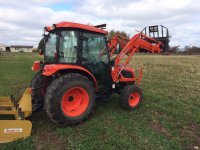
An unusual project for a tractor I'm sure, but I couldn't live without it!

I've lived at the same property now for 6+ years. I got it for a steal, so despite wanting a bunch of changes, I haven't been able to leave. One of the main issues though is that I work from home, and my Internet is HORRIBLE. We also use Netflix/Hulu/Prime a lot. The only option is AT&T DSL... 1.5mb down, .5 up. One cable provider is 1 mile to the west, another is nearly a mile to the east - and only on the opposite side of the road, plus the opposite side of the tracks from me. The only place that will service me is AT&T with fiber, for $600/month for a 10mb connection. So I found a solution. Install cable at my neighbors barn, and shoot it wirelessly to my property. Unfortunately, there was a slight elevation change as well as a very active train track in the middle, where trains are often parked... leading me to need a big pole to put it on. My barn is 45' tall but has no line-of-sight, so the pole will have to be in the field.

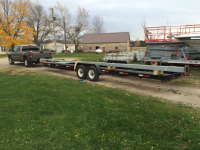
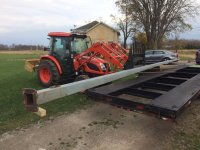
Next summer I will relocate it and either put it on a permanent foundation, or replace it with a new Rohn tower... but I have limited time this winter and my budget for the project is already blown. So I found a 35' steel light pole for $50! Getting it home was a challenge. I posted an ad on Craigslist, hoping someone with a ladder rack who wanted to make a quick buck would respond. I had one person who wanted to strap it into the trunk of their car and drive with their hazards on, another who wanted to have it stick out from the bed of his truck. I couldn't believe how stupid people were. In the end, I borrowed a 32' trailer and got it myself.
IMG_4618.png
IMG_4619.JPG

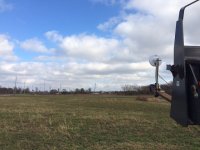
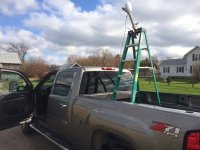
Testing to see if the link will work. One end on my pallet forks, one on a ladder in the back of my truck :)
IMG_4458.JPG
IMG_4460.JPG
IMG_4462.JPG

It works! With no fine tuning, just how I guessed they should be aimed, and poor line of sight due to the low height, I got over 320 megabits! With a 100 down/7 up business connection on one end, it's more than enough. Love the Ubiquiti products.


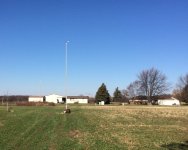
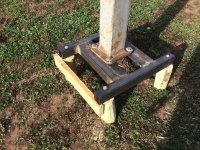
So, time to mount the pole. I found some 4x3x3/16 tube laying around, as well as some 1/2" bar. Made a rough frame for it. Pounded four 8'x5" pressure treated posts in with the post pounder, leveled and cut the tops off. Mounted the frame with four 1/2"x12" lag screws. Standing the pole up was a challenge - I set the end of it on the metal frame I had built and chained it on. On the other end, I set the pole on top of the forks, and lifted it up. I had a chain around the pole to keep it between the forks. Continued walking forward until the pole was nearly vertical. Now, I used two ratchet straps to strap it firmly to the forks so I could lift it completely off the ground with the tractor. Set it down, bolted it up... good to go! This was pretty scary as it's a huge piece of steel capable of exerting a lot of leverage, so despite only weighing 300-400 lbs it was a scary prospect.
IMG_4625.JPG
IMG_4630.JPG

Now, I have to trench in the Cat6 direct burial and pound in a ground rod and I'll be good to go on my end. On the opposite end, it's as simple as mounting it to a wood barn and I'll be good to go. Time for the painful process of waiting for the install from the cable company!
 
   / Using a tractor for wireless Internet installation #2  
Let me ask this: When the wind blows against that 35 foot pole, and its antenna load, are those 4 lag bolts screwed into the end grain of that wood going to hold? Do you plan on any guy wires? That seems like a lot of overturning moment force there.
 
   / Using a tractor for wireless Internet installation #3  
Looks like a nice setup.
A concrete pad may be a little safer for securing the pole.

How long is your run with the CAT wire?
 
   / Using a tractor for wireless Internet installation
  • Thread Starter
#4  
Let me ask this: When the wind blows against that 35 foot pole, and its antenna load, are those 4 lag bolts screwed into the end grain of that wood going to hold? Do you plan on any guy wires? That seems like a lot of overturning moment force there.

I'm not too concerned about that. The steel frame is set up to lower the torque on the ends, and the lag bolts are 12" long. Should be good in all but the worst wind conditions. No guy wires. If I get concerned, I will add steel tabs to the frame which allow me to bolt it to the sides of the posts. Despite being somewhat noodle-like given its length, the post moves around very little in the wind.

Looks like a nice setup.
A concrete pad may be a little safer for securing the pole.

How long is your run with the CAT wire?

Definitely agree with you, this is temporary to make sure everything works 110% before I pour a permanent foundation. Will require a 24" auger to set a 24" sonotube 5-6' deep or similar, which I don't have. As I said "Next summer I will relocate it and either put it on a permanent foundation, or replace it with a new Rohn tower... but I have limited time this winter and my budget for the project is already blown."

Cat6 run is about 250' end-to-end, including the 35' up the pole, and a small coil of wire at the house. Patch cable adds 7'. Once it is all set/placed it will be a bit shorter than that.
 
   / Using a tractor for wireless Internet installation #5  
Looks like you should be good to go!!!
If your location works out I'd just pour the footing next year and use the pole you have. Really don't think you need to spend a couple grand on a Rohn.
 
   / Using a tractor for wireless Internet installation #6  
I think K0ua made a good point. The wind pushing and twisting on that 35' rudder will create an amazing amount of torque. I hope it works for you but I think the odds are slanted in favor of the wind, verses a 5" piece of wood.
 
   / Using a tractor for wireless Internet installation #7  
So what all products did you end up using to build this wireless system? Looking at their site one can go way overboard on setting this up, looking at the smaller 5ghz stuff has me thinking :)
 
   / Using a tractor for wireless Internet installation
  • Thread Starter
#8  
So what all products did you end up using to build this wireless system? Looking at their site one can go way overboard on setting this up, looking at the smaller 5ghz stuff has me thinking :)

Pretty simple, one NBE‑5AC‑19 on each end.

The install also uses Ubiquiti mounting brackets, ToughCable and associated RJ45 connectors, and Ubiquiti surge protectors. The future plan is to switch a lot of my gear over to Ubiquiti, there will be a 24-port POE switch as well as an EdgeRouter. I already have an UAP-AC-PRO access point on order to replace my current access point.
 
   / Using a tractor for wireless Internet installation #9  
Cool project!

Where I live, there is no DSL nor cable anywhere near enough to do what you have done.

However, there are a few line-of-sight wireless ISP's that have made a business out of serving customers like me using the same technology that you are using. At least one of the ISP's started as a few neighbors cooperating so they could have Internet other than dialup. Back then, they were using wifi to connect house-to-house.

The ISP I'm on now uses Ubiquity wireless equipment, as do I for my router and wifi AP. Ubiquity can't be beat for quality at a reasonable price.

One thought with respect to your project... I have a cat5 run between my house and barn. Despite grounded surge protectors at both ends, I've had equipment on that run fried due to lightning. (The surge protectors themselves were also fried.) These were not direct hits on my house, barn, or anything in-between; rather, they were near enough hits to cause a large potential across the cable.

I'd like to switch out the cat5 with fiber someday, which would put an end to my lightning troubles. Something to think about if you have frequent thunderstorms.
 
   / Using a tractor for wireless Internet installation #10  
I'd like to switch out the cat5 with fiber someday, which would put an end to my lightning troubles. Something to think about if you have frequent thunderstorms.

Yep. Fiber is hard to beat to solve lightning problems.. A couple of things to remember, Not all locations have the same incidence or intensity of lightning. The next thing to remember is anytime you put copper into the ground, you have a lightning problem that needs to solved. Not all lightning protection devices are equal. Some are absolutely worthless. Some are so-so, and some (Transtector/Polyphasor) are the best. Just sayin.
 
   / Using a tractor for wireless Internet installation #11  
I'd like to switch out the cat5 with fiber someday, which would put an end to my lightning troubles. Something to think about if you have frequent thunderstorms.

Yep. Fiber is hard to beat to solve lightning problems.. A couple of things to remember, Not all locations have the same incidence or intensity of lightning. The next thing to remember is anytime you put copper into the ground, you have a lightning problem that needs to solved. Not all lightning protection devices are equal. Some are absolutely worthless. Some are so-so, and some (Transtector/Polyphaser) are the best. Just sayin.
 
   / Using a tractor for wireless Internet installation
  • Thread Starter
#12  
Cool project!

Where I live, there is no DSL nor cable anywhere near enough to do what you have done.

However, there are a few line-of-sight wireless ISP's that have made a business out of serving customers like me using the same technology that you are using. At least one of the ISP's started as a few neighbors cooperating so they could have Internet other than dialup. Back then, they were using wifi to connect house-to-house.

The ISP I'm on now uses Ubiquity wireless equipment, as do I for my router and wifi AP. Ubiquity can't be beat for quality at a reasonable price.

One thought with respect to your project... I have a cat5 run between my house and barn. Despite grounded surge protectors at both ends, I've had equipment on that run fried due to lightning. (The surge protectors themselves were also fried.) These were not direct hits on my house, barn, or anything in-between; rather, they were near enough hits to cause a large potential across the cable.

I'd like to switch out the cat5 with fiber someday, which would put an end to my lightning troubles. Something to think about if you have frequent thunderstorms.

The surge protectors are basically a throw-away if something happens, yeah.

Fiber is an additional cost and no guarantee of protection. Reason being, the antenna still needs to be powered by something... which means a much larger copper path right back to the building's electrical system, with the capability to carry much more current. With proper grounding of the pole, grounded cable, multiple surge protectors per Ubiquiti guidelines for grounding, etc... the risk is eliminated just about as much as I can make it.

And while a 35' metal pole sounds like a great target, the barn nearby at 45' with 5' lightning protectors connected to ground is a pretty good target too :) Lightning is one of those things that does whatever the **** it wants though, it will on occasion strike right next to a building directly to the ground, it can branch out and affect stuff all over the place, etc. The shielded cable does do a pretty good job of preventing massive EMF from traveling all over the place and affecting equipment.

Yep. Fiber is hard to beat to solve lightning problems.. A couple of things to remember, Not all locations have the same incidence or intensity of lightning. The next thing to remember is anytime you put copper into the ground, you have a lightning problem that needs to solved. Not all lightning protection devices are equal. Some are absolutely worthless. Some are so-so, and some (Transtector/Polyphaser) are the best. Just sayin.

Definitely. This installation is to professional guidelines for tower installations, but it's still an additional risk.
 
   / Using a tractor for wireless Internet installation #13  
I've been trying to figure out a way to do something similar at our place. My options are a T1 at $600/mo, using my cell phone as an access point or Satellite Internet. I'm spoiled by the cable modems I have at the suburban house, more so by the unlimited data than by the speed, and need to figure out a way to do that there. We're only a few miles from town and since we're on top of a hill, line of sight wouldn't be a problem, so I need to see what is available in town and then see if I can rent a place to mount an antenna from someone. Since we still haven't sold the suburban home and made a permanent move, I haven't gotten too far into it.

As to the lightning, with several years of working on residential and small commercial sprinkler systems, I can tell you from first hand experience that anytime you have wire in the ground you have the potential for lightning damage, no matter what sort of grounding you do. 100% of the time the damage we repaired on sprinkler systems came from the field, not the household electric. Honestly, the 24V transformer for the controllers took the brunt of the force on the house side and protected the rest of the electrical from further damage. I had one job where the PVC mainline was shattered for about 8', I'm assuming it was where the lightning hit. So, unless you can power the antenna via a battery and solar charger, even fiber won't protect you fully and if you run power directly to it, you're going to need a serious surge suppressor to actually stop anything. Personally, I'd rather stick with the POE and sacrifice the antenna and POE switch than have to deal with a strike that got into the household wiring and fried everything or worse, started a fire.
 
   / Using a tractor for wireless Internet installation
  • Thread Starter
#14  
Had 2 days of serious wind, one with a wind warning with 50+ gusts... all is well so far!

Hopefully no 90+mph days until I get a real foundation under it next spring. :eek:
 
   / Using a tractor for wireless Internet installation #15  
Had 2 days of serious wind, one with a wind warning with 50+ gusts... all is well so far!

Hopefully no 90+mph days until I get a real foundation under it next spring. :eek:

good deal, I was just concerned that the wood would break or the lags would pull out.. But if it held, then you are probably good to go until you can get the concrete in the ground.
 
   / Using a tractor for wireless Internet installation #16  
Man, and i thought my parents had it bad. they're in IL serviced by a WI telephone company that offers 5mbps DSL or 7mbps DSL.

I go over there and be like "wtf is this the stone age" now days you can't live without the internet anymore, everything is based on it.
 
   / Using a tractor for wireless Internet installation #17  
We get cable DSL at the city house, of course fast as all heck, the farm gets line of site at 10 down and 2 up. Not very good but better than nothing.

Was given a box of Cat-6. I know how to build cat 5 and do most of my own wiring so figured Cat-6, why not. Connectors cost should have been my first warning but trying to make a correct connection, fuggettaboutit. I don't know how you build cat-6 (would love to hear any tricks) but nope, gonna stick with cat-5 until I learn. way too hard...
 
   / Using a tractor for wireless Internet installation
  • Thread Starter
#18  
We get cable DSL at the city house, of course fast as all heck, the farm gets line of site at 10 down and 2 up. Not very good but better than nothing.

Was given a box of Cat-6. I know how to build cat 5 and do most of my own wiring so figured Cat-6, why not. Connectors cost should have been my first warning but trying to make a correct connection, fuggettaboutit. I don't know how you build cat-6 (would love to hear any tricks) but nope, gonna stick with cat-5 until I learn. way too hard...

Cat6 connectors are basically the same price as Cat5 and are installed exactly the same. The only difference is you need to cut the plastic divider. If you are having issues, get the EZ-RJ45 crimper and connectors... it will greatly simplify installation.
 
   / Using a tractor for wireless Internet installation #19  
Cat6 connectors are basically the same price as Cat5 and are installed exactly the same. The only difference is you need to cut the plastic divider. If you are having issues, get the EZ-RJ45 crimper and connectors... it will greatly simplify installation.

Not sure if its the same thing, but at work we use passthrough connectors with a passthrough crimper (the wires go through the connector and stick out the end until you crimp the connector on, then the crimper also cuts off the wire that is sticking out).

Aaron Z
 
   / Using a tractor for wireless Internet installation #20  
Not sure of the manufacturer of my crimper but I paid a healthy sum for it. Nope, my issue is the Cat 6 RJ-45 connectors. At least the version I had you had the CAT -6 wires are so thick that they have to be stacked, thus needing a divider that slides inside the RJ-45 connector. Could never get it all to come together. Maybe it was my hope to keep the exposed wires short that made it even more difficult. Will try again but in the end I am using wireless AC spec so I am not loosing any speed at the moment.
 

Tractor & Equipment Auctions

Kuhn FC400RG (A60462)
2021 BMW 1200RT (A55853)
2021 BMW 1200RT...
294 (A52706)
294 (A52706)
2022 Brush Wolf 7800-HF Skid Steer Brush Cutter (A56438)
2022 Brush Wolf...
2016 CATERPILLAR 311FLRR EXCAVATOR (A60429)
2016 CATERPILLAR...
204549 (A52707)
204549 (A52707)
 
Top