Plasma cutter, automation project

   / Plasma cutter, automation project
  • Thread Starter
#21  
Well JimMc, you were correct, the major contributor of electrical noise is the workpiece after the clamp is applied to it. So I ran a seperate ground wire from the workpiece to ground, and changed to shielded cable for all motor leads and the shields of these are shielded seperately from everything else, and IT WORKS!!! I have a software issue right now with torch power on and off at the right times but I am sure I will get that worked out. Now I am ironing out the details of scaling, travel speeds, etc. These are fun details though because I get to run a test every few minutes and watch as my computer-drawn 2D lines are cut out of steel automatically and accurately! Very Cool! Bring on that snowblower project now.
 
   / Plasma cutter, automation project #22  
If you're cutting metal, don't leave me in suspense./w3tcompact/icons/smile.gif Post some pictures of your test cuts when you get a chance.
 
   / Plasma cutter, automation project #23  
Congratulations!!! Makes a project more fun when you also made the some of the tools. Does your software generate G-code programs? Different machines use different codes for the on/off. Most software allows you to change the commands to the correct ones.

Enjoy!
 
   / Plasma cutter, automation project
  • Thread Starter
#24  
First few small parts produced. These are all cut from 14 gauge sheet steel (0.078" thick). The shapes were bent after plasma cut. The squares on the floor vinyl are 6", for scale.
I am out for better software now. Can't import files to Dancad3d/Danplot. Looking at a couple others. Hope to make the import possible, instead of drawing everything in DANCAD3d. Here's the pic...
 

Attachments

  • 236493-metalprojects 067a.jpg
    236493-metalprojects 067a.jpg
    35.8 KB · Views: 1,203
   / Plasma cutter, automation project #25  
Looks great!
Are these for a particular project or were these strictly for test? I have about a year to go before I can build my shop building. I am definitely looking forward to when I can build a cnc table.
 
   / Plasma cutter, automation project #26  
Now youve done it! I HAVE to have one for my 1/4 scale train stuff. Keep us informed on further progress.
 
   / Plasma cutter, automation project #27  
Those are nice looking ... How did you bend them to get such a nice radius ...
 
   / Plasma cutter, automation project
  • Thread Starter
#28  
Thanks. The stuff so far has been all for test and expanding the learning, and to progressively work out all the problems. I did just one thing for an actual project so far, actually some frame-stiffening gussets for the plasma table itself. They came out perfect, four of them drawn and cut in about 20 minutes, a little sanding belt time and on they went.
Bending is being done on my Chinese 3in1 sheet metal tool. It aint perfect but it works OK.
1/4 Scale stuff, yea I can see how a couple of those pcs look like truss components on a railroad bridge or something. Triangles are fun to cut, and make for lightened structures still maintaining stiffness, so they seemed like a good place to explore.
New software (Master5) looks promising. I need a Pentium now. More in a week or so...
 
   / Plasma cutter, automation project #29  
Looks great! I'm jealous. I was cutting steel angle last weekend with an abrasive wheel in my $30 sears circular saw. Ignorance is truly bliss. Unfortunatley for me as a Mech Eng., I know there is a better way! As my coworker says, always work like a gentleman.
 
   / Plasma cutter, automation project #30  
</font><font color="blue" class="small">( Bending is being done on my Chinese 3in1 sheet metal tool. It aint perfect but it works OK.
)</font>

Jim, what brand/style sheet metal tool do you have? I have been looking for one and they all seem to be imports. The most reasonable that I have found so far is a 48" box/pan brake from Grizzly
 
   / Plasma cutter, automation project
  • Thread Starter
#31  
http://www.grizzly.com/products/item.cfm?itemnumber=G4011&site=grizzly

This is my machine. It is OK, as I said. I am bending up to 6 inches of 14 (0.078") gauge with it now, even though it is rated for 22 gauge. This is the problem I see with most all these things, there is no full-specification published. To fully describe the capacity they would have to spec the gauge and width limitations, it would take a graph of some sort.
I figure when I break it, I will have to build it up stronger.
I think you do have a good priced one picked out there. However, I would go for the heavy duty 39" 14 gauge one at the bottom of your page, if it were for a bender-only.
 
   / Plasma cutter, automation project
  • Thread Starter
#32  
Progress update:
Now running a "new" computer: P2 400 Mhz, Win98.
Have switched to Master5 software for table control, which made a HUGE difference. Master5 uses acceleration/decel ramping on rapid moves. The effect of this additional "intelligence" is that the machine can run almost 20 times as fast as it did with the simpler code. It still cuts at the operator-defined speeds, but while traveling between cuts it absolutely flys, and accuracy is maintained.
I am now converting everything to Gcode for for execution by Master5. Master5 contains a DXF to Gcode converter but it does not always do what it should, so I end up editting the Gcode. Gcode is really quite simple so this is no big deal. I am trying to establish a process to draw mechanical parts with CAD software, saving them to DXF format, converting to Gcode, edit Gcode for torch-specific details, and send it to Master5 for burning out. I am not quite there yet but have had a little success. I drew a simple 50mmX50mm square shape and took it thru the above process to burn it out. I used this as my calibration guide to get the translation and scaling setup right.
But, the coolest thing I'v done is this:
I found and downloaded a file of the "mudflap girl". You know the one I mean. I was able to edit the file enough to get it to cut on my machine, very cool. The curves (very important parts of this model) came out real well. She's got all the features. /forums/images/graemlins/tongue.gif
So the results are encouraging, although a bit slow.
 
   / Plasma cutter, automation project
  • Thread Starter
#33  
More progress; All the electrical problems are fixed now, no more false switch-open signals. Added o-rings to the motor shafts to keep the insides cleaner longer.
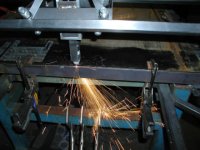
My Dad came home from a local auction with forty sheets of 0.060" stainless steel (400 series?) which had a little corrosion but can still be polished up nicely. Makes nice fodder for the plasma animal. We cut about ten parts out Saturday, including a part drawn in Catia, saved out as DXF, converted to Gcode by Master5, editted for torch pauses and cut order. It came out great. Here's an action shot attached. Next I will be learning cutter compensation to zero in on the part tolerances a bit better. The plasma machine is now worth painting, so I suppose that will have to happen soon. I was thinking John Deere green and yellow...just kidding, any suggestions, I need something cool and exotic looking!
 

Attachments

  • 250568-metalprojects 090a.jpg
    250568-metalprojects 090a.jpg
    32.2 KB · Views: 1,165
   / Plasma cutter, automation project #34  
Rather than using cutter comp, you can just offset the shapes you want to cut by 1/2 the kerf in your CAD program - remember offset outward for outer shapes, inward for holes. Makes programming life much simpler if you're hand coding.
 
   / Plasma cutter, automation project
  • Thread Starter
#35  
Yea, I like your suggestion. After asking a few "experts", compensation is too much for me to expect to add to most parts. So I will get into the habit of drawing critical dimensions with built-in comp. Conveniently, its 1 mm diameter, so easy math.
Next issue: lead-ins for the holes and slots so no start-up scarring points. I guess these will be "custom" for each feature. Just have to get accustomed to manually writing these lines of G.
 
   / Plasma cutter, automation project #36  
I used to use a 3/8" lead-in on a similar system to yours, with no lead out. On lead-ins for arcs and circles I used an arc lead-in. On a straight line use a straigt line lead-in. I could send you a sample dxf if you like.
 
   / Plasma cutter, automation project
  • Thread Starter
#37  
> I could send you a sample dxf if you like. <
I will take all the help I can get! THanks for the assistance. Jim
 
   / Plasma cutter, automation project #38  
I'm attaching a jpg of typical lead-in situations. The green is the finished part. The purple is the travel path of the plasma. Obviously for illustration, the offset for kerf is larger than you will actually need. The upper left enlargement is the leadin fo the outside profile, the bottom enlargement is for the hole. While I'm thinking about it, always cut outside profiles in a clockwise direction. Inside profiles, like holes in your parts, are cut in a counterclockwise direction. This reduces the amount of bevel in the kerf on the finished part. The way the gases swirl in the plasma tip cause the cut cone to have more angle on the left side of travel, so keep your finish cut to the right of travel for smoother parts. We have reversed this on purpose when we wanted to produce a tapered hole or a part with tapered sides though and it worked quite well.
 

Attachments

  • 252022-Drawing1.jpg
    252022-Drawing1.jpg
    8 KB · Views: 1,049
   / Plasma cutter, automation project
  • Thread Starter
#39  
JimMC, Thanks for the drawing. I am beginning to understand that you do this BEFORE feeding it to your Gcode converter, Correct? I will try this soon. I've been trying to add to the Gcode after its creation. Sometimes this can be done, but not for very complicated things. If I understand your method correctly, it would seem to be more efficient. I guess if it was too easy, everybody would be doing it.
What I want to do, is design a solid model, unfold the part to a flat pattern, project it to a 2-D surface (draft it), then (your method, if I understand correctly) add lines for lead-in to this 2-D drawing, THEN feed it to the Gcode converter.
Can I ask, on your production machines, is there an automatic height-above-workpiece control? I am having trouble staying the correct height above the sheet metal, as it is a balancing act between real close for great definition and further away for more reliable starts. One-sixteenth inch works well, but then the sheet stock can decide to warp from heat and ruin my best intention. I understand that some machines can adjust the cutter heigth based on plasma current sensing. I could do this, completely seperate from the 2-axis control system. What do you think, am I on the right track here?
(also, thanks for the bevel vs travel direction thing. I was aware of it, but its good to hear from someone else to confirm what I assumed.)
 
   / Plasma cutter, automation project #40  
Our height control reads the arc conditions and adjusts for warpage as well as raising between cuts and lowering back down during rapids (movements between cuts). Some machines use a roller or "presser foot" for thin gauge to keep the workpiece. It sort of glides across the sheet.
 

Tractor & Equipment Auctions

CATERPILLAR 305 CR EXCAVATOR (A52709)
CATERPILLAR 305 CR...
2012 Kenworth T800 T/A Day Cab Truck Tractor (A55973)
2012 Kenworth T800...
Hyster H90XMS Forklift (A59213)
Hyster H90XMS...
MORBARK WOOD HOG 6400 XT HORIZONTAL GRINDER (A60429)
MORBARK WOOD HOG...
Year: 2019 Make: Nissan Model: NV200 Vehicle Type: Van Mileage: 88,557 Plate: Body Type: 4 Door Van (A55853)
Year: 2019 Make...
Kubota HB84 Hopper Broom (A53317)
Kubota HB84 Hopper...
 
Top