
You are using an out of date browser. It may not display this or other websites correctly.
You should upgrade or use an alternative browser.
You should upgrade or use an alternative browser.
Downloading photo test
- Thread starter srs
- Start date
- Views: 2999
More options
Who Replied?
/ Downloading photo test
#1


weldingisfun
Veteran Member
- Joined
- Dec 12, 2006
- Messages
- 1,825
- Location
- West Bell County, Texas
- Tractor
- Mahindra 4500 4WD w/FEL, and Scotts S2048 lawn tractor
I'd give you a "B".
OP
srs
Veteran Member
I'll take it! But why just a "B"?
Jimbrown
Veteran Member
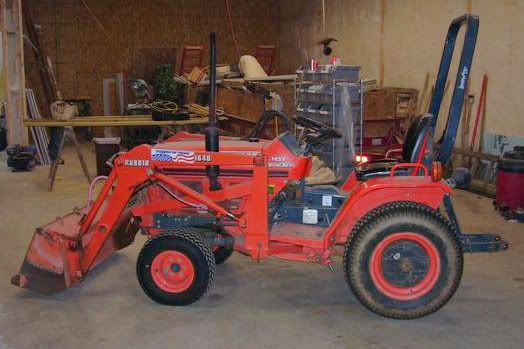
Cause you shuda done it like this: cleanup, crop and post.

DreaminGreen
Silver Member
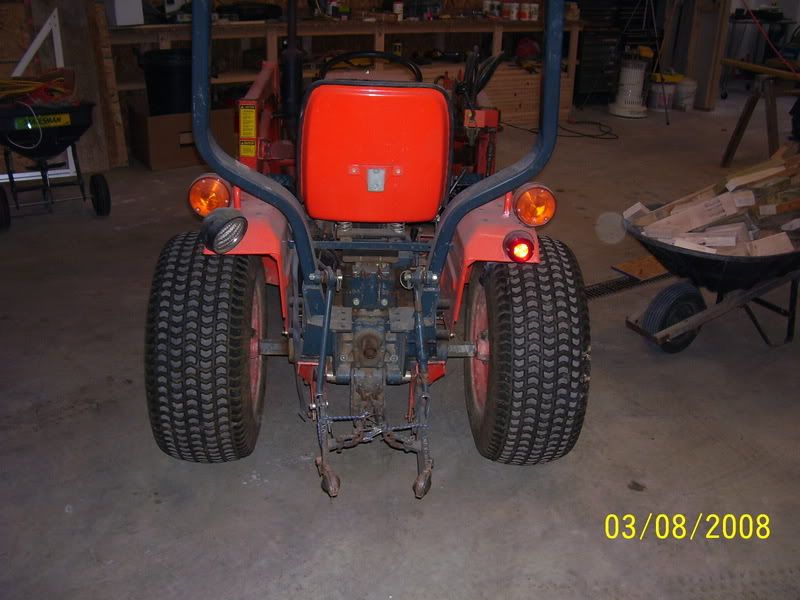
You need to post more pics of the tractor for practice. Because your not quite their yet...you were'nt downloading, you were "uploading" to TBN. now lets see more tractor pics.
Jimbrown
Veteran Member
Well I give you credit yours looks like mine a well used tool as opposed to waxed garage queen. you might find this helpful.
http://www.tractorbynet.com/forums/showthread.php?p=1220167#post1220167
http://www.tractorbynet.com/forums/showthread.php?p=1220167#post1220167
LBrown59
Super Star Member
- Joined
- Oct 27, 2004
- Messages
- 16,904
- Tractor
- 2003 Kubota BX1500/2004 Kubota Bx23/2005 Kubota BX1500
How did you do that?Jimbrown said:Cause you shuda done it like this: cleanup, crop and post.
How
OP
srs
Veteran Member
I'll keep practicing. Thanks guys!

WayneB
Elite Member
srs said:I'll keep practicing. Thanks guys!
You are doing just fine, and nice looking shop area too!
Jimbrown
Veteran Member
"How did you do that?"
Photo shop fill flash crop sharpen.
Here is a freebee that will do the same thing.
IrfanView - Official Homepage - one of the most popular viewers worldwide
Photo shop fill flash crop sharpen.
Here is a freebee that will do the same thing.
IrfanView - Official Homepage - one of the most popular viewers worldwide
OP
srs
Veteran Member
WayneB said:You are doing just fine, and nice looking shop area too!
Thanks Wayne! I'm trying, but I know I have a lot of reading to do to figure this photo stuff out, but slowly and surely I'll get there, at least I hope so. As far as the shop it's a Morton building 30 X 45. It's a mess right now as I'm trying to install some OSB to cover the insulation. I already installed some OSB in the rear of the building and on the side wall you can still see the plastic (vapor barrier) covering the insulation. It's one of those fun projects that will take some time to complete.
WayneB
Elite Member
Hi Stanley, one thing is for sure we would all love to have a Morton building to store stuff in and play! My wood shop is 24 x 32 and when we first set it up I figured I would never need all the space and spread things out, as time went on I keep moving things closer and closer and now there is no room.
As for the pictures you might want to establish an account (it's free) with something like photobucket to store your pictures. Image hosting, free photo sharing & video sharing at Photobucket
You will be able to up load pictures and then store them there. They also provide you with the ability to work with the pictures and be able to pull them into a forum thread either as a drop in type picture or a link to the location on line. You will also be able to re-size the image to make it fit nicely on the forum and it will be easier for the people reading / looking at the pictures.
example

same picture with a link
http://i176.photobucket.com/albums/w198/wayneB_album/DSCN0229.jpg
Once you get the hang of it you will see it is pretty easy to deal with.
Regards, Wayne
As for the pictures you might want to establish an account (it's free) with something like photobucket to store your pictures. Image hosting, free photo sharing & video sharing at Photobucket
You will be able to up load pictures and then store them there. They also provide you with the ability to work with the pictures and be able to pull them into a forum thread either as a drop in type picture or a link to the location on line. You will also be able to re-size the image to make it fit nicely on the forum and it will be easier for the people reading / looking at the pictures.
example
same picture with a link
http://i176.photobucket.com/albums/w198/wayneB_album/DSCN0229.jpg
Once you get the hang of it you will see it is pretty easy to deal with.
Regards, Wayne
OP
srs
Veteran Member
Wayne, thank you very much sir.

SCDolphin
Gold Member
touched up

Ray2310
Silver Member
This is a photo posting test.
This is my grandpap trying out my tractor last summer. He is used to something a little bigger. He has a John Deere 310 backhoe.

Although he is 85 years old he always looks for an excuse to be on his backhoe...just like me.

This is my grandpap trying out my tractor last summer. He is used to something a little bigger. He has a John Deere 310 backhoe.
Although he is 85 years old he always looks for an excuse to be on his backhoe...just like me.
WayneB
Elite Member
Nice pictures and I only can hope at 85 to be able to climb up onto my tractor, heck who knows by then I might have a brand new one!
LBrown59
Super Star Member
- Joined
- Oct 27, 2004
- Messages
- 16,904
- Tractor
- 2003 Kubota BX1500/2004 Kubota Bx23/2005 Kubota BX1500
Image hosting, free photo sharing & video sharing at Photobucket
lb59 - Photobucket - Video and Image Hosting
Testing testing testing.
Did either of these links work did anybody get to see the picture?
lb59 - Photobucket - Video and Image Hosting
Testing testing testing.
Did either of these links work did anybody get to see the picture?
Not bad, but it could be better...
In photobucket, (on the photo, not the slideshow) put your mouse curser inside of the photo and press your right mouse button. That should open up a menu box. At the bottom of that menu, click on "properties". That will open up another box. On the third line down, you should see, "Address: (URL)" Capture that address and post that into your message box. Like this:
http://i283.photobucket.com/albums/kk286/lb59/100_2300.jpg
If you don't know how to capture the address (read on...)
Put your mouse curser over the text (starting with "http") then press (and hold down) your left mouse button and drag your mouse curser to the right AND down a little (just in case the address wrapped around to the next line or two). When all the text is highlighted, release the left mouse button. The text should still be highlighted. Move your curser back on top of the highlight text, and press (and release) the Right mouse button... which should open a little menu box. Look for and click on "copy". Then you can go to tractorbynet and paste the URL address.
In photobucket, (on the photo, not the slideshow) put your mouse curser inside of the photo and press your right mouse button. That should open up a menu box. At the bottom of that menu, click on "properties". That will open up another box. On the third line down, you should see, "Address: (URL)" Capture that address and post that into your message box. Like this:
http://i283.photobucket.com/albums/kk286/lb59/100_2300.jpg
If you don't know how to capture the address (read on...)
Put your mouse curser over the text (starting with "http") then press (and hold down) your left mouse button and drag your mouse curser to the right AND down a little (just in case the address wrapped around to the next line or two). When all the text is highlighted, release the left mouse button. The text should still be highlighted. Move your curser back on top of the highlight text, and press (and release) the Right mouse button... which should open a little menu box. Look for and click on "copy". Then you can go to tractorbynet and paste the URL address.
Last edited:
Here are some similar links:


- Replies
- 0
- Views
- 88