Harbor Freight Tools that don't suck

   / Harbor Freight Tools that don't suck #9,621  
If the image isn't good enough for them to use their scanner, or if the scanner is a "Chicago Specialty" brand :laughing: and can't scan the phone just read the coupon number under the bar code to the cashier that will work too.
 
   / Harbor Freight Tools that don't suck #9,623  
https://www.northerntool.com/shop/tools/product_200625243_200625243<<<If I get this filter how far away from air compressor should I place it?

That's a good one.

There should be a 1 page instruction manual with it, mine did. It called for 20 feet. I bought a 1/2" x 25' long rubber air hose, connected one end to the tank, coiled about 20 feet into a 15" coil on the floor and connected the other end to the regulator. That 20' foot coil on the cool concrete floor is enough to let the air cool and condense into large enough droplets that the 5 micron filter can separate.
 
   / Harbor Freight Tools that don't suck #9,624  
'Harbor Freight Coupon Database' is an Android ap for your phone. ... show the phone to the clerk. They scan the barcode right off your phone.
Bummer that there is no iPhone version.
Oh man I've been livid for two days over the closed world of Apple.

30 years ago we typed our audit reports on pc laptops - typically 6~10 pages, and took them to the front office secretary to retype on her Mac so the boss with her Mac could make final edits which became the official version. In addition to inefficient this meant the electronic copy of the official report was inaccessible to everyone but the front office. Not only because PC's and Macs couldn't read one another's text, or diskettes, but also the Apple and PC partitions on the office network were incompatible, mutually inaccessible. Then it's my fault because "Mac's are supposed to be simple, teach me how to use mine" - when I had no access to one at all. Bah.

Move the calendar forward 30 years to last week. A dear friend, a retired attorney and thoroughly pc-literate before she retired, wrote an affidavit for me that I badly needed - on her iPad. She had no idea how to email or text it to me or print it. Her sister came over to help her, the 'Mac guru' from the closed world of Apple products in elementary education who had advised her to buy the iPad. They emailed me something with a .pages suffix. I Googled for advice how to read it and learned you have to go on a Mac to make a pc-readable version, there's no way for the recipient to translate .pages on a pc. In the several files comprising the .pages email I found a micro-sized visual image, a jpg, of the text we needed. Expanded that to legible, typed it into my laptop, printed it, had the friend come to me to sign it.

Affadavits from the other 16 people involved arrived as email drafts for our review followed by signed paper copies, no drama.

My attitude toward the closed world of Apple hasn't changed!


John, sorry to take this out on you! :D It just hit me in a freshly sore spot. That iPad (and its owner)'s foolishness cost me a day of attention and frustration during a tight deadline.


Sorry guys for the 'do-suck' diversion. :)
 
   / Harbor Freight Tools that don't suck #9,625  
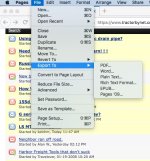
That was harder than it needed to be.

pages-export.jpg

Bruce
 
   / Harbor Freight Tools that don't suck #9,626  
That was harder than it needed to be.

View attachment 569392

Bruce

An iPad can do that after she typed in some text? How?

I do that (similar) from several environments on a pc but I couldn't convince her to find some way to 'save as .DOC or preferably .RTF' from her iPad. Maybe I should have said 'export'. Her sister with decades of Mac experience had no clue.

Seems to me the process should be: compose on iPad, send to Mac, then save (export) as RTF from the Mac, and email that RTF to me as an email attachment. I made no progress at all trying to explain this to them.


Still ranting! I learned after several years that the .jpg photos of family events that I had been sending as email attachments to a relative couldn't be opened on her Mac. I tried everything. Finally put the photos into a multi page PDF and now, finally, she thanked me for making them visible.
 
   / Harbor Freight Tools that don't suck #9,627  
Apple/Mac programs seem to be dropping "SAVE AS" and replacing it with "EXPORT."

That screen grab was on a desktop Mac. I don't know about the iPad version of Pages.

Bruce
 
   / Harbor Freight Tools that don't suck #9,628  
IMG_0867.JPG

Mac easily translated to PC 30 years ago (SoftPC or MacLink), iPads, macs still do. The hardest part back then was finding a competent IT that didn’t feel threatened, so standard response was it couldn’t be done.

Perhaps you need to upgrade your “experts”.

My apologies, I forgot that the underlying document had come from a PC and imported to my iPad. I can also access it on my Mac.
 
Last edited:
   / Harbor Freight Tools that don't suck #9,629  
How do I receive a .pages email attachment on my pc and transform it - using the pc - to something readable? I've already determined that the iPad user, and the long-time Mac user, I dealt with never heard of 'Export'. And never heard of filetype suffixes.

So it was up to me to make the .pages attachment readable after I received it.
 
   / Harbor Freight Tools that don't suck #9,630  
Google: use pages on windows
Plenty of links
 
   / Harbor Freight Tools that don't suck #9,631  
use pages on windows
??? Is that a program? Nothing useful turned up in a google search, no 'pages' program I could download, nothing, beyond 'must export using a Mac.'

I just now googled 'Pages for Windows', here's the result:
===============
How to open and edit .pages files on Windows

1) On your Windows PC, open the internet browser of your choice and visit iCloud.com.
2) The next step is to sign in using your Apple ID. ...
3) Once signed in, select the Pages icon.
4) Select the Settings (cog) icon and click Upload Document.

I'm not going to step into the Apple bubble for a one-time email attachment. That's like the tech support we got regarding moving files back in the early days I mentioned: "First you have to get on a Mac. Then ..."

I see nothing has changed.
 
   / Harbor Freight Tools that don't suck #9,632  
Really?
IMG_0868.JPG

Sorry the screenshot only shows a few
 
   / Harbor Freight Tools that don't suck #9,633  
Check your TBN PM
Email the doc and I will convert and return.
 
   / Harbor Freight Tools that don't suck #9,634  
My biggest problem using HF coupons on the iPhone is not getting to HF store often enough. ☹️
 
   / Harbor Freight Tools that don't suck #9,635  
Check your TBN PM. Email the doc and I will convert and return.
Thank you for your generous offer!

We resolved the issue Friday by looking at one of the components of the multi-file attachment we received, which was a tiny jpg image of the document. (I assume used for an icon representing the file). Then we re-typed what we saw and saved it as RTF. Printed that, then asked the sender to come over and sign it. Project completed! Life goes on. I can get back to harvesting apples and playing with the tractor. Again, thanks!
 
   / Harbor Freight Tools that don't suck #9,636  
You’re welcome. Just sad a number of people have a bad taste based on poor info. Sending you proper file was easy as choosing from ... (top right) Export, Choose a format, Choose How to send - a couple of seconds.
 
   / Harbor Freight Tools that don't suck #9,637  
Oh man I've been livid for two days over the closed world of Apple.

30 years ago we typed our audit reports on pc laptops - typically 6~10 pages, and took them to the front office secretary to retype on her Mac so the boss with her Mac could make final edits which became the official version. In addition to inefficient this meant the electronic copy of the official report was inaccessible to everyone but the front office. Not only because PC's and Macs couldn't read one another's text, or diskettes, but also the Apple and PC partitions on the office network were incompatible, mutually inaccessible. Then it's my fault because "Mac's are supposed to be simple, teach me how to use mine" - when I had no access to one at all. Bah.

Move the calendar forward 30 years to last week. A dear friend, a retired attorney and thoroughly pc-literate before she retired, wrote an affidavit for me that I badly needed - on her iPad. She had no idea how to email or text it to me or print it. Her sister came over to help her, the 'Mac guru' from the closed world of Apple products in elementary education who had advised her to buy the iPad. They emailed me something with a .pages suffix. I Googled for advice how to read it and learned you have to go on a Mac to make a pc-readable version, there's no way for the recipient to translate .pages on a pc. In the several files comprising the .pages email I found a micro-sized visual image, a jpg, of the text we needed. Expanded that to legible, typed it into my laptop, printed it, had the friend come to me to sign it.

Affadavits from the other 16 people involved arrived as email drafts for our review followed by signed paper copies, no drama.

My attitude toward the closed world of Apple hasn't changed!


John, sorry to take this out on you! :D It just hit me in a freshly sore spot. That iPad (and its owner)'s foolishness cost me a day of attention and frustration during a tight deadline.

Sorry guys for the 'do-suck' diversion. :)

30 years ago, I was regularly sharing files back and forth between PCs and Macs. Initially, there were utilities to do the conversion. Eventually there were plug-ins you could add to MSWord. This was the same procedure you had to do to convert between various word processors or spreadsheets on the same platform (Remember WordPerfect? VisiCalc? Lotus 123?) Now, there are cloud-based converters (such as the free Pages to Doc). There is also an easy trick to converting while on a Windows PC which involves fooling the PC into thinking the Pages file is actually a ZIP file. See this link: Convert .pages to .doc without a Mac

The simplest way is for the Mac user to just save the file as a .doc file (or whatever) using File>Export to... (Why macOS is changing from "Save As..." to "Export to..." I don't know. Export makes more sense, but when you've already trained your users to "Save as..." for decades, why change?)

I've been an Apple user since our family bought an Apple II+ back in the late 70s, bought one of the first Macs when I was in college, but I also use Windows PCs (though I admit my ability to fiddle with the deeper workings faded when they came out with Windows 8, which I hated). I've not been happy with how Apple has been locking down their hardware, making it next-to-impossible for a user to do simple upgrades. However, I've never had a problem with their ability to handle various file formats. It's the Windows world that seems to lag in that regard.

I don't use Apple's suite of software. I use the Mac version of MS Word and Excel. I've been using them forever, and know my way around them fairly well.
 
   / Harbor Freight Tools that don't suck #9,638  
Still ranting! I learned after several years that the .jpg photos of family events that I had been sending as email attachments to a relative couldn't be opened on her Mac. I tried everything. Finally put the photos into a multi page PDF and now, finally, she thanked me for making them visible.

That's actually most likely due to an idiosyncrasy with how a popular Windows email program (I forget which one? Maybe Outlook?) handles file attachments. It's a matter of changing some of the defaults in the program's preferences/settings to make your attachments more universally available. I forget the details on this. I wrestled with it for a while when the president of the company on whose board I serve got a new computer. He'd send me spreadsheets that I could not open, even though we were both using Excel. My temporary work around was to run a Windows virtual machine on my Mac, and open the email using the same program he was using. Eventually, we got his settings straightened out (we had to, since the law firm the company uses is a mixed Mac/Windows office, and they had issues with his attachments as well).
 
   / Harbor Freight Tools that don't suck #9,639  
Oh man I've been livid for two days over the closed world of Apple.

30 years ago we typed our audit reports on pc laptops - typically 6~10 pages, and took them to the front office secretary to retype on her Mac so the boss with her Mac could make final edits which became the official version. In addition to inefficient this meant the electronic copy of the official report was inaccessible to everyone but the front office. Not only because PC's and Macs couldn't read one another's text, or diskettes, but also the Apple and PC partitions on the office network were incompatible, mutually inaccessible. Then it's my fault because "Mac's are supposed to be simple, teach me how to use mine" - when I had no access to one at all. Bah.

Move the calendar forward 30 years to last week. A dear friend, a retired attorney and thoroughly pc-literate before she retired, wrote an affidavit for me that I badly needed - on her iPad. She had no idea how to email or text it to me or print it. Her sister came over to help her, the 'Mac guru' from the closed world of Apple products in elementary education who had advised her to buy the iPad. They emailed me something with a .pages suffix. I Googled for advice how to read it and learned you have to go on a Mac to make a pc-readable version, there's no way for the recipient to translate .pages on a pc. In the several files comprising the .pages email I found a micro-sized visual image, a jpg, of the text we needed. Expanded that to legible, typed it into my laptop, printed it, had the friend come to me to sign it.

Affadavits from the other 16 people involved arrived as email drafts for our review followed by signed paper copies, no drama.

My attitude toward the closed world of Apple hasn't changed!


John, sorry to take this out on you! :D It just hit me in a freshly sore spot. That iPad (and its owner)'s foolishness cost me a day of attention and frustration during a tight deadline.

Sorry guys for the 'do-suck' diversion. :)

I use Microsoft Office 365 on my PC Desktop, Dell Laptop, and my iPad. Everything is seamless.
 
   / Harbor Freight Tools that don't suck #9,640  
Yep, just use Microsoft Word on the iPad and everything is covered. Been using MAC's for years and cant say I have had many issues with file types. Biggest thing is a few companies make some good windows software but not a MAC version. You can get around this running a PC emulator if you really want to use that software. I find I have 10x's the issues with my Microsoft PC and the software not working correctly. Especially with this new Microsoft Edge and "discontinued" Internet Explorer stuff. Seems a there is a lot of issues with that change over.
 

Tractor & Equipment Auctions

3ft Metal 5-Point Star Art (A55853)
3ft Metal 5-Point...
2007 JCB 3CX BACKHOE (A60429)
2007 JCB 3CX...
JOHN DEERE 544G WHEEL LOADER (A58214)
JOHN DEERE 544G...
2002 Miller Trailblazer 301G Towable Welder Generator (A59228)
2002 Miller...
2003 IC Corporation 3000IC School Bus (A59230)
2003 IC...
2019 CATERPILLAR 326FL EXCAVATOR (A52709)
2019 CATERPILLAR...
 
Top