iPhone help please!

/ iPhone help please! #1  

robbyr

Elite Member
Joined
Mar 13, 2011
Messages
4,301
Location
western east central texas
Tractor
ford and mahindra
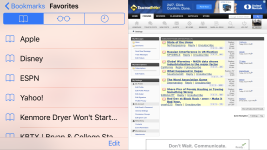
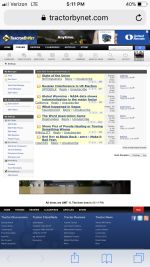
I don稚 know what I did to cause this or what to do to fix it. Sometimes when reading the threads I turn my phone sideways so I can blow up the text for easier reading. All of a sudden when I do it splits the screen in two parts. One with the text and one with the page where you click on google (I don稚 know what this page is called). Any ideas how to solve this problem are greatly appreciated. CC0F25C0-9EFB-4D60-A90D-A27A74D65ABB.pngD069B5A1-F300-40F9-9042-FBB441A7901D.png
 
/ iPhone help please! #3  
Yes, very annoying. Try googling "removing split screen on Safari" (or split view) it's apparently a feature some people prefer at times.
 
/ iPhone help please! #4  
If you are TBNing on an iPhone or iPad I’d recommend the TapTalk app. It works with TBN.
 
/ iPhone help please! #5  
And if you clicked your bookmarks button, it opened the bookmarks page. Click it again and it'll close.
 
/ iPhone help please!
  • Thread Starter
#7  
Ok I googled it. MossRoad was right. It was not working for me because I was clicking the wrong bookmark tab. The one I needed to click was not showing til I scrolled up. There was another one and it worked. Thanks.
 
/ iPhone help please! #8  
By far the best fix ever for my iPhone was to buy a Samsung. I was so sick and tired of getting "charging is not supported with this accessory" using a genuine Apple charger that I said I'm done!
 
/ iPhone help please!
  • Thread Starter
#9  
By far the best fix ever for my iPhone was to buy a Samsung. I was so sick and tired of getting "charging is not supported with this accessory" using a genuine Apple charger that I said I'm done!

Dang. My mom got rid of her iPhone and got one of those. I don’t like it. But I’m not familiar with them either. Son and daughter in law switched to Samsung but both have switched back to iPhone.
 
/ iPhone help please! #10  
Ok I googled it. MossRoad was right. It was not working for me because I was clicking the wrong bookmark tab. The one I needed to click was not showing til I scrolled up. There was another one and it worked. Thanks.

Glad that worked. I only knew about it because..... I DO IT ALL THE TIME AND IT DRIVES ME NUTS!!! :laughing:
 
/ iPhone help please!
  • Thread Starter
#11  
Glad that worked. I only knew about it because..... I DO IT ALL THE TIME AND IT DRIVES ME NUTS!!! :laughing:

Another one that drives me up the wall...from my home I click on a thread. It comes up. I do the thumb and finger thing to make page larger but it reverts back. Sometimes several times before it will stay the size I want.
 

Marketplace Items

2011 AUXILIARY POWER UNIT (A60736)
2011 AUXILIARY...
20FT X 12FT LIVESTOCK SHELTER (A58214)
20FT X 12FT...
HYSTER S60FT STRAIGHT MAST FOKLIFT (A59823)
HYSTER S60FT...
2017 Ford F-350 XL (A60462)
2017 Ford F-350 XL...
STORAGE FEES (A59906)
2014 Mercedes-Benz C250 Sedan (A61569)
2014 Mercedes-Benz...
 
Top