Starlink

   / Starlink #2,761  
I'm observing some significant speed changes when using Starlink. I've observed it on my system in CA, but the differential is much more pronounced here in NV. (Both areas are waitlist areas. CA system is RV and NV system is dedicated address.)

Yesterday afternoon a speedtest (NV) was reporting download speeds about 10-12mb. Twice it was below 10mb. A month ago, typical speeds were 60mb, maybe 80. Before sunrise this morning, speed was well over 100mb.

Measurements are not "pure" since my LAN and various equipment is also involved. But the LAN/equipment config has not changed. Streaming TV using Hulu chews some bandwidth during the day. But the speed differences I'm observing seem more than can be explained by that.

I'll try future testing (day vs night) with as much of my LAN "unhooked" as I can do. If I had to guess I'd wonder if my SL cell is getting saturated by lots of users on during the afternoon.

I'm not attaching any importance to the CA system since it is RV model. But my address-dedicated system for that property is in hand and waiting for me to install it this weekend. Once I am on that, I can start testing its speed variations as well.
 
   / Starlink #2,762  
Same here. 42Mbit/s down, 2 up, with some real delays on occasion.

Solar flares? Oversold bandwidth? Hot weather?

No idea for the cause(s).

All the best,

Peter
 
   / Starlink #2,763  
I'm observing some significant speed changes when using Starlink.
I got T mobile's Five-G I Dumped it within the trial period because they kept lying to me about email. Worse the lies were different with each of the half dozen reps I spoke to.
One thing I noticed was that The speed test site Ookla, had me showing blinding fast speeds over 450 Mbps
BUT when I went on the internet nobody else was pushing data out that fast, so downloads for me were about the same as before.
 
   / Starlink #2,764  
170mbps very early this morning. Getting 170mbps now tells me my SL and LAN is capable of such speed-- seemingly ruling out equipment problems or an obstructed view being responsible for earlier speed reductions.

btw, separate topic, my neighbor in CA received his SL RV. He is in a highly obstructed site where I was surprised a brief test of (my) SL even worked. As he gets days or a week of experience I will report back what he learns. His site is *highly* obstructed by 100+ ft trees in every direction with only a small hole/opening in the forest that his antenna points upward through.
 

Attachments

  • 170mbps.jpg
    170mbps.jpg
    210.2 KB · Views: 124
   / Starlink #2,765  
I would be happy with consistent smart phone hotspot...

The speed varies much depending on time of day or if a plane is flying overhead...

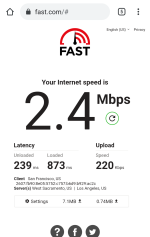
2.4 with Fast right now

Hospital campus has various providers/service and the public wifi is very slow and in room cabled fiber is 40 but tenant offices with Comcast Business wifi is 150 which I prefer.

During the course of my day I go from nothing to 150 depending on where I am.

ATT is pushing a 50 Business plan for $50 per month for those legacy still on ATT DSL.

The thing about DSL is it never stopped working during the extended power safety shut offs unlike every other provider/service.
 

Attachments

  • chrome_screenshot_1659789999183.png
    chrome_screenshot_1659789999183.png
    307.1 KB · Views: 104
Last edited:
   / Starlink #2,766  
My speed was lower this morning. 38mbps down and 2 up. from the iPhone to the router was about 40mbs down and about the same up. I did not pay close attention after I saw it low.

I rebooted the router and did not see much improvement. On my iPhone, I have noticed sometimes it will not go to LTE service when I start a call. I have found that if I go to airplane mode for about 30 seconds, then it will work properly again. So I just tried it for this issue and below are the results.

587F64C5-AFB5-4C2A-BBAD-5DC3719D11E0.jpg


Apparently it worked. Lol
 
   / Starlink #2,767  
I have to do this going from dining room to living room... totally different cell towers in 25 feet but it works.
 
   / Starlink #2,768  
I would be happy with consistent smart phone hotspot...

...

ATT is pushing a 50 Business plan for $50 per month for those legacy still on ATT DSL.

The thing about DSL is it never stopped working during the extended power safety shut offs unlike every other provider/service.
Our experience is different. DSL dies 0.5seconds after the power dies. AT&T is not proactive about changing the batteries in the hutch that takes fiber and puts it onto copper about 3.5miles from here. So dial tone, and internet goes away promptly when the power is shutdown, or dies.

Anyone considering AT&T DSL should be aware that many of the electronics for the AT&T DSL service are twenty plus years old and are no longer manufactured: I know of one parts driven outage that last six months (pre-Covid!). AT&T told me that some boards are sent to Canada for remanufacturing, and can get tied up in Customs. (I have no idea if it is true).

All the best,

Peter
 
   / Starlink #2,769  
Anyone considering AT&T DSL should be aware that many of the electronics for the AT&T DSL service are twenty plus years old and are no longer manufactured:
My ATT neighbors in CA (using DSL) are getting terminated if their equipment dies. The explanation is no spare parts.

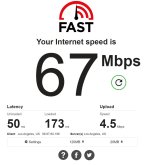
SL speed (via my LAN) hit 220mbps about 5am this morning. A little after 8am, 67mbps.
 

Attachments

  • 67mbps.jpg
    67mbps.jpg
    218.7 KB · Views: 119
  • 220mbps.jpg
    220mbps.jpg
    161.8 KB · Views: 112
   / Starlink #2,770  
Our experience is different. DSL dies 0.5seconds after the power dies. AT&T is not proactive about changing the batteries in the hutch that takes fiber and puts it onto copper about 3.5miles from here. So dial tone, and internet goes away promptly when the power is shutdown, or dies.

Anyone considering AT&T DSL should be aware that many of the electronics for the AT&T DSL service are twenty plus years old and are no longer manufactured: I know of one parts driven outage that last six months (pre-Covid!). AT&T told me that some boards are sent to Canada for remanufacturing, and can get tied up in Customs. (I have no idea if it is true).

All the best,

Peter
No new DSL here but it was interesting when PGE had an extended power safety shut down the neighborhood is packed with Wifi.

24 hours later I was the only one and had neighbors coming over to use the rotary dial phone in the garage to make calls.

It was the only thing working...

Some also needed to charge their phones and had forgotten they could charge from car if they had the cable.

By the next big shutdown the providers had set up generators at the cell sites and many of the neighbors had bought Home Depot generators...

I have a big old Grizzley UPS the hospital got rid of 20 years ago and I have it on an old dozer battery... kept my wifi up.
 
   / Starlink #2,771  
My ATT neighbors in CA (using DSL) are getting terminated if their equipment dies. The explanation is no spare parts.

SL speed (via my LAN) hit 220mbps about 5am this morning. A little after 8am, 67mbps.
ATT is terminating Doctors offices DSL in the medical suites and switching to 50 fiber for $50 a month... no contract.
 
   / Starlink #2,772  
We've had our Starlink set up for a month or so now. I have a couple questions maybe someone here can answer.

I need to permanently set the cable between the antenna and the router. It is temporarily run into the house though a doorway and then draped around a couple rooms. I have two questions here: 1) is this cable "direct burial" cable, and, 2) if I need a conduit or pipe to run it through outdoors, how does one disconnect the cable at the antenna? I know it should be simple, as one can buy longer cable from Starlink.

I want to know because I was planning to run some pipe the 15 ft from the antenna to the house to protect against rodent damage and UV and etc. I measured the connector of the cable at the router and will need a nearly 2" ID pipe or other conduit. I have a bunch of pieces of various metal pipe around, none of any length in that diameter. I am hoping that the connector inside the antenna is smaller and I could disconnect it long enough to run it through some conduit of smaller diameter.

If it is direct burial stuff, I can trench it and likely do without rodent protection.

Anyone know?
 
   / Starlink #2,775  
We've had our Starlink set up for a month or so now. I have a couple questions maybe someone here can answer.

I need to permanently set the cable between the antenna and the router. It is temporarily run into the house though a doorway and then draped around a couple rooms. I have two questions here: 1) is this cable "direct burial" cable, and, 2) if I need a conduit or pipe to run it through outdoors, how does one disconnect the cable at the antenna? I know it should be simple, as one can buy longer cable from Starlink.

I want to know because I was planning to run some pipe the 15 ft from the antenna to the house to protect against rodent damage and UV and etc. I measured the connector of the cable at the router and will need a nearly 2" ID pipe or other conduit. I have a bunch of pieces of various metal pipe around, none of any length in that diameter. I am hoping that the connector inside the antenna is smaller and I could disconnect it long enough to run it through some conduit of smaller diameter.

If it is direct burial stuff, I can trench it and likely do without rodent protection.

Anyone know?

Probably not direct bury rated. Even if it was, use conduit to make your life easier if you ever move it or need to replace it. The connector is annoying but will fit down a smaller pipe at an angle.

You can get a 75' or 150' replacement cable. I put the stock 75' in our trailer & got a 150' I hard mounted at the house.

The 2nd gen (rectangular) dishys have a cable that can be removed from the antenna. It just pulls out straight down when the antenna isnt mounted to a pole, may be a bit of a latch, I forget.
 
   / Starlink #2,776  
We've had our Starlink set up for a month or so now. I have a couple questions maybe someone here can answer.

I need to permanently set the cable between the antenna and the router. It is temporarily run into the house though a doorway and then draped around a couple rooms. I have two questions here: 1) is this cable "direct burial" cable, and, 2) if I need a conduit or pipe to run it through outdoors, how does one disconnect the cable at the antenna? I
Anyone know?

You had to have plugged the cable in to set it up. Reverse those directions.
 
   / Starlink #2,777  
We've had our Starlink set up for a month or so now. I have a couple questions maybe someone here can answer.

I need to permanently set the cable between the antenna and the router. It is temporarily run into the house though a doorway and then draped around a couple rooms. I have two questions here: 1) is this cable "direct burial" cable, and, 2) if I need a conduit or pipe to run it through outdoors, how does one disconnect the cable at the antenna? I know it should be simple, as one can buy longer cable from Starlink.

I want to know because I was planning to run some pipe the 15 ft from the antenna to the house to protect against rodent damage and UV and etc. I measured the connector of the cable at the router and will need a nearly 2" ID pipe or other conduit. I have a bunch of pieces of various metal pipe around, none of any length in that diameter. I am hoping that the connector inside the antenna is smaller and I could disconnect it long enough to run it through some conduit of smaller diameter.

If it is direct burial stuff, I can trench it and likely do without rodent protection.

Anyone know?
The cable detaches from the antenna end and that fitting is much smaller. It slides out, but isn't terribly robust, so be gentle. You will want to use sweeps for your corners, so if you have some sweeps and some direct burial EMT, you are set. If not, I would use PVC, and cable pulling gel. Cover the antenna end in a plastic bag and tape it up really well to keep it clean, and to help not yank on the fitting itself. Tie your pull rope 6-8 feet away from the end, and use a couple of line pull hitches to distribute the load.

I have seen folks who have spliced their cables, and there is no obvious filler (e.g. gel or oil), and no armor, so I wouldn't classify it as direct burial myself.

All the best,

Peter
 
   / Starlink #2,778  
We've had our Starlink set up for a month or so now. I have a couple questions maybe someone here can answer.

I need to permanently set the cable between the antenna and the router. It is temporarily run into the house though a doorway and then draped around a couple rooms. I have two questions here: 1) is this cable "direct burial" cable, and, 2) if I need a conduit or pipe to run it through outdoors, how does one disconnect the cable at the antenna? I know it should be simple, as one can buy longer cable from Starlink.

I want to know because I was planning to run some pipe the 15 ft from the antenna to the house to protect against rodent damage and UV and etc. I measured the connector of the cable at the router and will need a nearly 2" ID pipe or other conduit. I have a bunch of pieces of various metal pipe around, none of any length in that diameter. I am hoping that the connector inside the antenna is smaller and I could disconnect it long enough to run it through some conduit of smaller diameter.

If it is direct burial stuff, I can trench it and likely do without rodent protection.

Anyone know?
1) I believe Starlink states it is not direct burial on their website.
2) Detach the cable from the square dishy end with a gentle tug. I drilled a hole about one inch diameter to fit it through the foundation. The connector is ‘straight’ on the dish end. Be gentle with the cable & connectors.

Enjoy..
 
   / Starlink #2,779  
fyi my neighbor's (obstructed) SL system reports being largely obstructed-- advises an interruption every 1 minute.

But so far, he's very pleased with performance. He's done wifi calling and facetime calling-- wifi calling being perfect and facetime having an occasional blip. Web surfing very acceptable/fast.

Speed range from 4mb to 80mb download. Blows away his old DSL system.

Not sure what will happen with a snow load in the trees which surround him-- but so far he is excited about his system even with significant obstruction ....
 
   / Starlink #2,780  
Anyone know how to contact starlink to cancel a deposit? The way they say doesn’t work. There is no link to where it say cancel.
There is no contact info anywhere.
The help is worthless.
 

Tractor & Equipment Auctions

John Deere 4-Bottom Plow (A56438)
John Deere...
John Deere 3025E (A53317)
John Deere 3025E...
296385 (A57192)
296385 (A57192)
2015 TEXAS PRIDE 30 FLATBED GOOSENECK (A58214)
2015 TEXAS PRIDE...
2016 FREIGHTLINER CASCADIA SLEEPER (A59905)
2016 FREIGHTLINER...
2012 International WorkStar 7300 AWD Altec DC47TR Insulated Digger Derrick Truck (A60460)
2012 International...
 
Top