Starlink

   / Starlink #2,821  
...

I do get a chuckle re Customer Service comments.

My initial ‘broadband’ here (2-3mbps) was a local hook up via Ubiquiti pico/nano to the local telecom/cable. While the service provider was responsive that was only for his equipment, not the source.
...
Exactly.

I wonder where this mythical great Internet Customer service exists? Never see it myself.

  1. Spectrum/Cable Internet sucked. Don't get me started on how those idiots wired a connection in my house. Guy at work has constant outages with Spectrum.
  2. CenturyStink. We have 1.5 mbps yet the company has taken hundreds of millions of dollars in tax money to provide faster access. They did install new boxes for faster speed that would improve our service. Nothing there but a future planned subdivision but they won't spend the money to improve our speeds. The cattle herd is happy I guess. We had lots of calls for service which is NOT good. The employees tried their best but are over worked. They eventually solved the problems but it took years.
  3. UbiFi worked great until it did not work at all. There was no support. They raised their prices. Then the service just stopped working. At least they did not hassle us with turning of the service and returning the money they owed us.
  4. Verizon cell. It worked. Then it too did not work. Had to buy more equipment, like we had to to with UbiFi and Starlink, and it now is working.
  5. Starlink. Knock on wood. Not had a problem and no need for service. But Starlink is not for everyone. Nor can it be. Our neighbors can't use it because of trees so they are SOL with using a cell service with all the costs and problems there in.
Later,
Dan
 
   / Starlink #2,823  
Just completed a trip to see a new house our friends bought.

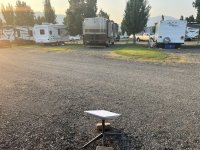
Saw something very unusual-- a Starlink "RV" system -- operating INSIDE AN RV PARK !!!!! :LOL:
 

Attachments

  • SLRV2.jpg
    SLRV2.jpg
    2.8 MB · Views: 203
   / Starlink #2,824  
Driving home from my RV trip, my phone chimed. A warning that all wifi-based HVAC thermostats in my residence had lost wifi connection. This is odd.

Pulled over, logged into my burglar alarm system. Looked normal. The security "dashboard" displayed the wifi name and didn't report anything abnormal. But it shares this wifi with the thermostats. Huh?

Tried connecting to my surveillance cameras. Nope. Tried remote desktop to my home PC. Nope. Huh?

I was stumped about what was going on. And how my home wifi could connect to my burglar alarm, but nothing else seemed to work. I remotely "forced" the burglar alarm to do a remote check of itself-- and it reported success. Huh?

So, I cut my trip short, and came home a day early. And found the culprit was Starlink. [I later learned my burglar alarm did lose wifi, but automatically switched to cellular backup.]

At the RV park, I was using my SL "RV" system-- with connections to my phone, tablet, and TV. Prior to leaving, I used my phone to "stow" the SL antenna. The stow function didn't work-- which has happened before. So I used the "manual stow" process to turn the antenna upside down on the ground and wait a few minutes until it stows itself. That worked fine.

What I didn't know at the time is that the #$!%@#$^ SL app instead "stowed" the antenna at my home residence. At the time it did that, I was 500 miles from home.

When I had first arrived at the RV park, I power cycled my SL RV system to force it to reset. Gave it a new SSID and password using my phone. When I issued the stow command, my phone had an active wifi connection to the SL system, and it was only about 10 feet away. So I never dreamed it would stow my home system antenna instead.

It has been probably 6 months since I used my phone to set up my home SL system. And since then I have deleted the SL app entirely, which caused the warning to pop up that "ALL DATA WILL BE DELETED!!" Aaahh, if only I were so lucky .... :D
 
   / Starlink #2,825  
btw download speeds in two different RV parks varied between 20-60mbps and was most often 20mbps. (SL RV system)
 
   / Starlink #2,826  
Interestingly, Sl says I am experiencing degraded service. I’m RV, not Residential yet.
IMG_0997.JPG


But looks pretty good

IMG_0996.JPG
 
Last edited:
   / Starlink #2,827  
That "degraded service" warning message was experienced by many Starlink users yesterday in many geographies. During that time my service was indeed impacted. I was on a Teams call at the time and was getting disrupted frequently. Fortunately it was near the end of my work day so it wasn't a major problem.
 
   / Starlink #2,828  
My concern over "minimalist" support is as much with marketing communications as customer service. There is a growing (unanswered) buzz that SpaceX has oversold capacity. I wish there was a better (any?) response.

Years ago, my software product sales way outstripped my company's capacity for proper service. I learned customers will be loyal, and patient, ... if ... you keep them informed. SL isn't doing that.

Do they intend to slow or pause new sales while the bottlenecks are advancing? I don't know. Are they on track with launch schedules for added satellites, and if so, when would more sats maybe help? I don't know.

Maybe such answers are out there but I am not seeing them. In the meantime, articles like the one below seem to get wide distribution with little to no response.

Quotes from the story linked below:

"those who looked to Starlink to solve their rural broadband woes are now experiencing slow speeds and latency issues ... slow speeds are causing some affected customers to wonder if Starlink is facing a congestion problem due to its popularity. In other words, has SpaceX oversold its capacity ... SpaceX didn’t respond to a request for comment."

 
   / Starlink #2,829  
Musk companies are well known for not having much customer service (it is not a profit center in his view), and infamous for never responding to journalists. Par for the course here, which of course leads to rampant speculation about what the ground truth really is.

It works ok when you are the only game in town...

All the best,

Peter
 
   / Starlink #2,830  
Starlink is so far ahead in speed and reliability(and no data cap) compared to any of the other options available to me it's unbelievable. I just put conduit in the ground for spectrum fiber on my street but it will be a year minimum before it's active. Then we'll see.
 
   / Starlink #2,831  
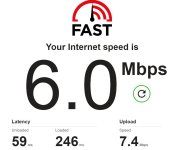
Don't usually pay attention to upload speeds. Internet seemed slow ... checked speed including download and upload .... 6mbps down, but upload is faster???
 

Attachments

  • 6mbps.jpg
    6mbps.jpg
    173.7 KB · Views: 132
   / Starlink #2,832  
Hmm... 6 down, 4 up at the moment. That is a long way from 100Mbits/s, and close to our DSL speeds. Sigh.

A few more speed test repeats, and it is clear that something isn't happy somewhere in the connection.

All the best,

Peter
 
   / Starlink #2,833  
My Starlink speeds have slowed significantly, but not to the degree others are seeing. I used to always get in the 150-250 Mbps range down, and 15-25 up with pings in the 20-30 ms range. Lately I'm usually getting 75-100 down and 7-12 up with pings 45-70 ms.. Still much faster than my so-called 7/1 DSL that rarely got it's rated speeds and stopped working any time it rained or the wind blew more than about 15-20 mph.

Time to dive back in to the Starlink Reddit and see what is going on.
 
   / Starlink #2,835  
Don't usually pay attention to upload speeds. Internet seemed slow ... checked speed including download and upload .... 6mbps down, but upload is faster???

What device did you test with? I know that AT&T has something called a 'stream saver' that automatically throttles streaming traffic to about that speed to conserve bandwidth on the cell network. They turn it on for your cell line automatically. And Fast.com is a speed test by Netflix, which uses streaming in its test. Years ago I could never figure out why my phone always showed 5Mb/s speeds at Fast.com when any other device on my network was way faster. That's when I learned about it.

So, if you're testing via your AT&T cell phone against Fast.com it won't be accurate. Other cell providers may do similar. If you were testing from a computer then it isn't related. I'd recommend avoiding Fast.com for this reason though.
 
   / Starlink #2,836  
What device did you test with? I know that AT&T has something called a 'stream saver' that automatically throttles streaming traffic to about that speed to conserve bandwidth on the cell network. They turn it on for your cell line automatically. And Fast.com is a speed test by Netflix, which uses streaming in its test. Years ago I could never figure out why my phone always showed 5Mb/s speeds at Fast.com when any other device on my network was way faster. That's when I learned about it.

So, if you're testing via your AT&T cell phone against Fast.com it won't be accurate. Other cell providers may do similar. If you were testing from a computer then it isn't related. I'd recommend avoiding Fast.com for this reason though.
Blue, what speed test do you find most accurate and useful. Ookla? Thanks
 
   / Starlink #2,837  
I'd recommend avoiding Fast.com for this reason though.
I use my newest PC, hard wire ethernet, for speed tests. i7 processor w/16GB ram. Compared to other devices, it usually gives the fastest results. Maybe due to a better newer ethernet adapter?

Which speed test site (or sites) do you use or prefer?
 
   / Starlink #2,838  
Blue, what speed test do you find most accurate and useful. Ookla? Thanks
That's difficult to answer. Because any speed test is only a test of the connection speed on the specific path between your system and the one particular endpoint of the speed test site. And there is nothing to base "is it accurate" on except a comparison to your own testing against that same exact test site and endpoint server over time.

My suggestion is to pick one speed test site that you like and stick with it. Always choose the same endpoint (usually listed as a city name). Then keep track of your speeds over time. The actually number doesn't really mean a lot, but the variance from your average test result is what is insightful.

Just be aware that there are TONS of variables that impact connection speeds. You're on a shared network on your ISP (Starlink) and your ISP routes you to the Internet which is also a shared system. Time of day, day of week, events happening in your area or across the country at the time can all be impactors.
 
   / Starlink #2,839  
Here's maybe another clue re: SL speed issues.

Even though SL has been slowing during the day, my SL speeds between 4-5am have stayed fast-- always 200+mbps. I've seen as high as 260mbps.

But lately, even at 4am, I'm seeing slower speeds. This morning it would not exceed 100mbps. (For the record, 100mbps is still WONDERFUL compared to my past system.)

The question is: why the speed change when the local/nearby load is light? I presumed daytime speeds were slowing as other users in my "cell" or region use bandwidth and add system load. But how many others around me are up at 4am? Not many.

I'm not really sure how to interpret this .... my ground station is Los Angeles so it's 4am for those folks as well .....
 
   / Starlink #2,840  
What device did you test with? I know that AT&T has something called a 'stream saver' that automatically throttles streaming traffic to about that speed to conserve bandwidth on the cell network. They turn it on for your cell line automatically. And Fast.com is a speed test by Netflix, which uses streaming in its test. Years ago I could never figure out why my phone always showed 5Mb/s speeds at Fast.com when any other device on my network was way faster. That's when I learned about it.

So, if you're testing via your AT&T cell phone against Fast.com it won't be accurate. Other cell providers may do similar. If you were testing from a computer then it isn't related. I'd recommend avoiding Fast.com for this reason though.
I used the actual dish router to take everything else out of the equation.

At five am this morning it was 140/17, suggesting to me that they have oversold "my" cell. The space weather hasn't changed that much in eight hours.

All the best,

Peter
 

Tractor & Equipment Auctions

Kubota L4701 (A53317)
2021 JOHN DEERE 6145R TRACTOR (A59823)
2021 JOHN DEERE...
208789 (A60430)
208789 (A60430)
2009 CHEVROLET C8500 DUMP TRUCK (A59823)
2009 CHEVROLET...
iDrive TDS-2010H ProJack M2 Electric Trailer Dolly (A59228)
iDrive TDS-2010H...
2010 Honda Accord Sedan (A59231)
2010 Honda Accord...
 
Top