Advice Needed...Samsung Galaxy Note 10.1

/ Advice Needed...Samsung Galaxy Note 10.1 #1  

2LaneCruzer

Epic Contributor
Joined
Nov 17, 2011
Messages
20,816
Location
Oklahoma
Tractor
John Deere LX172
We recently received a Galaxy NOTE 10.1 as a gift; neither of us know anything about the device, especially me. Sharn Jean has been wanting one, but thought an Apple would be better...why, I don't know and she doesn't either. I personally have no use for it; I don't even have a cell phone. Question: is this a good device for beginners; would something else be better for technically challenged old farts? If an Apple would be better, or something else maybe, I suppose we could trade it; it's never been opened.

I admittedly am not even versed enough to ask an intelligent question, so please excuse my feeble attempt.

Thanks in advance;
Dennis
 
/ Advice Needed...Samsung Galaxy Note 10.1 #2  
What kind of cell phones do you have? And, what kind of games/applications do you use?
 
/ Advice Needed...Samsung Galaxy Note 10.1
  • Thread Starter
#3  
What kind of cell phones do you have? And, what kind of games/applications do you use?

She has a basic cell phone, although it has a touch screen. I don't know what all it can do; she uses it mainly as a phone. We do not play any games, and we use our PC primarily to get email, function as a word processor and mess around on TBN and the internet.

I feel much as I imagine Columbus would have felt had the Queen given him a couple of Nuclear Submarines.
 
/ Advice Needed...Samsung Galaxy Note 10.1 #4  
Dennis, that Galaxy Note 10.1 can do voice communications using 3G and also attach to a home or any public WIFI network where you can do internet browsing, access email, watch movies, make video calls using Skype with the built-in camera, take and edit photos using built-in photoshop, and even download and read digital books from many sources. Having both 3G and WIFI built in makes it extremely flexible. You can also expand the memory up to 64 GB and even add a micro SD card up to 64 GB for offline storage and file transfers. Using a micro-usb to USB adapter, you can attach it to printers and other external devices like keyboards, but the best way to attach keyboards is by bluetooth since that is included. I guess the real question is what can't that Galaxy Note do? It's truly power in your pocket.
 
/ Advice Needed...Samsung Galaxy Note 10.1 #5  
A little older version of the Note, but still valid..

 
/ Advice Needed...Samsung Galaxy Note 10.1
  • Thread Starter
#6  
Thanks gang. Maybe I can get my Grandson to demonstrate it for us. I like the video calls idea; I just hope the politicians and siding salesmen can't do robo calls on it.
 
/ Advice Needed...Samsung Galaxy Note 10.1 #7  
/ Advice Needed...Samsung Galaxy Note 10.1 #8  
I had considered upgrading to the note version and I am an Android guy. What you have is the newer version of android. All you need to do to begin is setup an free email account from google called gmail. Once its setup and account verified, you can use the gmail address as your username and the pass word to login on your tablet. I think its a wise idea to have your grandson to do the initial setup becuase once it setup , you dont have to do it again. If you have internet at home, he can also setup the wifi connection before he is done. he probably should also do the skype setup for video chat. You can use your tablet to browse internet, go to TBN, do email if you want. There are many free apps for various thing that you can use to make the tablet enjoyable.
 
/ Advice Needed...Samsung Galaxy Note 10.1 #9  
I just ordered (like in the last 15 minutes) a Samsung Galaxy tablet. I prefer the Samsung products to the Apple products. My wife has a Nook tablet, which I bought for her when the came out two years ago. She loves it, and has not touched her laptop since. This will be my first tablet, but I have used them before.

You will find that the tablet is very intuitive, and can handle many functions that a laptop can-probably more than a laptop could 5 years ago. The touchscreen makes it simple. These are great devices for beginners. My parents have an iPad. If they can figure out a tablet, you certainly can.

The key to functioning is applications. Some will be automatically installed, others will need to be downloaded through Google's app store. If you want it, they have it, be it games, music, video conferencing, apps to read books, whatever.

What do you use your computer for now? If it's web and e-mail, those applicatlions come pre-installed, and it is as simple as touching the app on the screen and they will open. Sending outgoing e-mail is easy, and a virtual keyboard will appear anytime you want to enter text. Touch the box where you want to type and the keyboard opens on screen. Send the e-mail and the keyboard closes.

You can change views by rotating the device.

Tell us what you want to do, and I'm sure someone here can suggest an app to make it happen.
 
/ Advice Needed...Samsung Galaxy Note 10.1 #10  
BTW, I believe the Note (like the Galaxy Tab) has a built in GPS receiver, so you can use it as a GPS even when not connected to a network. I use my phone for a GPS now, and love having it when going new places.
 
/ Advice Needed...Samsung Galaxy Note 10.1 #11  
With PDF Reader you can keep factory part's list, manuals, and schematics download from Internet or PC or smartphone. Bunches of apps, where you can bluetooth a device that plugs into your vehicle and read error codes, etc. You can download books ffom online sources or your library, read on the tablet. Thousands of applications you can tailor to your needs. Or play games as a last resort. With the camera you can scan product bar codes, save the parts or products and purchase later. It is unlimited to what you yourself good find useful not being a technology wizard. Here is an example of my use. Complete operation manual for Dodge truck, along with charts on fluid capacities, Light bulb numbers, oil filter cross reference. Also same listing for my JD-X758, and JD-4110. And a complete running database of all my Model Railroad parts, equipment and supplies. So have at it.
 
/ Advice Needed...Samsung Galaxy Note 10.1 #12  
Nobody mentioned the TBN app.
I have a Galaxy Tab 2 7.0.
I have my banks app on mine to keep track of my accounts. You can use cloud print to print from it to your printer. The Ebay app is nice. They are a good way to check you email's. The weather app's are handy. The temp is always in the status bar and it lets you know about severe weather. I also like the Pandora app, you can create your own radio station.

To use the GPS you need a wifi connection or atleast to get it started.
 
/ Advice Needed...Samsung Galaxy Note 10.1 #13  
We recently received a Galaxy NOTE 10.1 as a gift; neither of us know anything about the device, especially me. Sharn Jean has been wanting one, but thought an Apple would be better...why, I don't know and she doesn't either. I personally have no use for it; I don't even have a cell phone. Question: is this a good device for beginners; would something else be better for technically challenged old farts? If an Apple would be better, or something else maybe, I suppose we could trade it; it's never been opened.

I admittedly am not even versed enough to ask an intelligent question, so please excuse my feeble attempt.

Thanks in advance;
Dennis

My wife and I have 2 Samsung Galaxy Tabs and we love them. I bought one for travel and then my work sprung for one for email and research but I can also use it to home. She does all our banking using a free Virtual Private Network app for extra security.

Follow the prompts and don't get apps from anywhere but google play store and you will find it irreplaceable soon!

I like using either puffin or opera for internet/ tbn, better than the tbn app for beter function.

PM ME if you have any specifics questions. (BTW, we have a 10.1 with Verizon from work, and a 7.0+ wifi only personal).

Thomas

PPS: STAY AWAY FROM CHROME!! IT HAS A BUG WITH ANDROID 4.X that causes you to lose you memory and clipboard functionality.
 
/ Advice Needed...Samsung Galaxy Note 10.1 #14  
You didn't just get an android tablet, you have one with pretty good hand writing recognition.

First - I do not believe you can expand the internal memory, but you can use a 64Gb micro SD card.

And there is a Chrome beta that works well with it.

/edit - now for the long version -
Think of it as a ledger with a camera, an expensive ledger.

I recently bought a Note 8. That DOES slide into my cargo pants pocket. It does go with me.

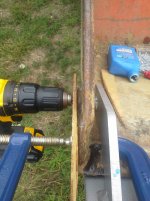
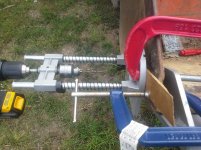
Just yesterday I had to drill my bucket.
20130921_102925.jpg 20130921_103239.jpg

I snapped some pics and took some notes.

I made a score on woodworking equipment.
20130919_094521.jpg 20130919_094832.jpg

I snapped some pics and recorded serial #'s etc.

I download the parts manual from Messicks and it's there in my pocket.

There are "apps" for almost everything. I've got a Level app. When the pucker factor get's high I can measure the angle. I've a tree height app which figures out the angles and helps me determine wood volume.

Background - except for brief periods of dead batteries I've had a fully functioning computer that fit in my pocket since the HPLX95, that's back to 1996. Almost 20 years of carrying a computer around. Virtually anything a "PC" or "Mac" can do the Note can do.

Native apps are robust - an office suite compatible with Microsux Office. Comm's capability. Accurate GPS. Halfway decent camera. SPLIT-SCREEN MULTI WINDOWS.

You want to to play WORD ASSOCIATION? Get a thesaurus. With an adapter you can plug in a thumb drive, and HDMI cable to your TV, or hook up to a larger computer.

Transferring data is a breeze. It's actually TOO easy because if your not careful Google+ will share your data amongst anything you have a Google account on.

Remember - a computer is only a tool, like a tractor. And it's only good when it's handy. I've an Otterbox Defender for protection and wear cargo pants, mine is with me almost all the time. Many smartphones are approaching full computer functionality but all have the limit of screen size.
 
Last edited:
/ Advice Needed...Samsung Galaxy Note 10.1 #15  
You didn't just get an android tablet, you have one with pretty good hand writing recognition.

First - I do not believe you can expand the internal memory, but you can use a 64Gb micro SD card.

And there is a Chrome beta that works well with it.

/edit - now for the long version -
Think of it as a ledger with a camera, an expensive ledger.

I recently bought a Note 8. That DOES slide into my cargo pants pocket. It does go with me.

Just yesterday I had to drill my bucket.
View attachment 337861 View attachment 337862

I snapped some pics and took some notes.

I made a score on woodworking equipment.
View attachment 337863 View attachment 337864

I snapped some pics and recorded serial #'s etc.

I download the parts manual from Messicks and it's there in my pocket.

There are "apps" for almost everything. I've got a Level app. When the pucker factor get's high I can measure the angle. I've a tree height app which figures out the angles and helps me determine wood volume.

Background - except for brief periods of dead batteries I've had a fully functioning computer that fit in my pocket since the HPLX95, that's back to 1996. Almost 20 years of carrying a computer around. Virtually anything a "PC" or "Mac" can do the Note can do.

Native apps are robust - an office suite compatible with Microsux Office. Comm's capability. Accurate GPS. Halfway decent camera. SPLIT-SCREEN MULTI WINDOWS.

You want to to play WORD ASSOCIATION? Get a thesaurus. With an adapter you can plug in a thumb drive, and HDMI cable to your TV, or hook up to a larger computer.

Transferring data is a breeze. It's actually TOO easy because if your not careful Google+ will share your data amongst anything you have a Google account on.

Remember - a computer is only a tool, like a tractor. And it's only good when it's handy. I've an Otterbox Defender for protection and wear cargo pants, mine is with me almost all the time. Many smartphones are approaching full computer functionality but all have the limit of screen size.

What app do you use for taking notes? I'm trying to decide on one. Do you use a stylus or your finger?
 
/ Advice Needed...Samsung Galaxy Note 10.1 #16  
You didn't just get an android tablet, you have one with pretty good hand writing recognition.

First - I do not believe you can expand the internal memory, but you can use a 64Gb micro SD card.

I believe you are confusing the Galaxy Note 10.1 with the specs on the Galaxy Tab 10.1. Here are the memory specs from Samsung's site:

Memory:
- 16/32/64GB User memory + 2GB (RAM)
- microSD (up to 64GB)
 
/ Advice Needed...Samsung Galaxy Note 10.1 #17  
I believe you are confusing the Galaxy Note 10.1 with the specs on the Galaxy Tab 10.1. Here are the memory specs from Samsung's site:

Memory:
- 16/32/64GB User memory + 2GB (RAM)
- microSD (up to 64GB)

You can buy it in three sizes, but it's not user upgradeable.
/edit I read the user manual and you can use different sd cards
 
/ Advice Needed...Samsung Galaxy Note 10.1 #18  
You can buy it in three sizes, but it's not user upgradeable.
/edit I read the user manual and you can use different sd cards

There is also a kit I bought from Amazon with a usb connector and a sd/microsd reader that makes storage more flexible (my Tab does not support any added memory cards otherwise), but with Google Docs, Dropbox, etc, I'm finding storage much less of an issue. I do use Hotshield VPN App for security, SmartTools for a whole bunch of good utilities like compass, level, acoustic and other measuring apps, as well as am emergency flaslight, The included utilities in Android like calendar, pen memo, etc are intuitive and easy to access and use from the up arrow at the center bottom of your screen. The typos you see here are typical of my large hands on the 10.1 virtual keyboard, which is why Pat has the 7.0.

Thomas
 
/ Advice Needed...Samsung Galaxy Note 10.1 #19  
I think of "user memory" like a built-in solid state drive (non-volatile) and RAM (volatile) as executable program space. I don't know this, but expect user memory to be much faster than an external micro-SD card. Of course, I could be wrong on both accounts since I'm no expert.
 
/ Advice Needed...Samsung Galaxy Note 10.1 #20  
Ya.. little different in the Android world.. RAM is what the operating system is on and where most apps go, and 'user memory' or 'ROM' is where all the music and stuff the user puts on goes and has access too.. An SDCard is pretty quick as its the same memory chip type as the ROM.
 
 
Top