Starlink

   / Starlink #2,501  
   / Starlink #2,502  
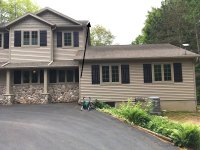
In March when there was a bunch of snow on the roof, a fellow installed dish in the location shown in the attached image. There is a large oak tree with some branches that hand out in the path of the dish. Since the tree has leafed out we have experienced some buffering with YouTube TV that we did not experience prior to the leafing out. At this point I don't want to cut down the oak and the plan is to relocate the dish to the gable area on the upper roof indicated by the arrow in the image. I think it will clear the branches and give a better field of view.

The fellow who did the original install used a Direct-TV mount that penetrated the roof, not what I anticipated. When I asked him about relocating the dish and mounting it with a Starlink short wall mount or some other kind of gable mount with a pole, he was reluctant. His point is that he knows how to do the DTV mount and it has confidence in that so.....

I would prefer an installation with no roof penetration, but I have to find someone to make the climb onto the roof and do the mechanical part. What are some options for mounting the dish on the roof gable in the image? Seems like the short wall mount might not allow the dish to clear the roofline given the direction the dish has to point.

1654721456985.jpeg
 

Attachments

  • IMG_0133.jpeg
    IMG_0133.jpeg
    453.4 KB · Views: 128
   / Starlink #2,503  
I recently purchased and received the StarLink ground mount pole. 88” long total. (My days of climbing on ladders and roofs are behind me. :giggle: ) My issue is the pole and attached rectangular dish, with two feet buried, will be much taller than I’d like at 7 plus feet. I’d like somewhere around 4 foot tall total. Cutting the pole doesn’t appear to be a simple option due to the design, pipe flairing and cable entrance and oblong exit hole near the ground.

Has anyone encountered this and found a solution to shorten?
Thanks

D8D80327-014F-40D3-BF26-096E6EB624B1.png

3AD11E74-AB4C-4230-9643-4967A7B4D709.png
 
   / Starlink #2,504  
For anyone interested, the Starlink mesh router is available ar Starlink.com
 
   / Starlink #2,505  
Lots of mounting options discussed in reddit

 
   / Starlink #2,506  
In general, I find the posts and comments/recommendations here more useful than those at Reddit or Facebook. So, I'm hoping for some wisdom from the experiences of others here....
 
   / Starlink #2,507  
In general, I find the posts and comments/recommendations here more useful than those at Reddit or Facebook. So, I'm hoping for some wisdom from the experiences of others here....
Well, in that vein, I used all of these for two different mounts;
#1) Well built under the eave mount to rafter (A+) (detailed above in another post)
Dishy slides right into it, though I would recommend something to keep the dish from rotating in the breezes. (I built a small key way from two nuts and bolts.)

#2) Fascia mount, with this nice kit of sealant and bolts;

Looking at your upper roof, I would go with #2 if you do not have a rafter there.

Starlink makes and sells mounts that should also work;
Starlink
I would use the smallest one that clears your overhang.

As far as location, I would also consider putting Starlink on one of the gables to the left of your photo. Dishy is oriented toward behind the photographer, suggesting that either of those two gables would have good views. For me, it might come down to where it is easiest to run the Starlink cable, and where I needed the router to be.

All the best,

Peter
 
   / Starlink #2,508  
I used an old satellite TV mount, with U bolt to secure in place
IMG_0282.JPG
 
Last edited:
   / Starlink #2,509  
I recently purchased and received the StarLink ground mount pole. 88” long total. (My days of climbing on ladders and roofs are behind me. :giggle: ) My issue is the pole and attached rectangular dish, with two feet buried, will be much taller than I’d like at 7 plus feet. I’d like somewhere around 4 foot tall total. Cutting the pole doesn’t appear to be a simple option due to the design, pipe flairing and cable entrance and oblong exit hole near the ground.
Has anyone encountered this and found a solution to shorten?
Thanks

View attachment 749437
View attachment 749438
Dig a hole an extra 3' deep?
 
   / Starlink #2,510  
Decided yesterday to get my refund from Starlink. I've had T Mobil home internet since November '21 when it first became available here and so far it's performed very well with speeds from 75-200 mbps depending on the time of day. $50/month is pretty good too. I had put my deposit down in February '21 and Starlink still showing mid '22 in my area.
 
   / Starlink #2,511  
Decided yesterday to get my refund from Starlink. I've had T Mobil home internet since November '21 when it first became available here and so far it's performed very well with speeds from 75-200 mbps depending on the time of day. $50/month is pretty good too. I had put my deposit down in February '21 and Starlink still showing mid '22 in my area.
With those speeds and that cost sounds like the way to go.
 
   / Starlink #2,512  
Ponytug: Thanks, very useful comments. The under-eave mount you are using may not be necessary since I can use one of the gable peaks for attaching the mount. The second, Weingard, mount looks like it would work, and the Starlink short wall mount would work on the two peaks facing in the front of the house, but I think there might be an issue with the dish clearing the roof on the gable with the arrow point to it. I 'll revisit the placement to assess putting the dish on one of the front gables with the SL short wall mount, otherwise the Weingard mount might be the best option.

sodamo: useful, looks similar to the Weingard mount.

If I use the Weingard J mount, does it require the Starlink pole adapter?
 
Last edited:
   / Starlink #2,513  
Ponytug: Thanks, very useful comments. The under-eave mount you are using may not be necessary since I can use one of the gable peaks for attaching the mount. The second, Weingard, mount looks like it would work, and the Starlink short wall mount would work on the two peaks facing in the front of the house, but I think there might be an issue with the dish clearing the roof on the gable with the arrow point to it. I 'll revisit the placement to assess putting the dish on one of the front gables with the SL short wall mount, otherwise the Weingard mount might be the best option.

sodamo: useful, looks similar to the Weingard mount.

If I use the Weingard J mount, does it require the Starlink pole adapter?

I would get the Starlink adapter. The Weingard mount is just steel pipe, unlike the forged under eave mount.

All the best,

Peter
 
   / Starlink #2,514  
Looks like others are joining the "RV mobile internet" bandwagon. Just got this "new announcement" from Verizon:

Our mobile router system will manage all your devices while you roll!

  • Complete mobile WIFI solution for long haul Truckers
  • Reliable WIFI in all conditions while you’re rolling
  • Router will connect to all your devices and let you have full access for each
    • Highspeed internet access
    • $109 Unlimited Data Plan from Verizon
    • One special data plan uses all wireless carriers for super reliable connectivity
    • Have one dedicated data plan to service all your devices
    • Connect to other free WIFI hotspots to preserve your data plan
Comment: I wonder what the "uses all wireless carriers" is ......
 
   / Starlink #2,516  
Looks like others are joining the "RV mobile internet" bandwagon. Just got this "new announcement" from Verizon:

Our mobile router system will manage all your devices while you roll!

  • Complete mobile WIFI solution for long haul Truckers
  • Reliable WIFI in all conditions while you’re rolling
  • Router will connect to all your devices and let you have full access for each
    • Highspeed internet access
    • $109 Unlimited Data Plan from Verizon
    • One special data plan uses all wireless carriers for super reliable connectivity
    • Have one dedicated data plan to service all your devices
    • Connect to other free WIFI hotspots to preserve your data plan
Comment: I wonder what the "uses all wireless carriers" is ......
If it is unlimited data why do you need to connect to the WiFi hotspots to preserve your data plan? Uses all wireless carriers I think means if AT&T or T-Mobile has a stronger signal it will use their tower at no additional cost to you.
 
   / Starlink #2,517  
Looks like others are joining the "RV mobile internet" bandwagon. Just got this "new announcement" from Verizon:

Our mobile router system will manage all your devices while you roll!

  • Complete mobile WIFI solution for long haul Truckers
  • Reliable WIFI in all conditions while you’re rolling
  • Router will connect to all your devices and let you have full access for each
    • Highspeed internet access
    • $109 Unlimited Data Plan from Verizon
    • One special data plan uses all wireless carriers for super reliable connectivity
    • Have one dedicated data plan to service all your devices
    • Connect to other free WIFI hotspots to preserve your data plan
Comment: I wonder what the "uses all wireless carriers" is ......
I think that is their home internet box, just used in vehicles. It uses a cell phone signal and hence has its own cell number. We have the equal by AT&T and have used it in our car travelling to CO from MI. We have to use it at home because no other way to access the internet. Jon

edit. Ithink this is the same Jesse1 uses from T Mobile
 
   / Starlink #2,518  
Looks like others are joining the "RV mobile internet" bandwagon. Just got this "new announcement" from Verizon:

Our mobile router system will manage all your devices while you roll!

  • Complete mobile WIFI solution for long haul Truckers
  • Reliable WIFI in all conditions while you’re rolling
  • Router will connect to all your devices and let you have full access for each
    • Highspeed internet access
    • $109 Unlimited Data Plan from Verizon
    • One special data plan uses all wireless carriers for super reliable connectivity
    • Have one dedicated data plan to service all your devices
    • Connect to other free WIFI hotspots to preserve your data plan
Comment: I wonder what the "uses all wireless carriers" is ......
I looked at these “Unlimited“ plans. The gotcha is most plans will throttle down your speed at some point and at 720p video quality or less. Important if you do a lot of video streaming.
 
   / Starlink #2,519  
Well.... I have to say, been waiting since Feb 2021. Starlink says mid-2022 now on my order. If I check availability, it says late 2023.

Unfortunate, but this is leaving a bad taste in my mouth. My area is rural and I have fiber, cell and wifi all around us, but we are in a connectivity desert.
 
   / Starlink #2,520  
I looked at these “Unlimited“ plans. The gotcha is most plans will throttle down your speed at some point and at 720p video quality or less. Important if you do a lot of video streaming.
The Verizon LTE Home Internet does not throttle down or restrict video. The plans for phones, hotspots, and MiFis do have caps and throttle down language. I have uploaded and downloaded considerable data and updates lately as I replaced 2 desktops and 1 laptop. In doing so each had to download 30GB of OneDrive data, plus update Windows. No issues with speed or video quality.

Here is from the Verizon website.

1654877261539.png


Here is my speed test. Upload is usually closer to 6 Mbps. Download starts higher and throttles back to 50 Mbps.

1654878034141.png
 

Tractor & Equipment Auctions

2019 F-550 Bucket Truck (A56438)
2019 F-550 Bucket...
2015 AMERITRAIL MANIFOLD TRAILER (A58214)
2015 AMERITRAIL...
2016 Freightliner M2 106 Ambulance (A59230)
2016 Freightliner...
2007 Sterling L7500 Terex Commander C6060 T/A Insulated Derrick Digger Truck (A60460)
2007 Sterling...
2021 Club Car Carryall 500 Electric Utility Cart (A59228)
2021 Club Car...
2022 Greenworks CU400W Commercial Work Utility Vehicle DEMO UNIT (A56438)
2022 Greenworks...
 
Top