Enhancing WiFi reception?

   / Enhancing WiFi reception? #61  
Personally, I would put a Ubiquity Nanostation M2 Loco ($46 on Amazon https://www.amazon.com/Ubiquiti-NanoStation-locoM2-2-4GHz-Outdoor/dp/B00DCNRTAG/ ) on the wall of the shop pointing towards the neighbors house in client mode. That is powered over the Ethernet cable that connects to it, so you can snake the cable into the shop.
Bring the cable inside, then connect it to a $20 router inside the shop https://www.amazon.com/TP-Link-N300-Wireless-Wi-Fi-Router-TL-WR841N/dp/B001FWYGJS
That is how I setup a guy at work who has a pole barn style shop across the street from his house. He now has a very good wireless connection in the shop.

Aaron Z
As I had said in a post some time ago, I used a M2 loco exactly as described. My barn is over 1/4 mile from the house and I now have internet in the barn.
 
   / Enhancing WiFi reception?
  • Thread Starter
#62  
So my workaround has been using Verizon Personal Hotspot as Verizon consistently gets 1 bar and sometimes 2... whereas T-Mobil and ATT don't have coverage...

Have to say the Verizon is working much better than expected...

In the course I have collected several neighbor passwords... everyone heard I was having trouble and offered to assist... just because they show up on WiFi doesn't mean it is reliable... even a delivery truck driving by is enough to drop...
 
   / Enhancing WiFi reception? #63  
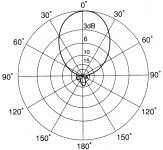
Here's a picture of what KUOA described in post #54 & #55. The antenna is redirecting the power in one direction instead of all directions.

yagi-radiation.gif
 
   / Enhancing WiFi reception? #64  
Here's a picture of what KUOA described in post #54 & #55. The antenna is redirecting the power in one direction instead of all directions.

View attachment 594450

For those that might be interested lets analyze this polar plot a bit. Lets assume this is a horizontally polarized Yagi antenna and we are looking down at it from above. Although the pattern seems to be slightly skewed to the right from dead on, we can see that the 3 dB beamwidth is about 30 degrees to the left and about 37 degrees to the right from the bore of the antenna which is 0 dB. What does this mean? Well if you were an observer out in front of the direction the antenna was pointing if you were "dead on" in the direction the antenna was pointing you would have a reference signal of 0 dB. Now we didnt' say at all how much gain this antenna has or how much power was put into it or anything like that in this plot, it is simply a plot of relative values as observed by an observer at various angles from the antennas bore direction. If we move around directly behind the antenna we can see that the front to back ratio is 17 or so dB. The front to side ratio is even larger, but harder to resolve from this plot. Since the 3 dB beamwidth is somethig over 60 degrees in total this is a fairly broad pattern, meaning that this beam in not all that "sharp". The front to back ratio while significant is also not as much as some antennas are able to achieve. The approximate power ratio of the 17 dB front to back would be something like you would equate to the difference between a 100 watt signal and a 1.7 watt signal. If I was to guess at what we are looking at here, I would say this is a 4 or 5 element Yagi, but that is just a guess. I hoped this helped, and did not further confuse.
 
   / Enhancing WiFi reception? #65  
Personally, I would put a Ubiquity Nanostation M2 Loco ($46 on Amazon https://www.amazon.com/Ubiquiti-NanoStation-locoM2-2-4GHz-Outdoor/dp/B00DCNRTAG/ ) on the wall of the shop pointing towards the neighbors house in client mode. That is powered over the Ethernet cable that connects to it, so you can snake the cable into the shop.
Bring the cable inside, then connect it to a $20 router inside the shop https://www.amazon.com/TP-Link-N300-Wireless-Wi-Fi-Router-TL-WR841N/dp/B001FWYGJS
That is how I setup a guy at work who has a pole barn style shop across the street from his house. He now has a very good wireless connection in the shop.

Aaron Z

This is what I use in my motorhome while traveling. However, I do use Ubiquiti's airGateway instead of a generic router to create my Wifi network 'inside' my motorhome. The M2 is configured with the settings for each campground as I travel. In this case..... his NEIGHBOR'S settings. I have the M2 mounted to an extendable 12' pole and strap it to my ladder to get me above the other trailers, etc pointed back to the source. Since its beamwidth is focused at 60 degrees it is very effective.

https://www.amazon.com/Ubiquiti-NanoStation-loco-M2-Wireless/dp/B00HXT8FFI/ref=sr_1_3?keywords=ubiquiti+nanostation+m2&qid=1551721540&s=electronics&sr=1-3

https://www.amazon.com/Ubiquiti-AIRGATEWAY-Pro-Installer-AG-Pro-INS/dp/B017B00ZCO/ref=sr_1_1?keywords=ag-pro-ins&qid=1551722112&s=electronics&sr=1-1-catcorr

airGateway snaps on the POE for the M2, then just run an ethernet cord out to the M2 on the roof or side facing neighbor.
 
   / Enhancing WiFi reception? #66  
This works great, not too expensive and when needs change in future, still something nice to have in parts box..

Ubiquiti is my current equipment of choice for my home network, plan in picking up one of these up for campgrounds (Ubiquiti NanoStation loco M2).

A few years ago, my niece wanted to piggyback off my brother's wifi, but she was just over a 1/4 mile away.. some bushes in the way, but otherwise pretty clear line of sight. I bought two tplink units and put one on outside of brother's house with plans to put second one on niece's house. I didn't need the second one, having just the one was fine. They got great speeds.
 
   / Enhancing WiFi reception? #67  
This works great, not too expensive and when needs change in future, still something nice to have in parts box..

Ubiquiti is my current equipment of choice for my home network, plan in picking up one of these up for campgrounds (Ubiquiti NanoStation loco M2).

A few years ago, my niece wanted to piggyback off my brother's wifi, but she was just over a 1/4 mile away.. some bushes in the way, but otherwise pretty clear line of sight. I bought two tplink units and put one on outside of brother's house with plans to put second one on niece's house. I didn't need the second one, having just the one was fine. They got great speeds.


pick up the regular nanostation, has a bigger antenna
 
   / Enhancing WiFi reception? #68  
pick up the regular nanostation, has a bigger antenna

Yep, 55' beam with more power. But of course, $30-35 more than the M2. But seeing as how he is already picking it up with a laptop radio if his door is open, didn't think he needed it.
 
   / Enhancing WiFi reception? #69  
This is what I use in my motorhome while traveling. However, I do use Ubiquiti's airGateway instead of a generic router to create my Wifi network 'inside' my motorhome. The M2 is configured with the settings for each campground as I travel. In this case..... his NEIGHBOR'S settings. I have the M2 mounted to an extendable 12' pole and strap it to my ladder to get me above the other trailers, etc pointed back to the source. Since its beamwidth is focused at 60 degrees it is very effective.

Another thumbs-up for Ubiquiti here. I run a very similar setup for our motorhome, with a NanoStation M2 external (inside the satellite dome so I could rig up automatic slew) and connected to an airCube inside. Works great for us.
 
   / Enhancing WiFi reception? #70  
Yep, 55' beam with more power. But of course, $30-35 more than the M2. But seeing as how he is already picking it up with a laptop radio if his door is open, didn't think he needed it.

this was aimed at hawkeye08 for campgrounds. i agree the loco is fine for the OP
 
   / Enhancing WiFi reception? #71  
Sorry in advance...did not read all first....

#1 I find that with a double layer on my tin foil hat I get better Wifi AND the government cannot read my thoughts! :)

But really....my brother in law just gave me a netgear nighthawk wireless router. It literally doubled my range for WiFi vs the modem/WiFi combo provided by my cable company. So gifting one to your generous neighbor might be a nice thank you AND give you the signal you need. Mine has 4 antennas that can be aimed for better directional coverage too. That might make you go from almost some signal to good coverage.
 
   / Enhancing WiFi reception? #72  
So not even a single question after all of that typing.... sheesh, what is a nerd to do. :grumpy:

Thanks for the explanation.
I worked with telecom engineers on satellite earth stations and submarine cables and, while I didn't have to know, I only had a vague idea what they were talking about. Wish I'd known it in that detail 30 years ago.
 
   / Enhancing WiFi reception?
  • Thread Starter
#74  
Progress Report...

My work around is placing cell phone to maximize signal and using as a Hotspot to feed either laptop or another cell when visiting the property. The placement requires 6' ladder.

This means using two devices but gets the job done when I need to check email or TBN...

Works the same either for Verizon or neighbors WiFi.

Neighbor said he always knows when I'm on and asked what is Tractor By Net? This is the neighbor I did site work for his new 2500 gallon water tanks and we'll.
 
   / Enhancing WiFi reception? #75  
   / Enhancing WiFi reception?
  • Thread Starter
#76  

The technology keeps improving...

I have physical terrain barriers that can be overcome with height and/or perfect placement to capture signal what amounts to a narrow ravine...

Thanks for posting... really appreciate it
 
   / Enhancing WiFi reception? #77  
I'll throw my little setup out here again.
ZTE Velocity cellular wifi hotspot. Basically just a cell phone for data only.
GL-AR300EXT travel router.

Router connects wireless to the hotspot. Could connect by cable but I don't see the need. My PC uses the one RJ45 jack and everything else on my home network connects wireless to the router.

Not related to this discussion other than the distance relevance but I have 3 Reolink wifi cameras and a Wyzcam on the network. One of the Reolink cameras is 400 ft out in front and the Wyzcam is on the opposite side of the house about 200 ft away in the barn. All connect through the network on my phone apps.

I have tested the router out to 500 ft and had a signal. I added 9 DBI antennas to the router and one camera that is 400 ft from the house. It worked before with the short antennas they both came with but seems to access a little faster with the longer antennas. Standing at the camera the signal has to go from the camera to the router and back to my phone and movement is almost real time. Very little delay.

I have the Velocity hanging on the window blinds in my computer room.

ZTE-Velocity.JPG


The little router sits on the window sill in the same window.

AR300.JPG


Here is my camera setup 400 feet away.

IMG_2121.JPG
 
   / Enhancing WiFi reception?
  • Thread Starter
#78  
Cams would be nice especially since I keep my tractor and Stihl tools away from home...
 

Tractor & Equipment Auctions

2013 KENWORTH T680 TRI AXLE SLEEPER TRUCK (A59905)
2013 KENWORTH T680...
Informational Lot - Financing (A56438)
Informational Lot...
2017 Chevrolet Express 2500 Cargo Van (A59230)
2017 Chevrolet...
2018 FREIGHTLINER CASCADIA TANDEM AXLE SLEEPER (A59904)
2018 FREIGHTLINER...
2026 tilt trailer (A56859)
2026 tilt trailer...
2021 CATERPILLAR 299D3 XE SKID STEER (A60429)
2021 CATERPILLAR...
 
Top