Wifi to barn

/ Wifi to barn #1  

jcummins

Veteran Member
Joined
Jan 14, 2007
Messages
1,640
Location
Creal Springs, IL
Tractor
Kubota M7040, F3680, Mule Pro Fxt
I've lived here for 6 years. My wifi does reach to the barn, but just barely. If I shut the barn door, it doesn't. As old as I am, I like to take breaks, check email etc on my phone at the barn. Any winter projects with the barn door closed, I can't do that.

Thinking of setting up access points with old routers. So tonight in my living area I set one up, got it working, and I'm leaving it here in the living area. My main router is on the other side of the house. The signal has been good, but with this router, now access point, the signal is very strong, speed is better. So, going to setup another old router I have for the barn.

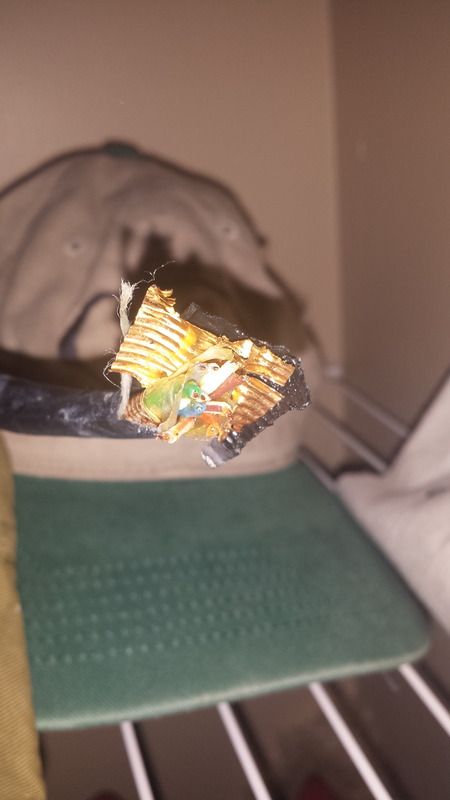
What really kicked this off in doing this, besides the poor signal, I discovered a wire the previous owner and builder, ran from the barn to the utility closet where my router is. The distance house to barn is 200ft. Here is a picture of the end of the wire. My question for those smarter than me....can I cut a cat5 cable in two, then splice the cat5 ends into this wire to get signal to the barn? If I can, I'll end up with a very strong, I think signal in the barn. What's the odds of it working?
 
/ Wifi to barn #2  
You could certainly crimp new RJ-45 connectors on both ends of that wire. That appears to be a good quality CAT5 direct burial cable so it should work fine over that distance if it has not been damaged somewhere.
You may want to check for continuity between the wires. If the cable is good they will not be connected to each other.
 
/ Wifi to barn #3  
How old is your wireless router? If it is using A, B or G wireless, get one that uses N. Better range and signal strength. Agree with Mendonsy, cut the cable back and splice on a new connector. Just make sure you get the colored wires in the correct holes on the plug!
 
/ Wifi to barn
  • Thread Starter
#4  
You could certainly crimp new RJ-45 connectors on both ends of that wire. That appears to be a good quality CAT5 direct burial cable so it should work fine over that distance if it has not been damaged somewhere.
You may want to check for continuity between the wires. If the cable is good they will not be connected to each other.

Great.....I did not know what kind of wire that was. So much the better. I need to get a crimping tool though...I've needed one so many times, OR...can I just twist wires together?
 
/ Wifi to barn
  • Thread Starter
#5  
How old is your wireless router? If it is using A, B or G wireless, get one that uses N. Better range and signal strength. Agree with Mendonsy, cut the cable back and splice on a new connector. Just make sure you get the colored wires in the correct holes on the plug!

they are the A, B or G routers.....the one I've setup though works better than the one on the other side of the house.
 
/ Wifi to barn #6  
Cat5 spec is good to ~350ft, assuming it's a good cable that should work with the right termination.
 
/ Wifi to barn #7  
Hard for me to tell from the picture how many wires are in that cable looks like direct burial phone line best I can make out????
 
/ Wifi to barn #8  
I does not look like twisted pairs that are in cat5 - worth a try though.
 
/ Wifi to barn
  • Thread Starter
#9  
I've got a problem with the wire termination on both ends. After a little research, here's what I think is the best way, at least for me. Advise me if I'm wrong.

The wire terminating in the house is short. I'm thinking of putting a punch block there. Punch in the existing wire and then 1/2 of another cat5 cable that got the right end plug so it can go to the router.

On the barn side, a fair amount of wire was coiled there....in my stupidity, I cut that wire off, several years ago, but still have the wire. There is enough for me to route the wire inside the barn....then do the same thing there with a punch block...but instead of the cat5 cable...punch in the piece I cut off. It has some length to it. Route that to an electrical source...probably higher up....then another punch block, with the other 1/2 of the cat5 cable punched down so I can plug into the access point.

IF.....I had a crimp tool for crimping the ends on...I'd do that instead of the punch blocks. Since I don't, is the reason to use the blocks instead of buying the tool. Seems cable is disappearing, and I doubt I'd ever use an end crimping tool again for anything.
 
/ Wifi to barn
  • Thread Starter
#11  
/ Wifi to barn #12  
I'd think cat5 would have a better shot, given that you have multiple differential pairs for tx and rx compared to Powerline. I've heard mixed results with Powerline depending on how noisy the line is.

If you have an SMA connection on your router/extenders another option is a directional antenna on both ends(otherwise you'll be able to recv well but not send and vice-versa).
 
/ Wifi to barn #13  
I'll +1 the directional antenna approach. If the old cable is not twisted pair/cat5, it is not likely to provide a happy result. Go for a repeater/bridge type setting on a router box in the barn. There are a ton of DIY antenna options, or you can go commercial if desired. Google wifi directional antenna and you should find plenty of hits. If your current router doesn't have removable antennae, find a cheap pair that do & use them in addition to your current router (fewest changes for your home network).

Nick
 
/ Wifi to barn #15  
That wire looks to large for crimp. Is there anything written on the outside of the cable?
 
/ Wifi to barn #16  
Great.....I did not know what kind of wire that was. So much the better. I need to get a crimping tool though...I've needed one so many times, OR...can I just twist wires together?

I had almost the same situation. My son hooked up two boosters that together cost $94 shipped. Now I have great wifi coverage in my work building as well as the back bedroom of the house. No problem just plugged them in. Instant wi-fi signal.


TBS
 
/ Wifi to barn #17  
I can't make out what that wire in the photo is. Strip it back and tell us how many wires are in it and if they are twisted pairs.

RJ45 punch blocks will work if you have 4 twisted pairs.
 
Last edited:
/ Wifi to barn #18  
Last edited:
/ Wifi to barn #19  
I think, maybe, possibly I see a white/brown pair in the direct burial cable.. Not 100 percent sure, as the cable is not stripped back so I can tell. BUT if there is actually 4 pairs of good cat5 twisted direct burial cable there, you could get some ethernet out there. And 200 foot is very doable. I have run ethernet over the 100 meter spec with some loss of speed/reliability. It may not pass a test, but it still worked.

How about you use that rip string and get that black jacket and the copper/steel rodent shield off of that cable and get the pairs stripped back about 3 or 4 inches and take another photo. You should have a white/blue pair (white blue wire and a blue/white wire) and a white orange pair and a white green pair and a white brown pair. You can google for the hookup of 568b wiring protocol.

Yes you can punch them down on a good cat5 punch block and then punch down each end of a good 568b patch cord. Be careful that your patch cord is not using tinsel wire, or it won't punch in the insulation displacement prongs correctly.

To be honest 10/100 ethernet will work fine with just two pair of wire. Use pins 1,2 and pins 3,6 . I have done it plenty of times. Again.. not to spec, but will work. What is to spec and what you can get away with and make work is two different things.
 
 
Top